


Radix
-
Posts
255 -
Joined
-
Last visited
-
Days Won
26



.thumb.png.38683d9fe22b81d6541ae23dacf74ca8.png)


-
 Radix reacted to a post in a topic:
Pango [WIP]
Radix reacted to a post in a topic:
Pango [WIP]
-
Radix reacted to a post in a topic:
Piranesi [CS2]
-
Radix reacted to a post in a topic:
Counter-Strike 2 Workshop Q&A
-
Radix reacted to a post in a topic:
Counter-Strike 2 Workshop Q&A
-
 Radix reacted to a post in a topic:
Counter-Strike 2 Workshop Q&A
Radix reacted to a post in a topic:
Counter-Strike 2 Workshop Q&A
-
Radix reacted to a post in a topic:
Counter-Strike 2 Workshop Q&A
-
Radix reacted to a post in a topic:
[CS:GO] SOAT
-
poLemin reacted to a post in a topic:
Counter-Strike 2 Workshop Q&A
-
Question: How to create water in CS2? Answer1:
-
Question: Where are the compile logs saved?
-
Question: How to achieve a seamless transition between the water in your map an the water in the skybox? (like in de_anubis) (water texture scale in skybox; cubemaps?) I've been struggling with this for a while now. I tried to decompile de_anubis map, because it works pretty well there. There the skybox map uses the exact same water texture as the actual map. But in my map the skybox water looks scaled too large (=> larger waves) compared to the water in the actual map. It seems like the texture scale of the water texture doesn't have an effect (like in Source1). Also I'm not sure how to get the cubemaps right, since I can't assign a cubemap to a specific face anyore (Can I?).


-
tomm reacted to a post in a topic:
[CS2] Big Adventure Mapping Contest
-
Serialmapper reacted to a post in a topic:
[CS2] Big Adventure Mapping Contest
-
Radix reacted to a post in a topic:
[CS2] Big Adventure Mapping Contest
-

[CS2] Big Adventure Mapping Contest
Radix replied to FMPONE's topic in Counter-Strike 2 Big Adventure Contest
Just wave with some dollar bills and all the rats climb out of their holes again. Interesting. -
Deh0lise reacted to a post in a topic:
Counter-Strike 2 Workshop Q&A
-
Deh0lise reacted to a post in a topic:
Counter-Strike 2 Workshop Q&A
-
Question: How to upload a map to the Workshop? Answer: Open the CS Workshop Tools and select the project you want to publish. Then open the Tools tab (top right) and select "Counter-Strike 2 Workshop Manager" The rest is self-explanatory...

-
Question: (Porting CS:GO maps to CS2) All the instances that I had in my CS:GO map don't exist in the ported map (as a prefab). They are only inside the maps/prefabs folder, but all func_detail geometry is missing. How to fix this? Answer: If you want to preserve your func_instances, replace "-usebsp" with "-usebsp_nomergeinstances" in the Python script parameters: python import_map_community.py <s1gameinfopath> <s1contentpath> <s2gameinfopath> <s2addon> <mapname> -usebsp_nomergeinstances (Import Tool Documentation)
-
Question: Some entities have an 'obsolete' icon after porting. What's up with that? Answer: These entities are not used anymore. You can remove or replace them.

-
Question: Many entities have unused keyvalues after porting a map. Can I just delete these? Answer: (Edit: This answer is probably wrong) These keys are obsolete and not used anymore (?). If you want, you can remove all of them by clicking 'Map'->'Check for problems' and then hitting 'Fix':

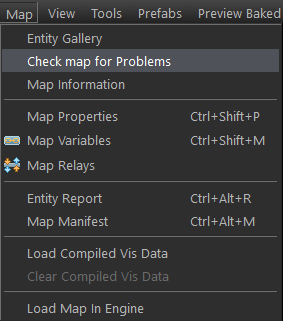
-
Thanks! But I have to say that this didn't work as intended. Originally I hoped to get some people involved to get some answers for my own questions while doing the tedious work of putting it all together. But obviously people/communities have changed in the last years. But I will keep this thread up for everybody or even just for me in case I need to look up something.
-
Freaky_Banana reacted to a post in a topic:
Counter-Strike 2 Workshop Q&A
-
Backup post for me
-
Question: Console command to directly load a Workshop map? Answer: map_workshop *ID* *mapname* So you will need the exact map ID. Every workshop map has a unique ID number. You can find it here: ...\Steam\steamapps\workshop\content\730 Example: map_workshop 3121217565 de_thera
-
Question: Is there an equivalent to "shift+drag" duplicate of the old Hammer? Answer: It's still the same, but be aware that "Translate" mode is active. Then just hold "shift" while click+drag the arrows/squares. In "Meshes"/"Objects"/"Groups" mode shift+drag duplicates. In "Vertices"/"Edges"/"Faces" mode it extrudes You can also use shift+arrow keys of your keyboard.


-
Are these grass/flower props some kind of detail props (associated with the ground texture, similar to the detail sprites in S1) or are they manually placed/Asset Spray Tool? Looks great though.
-
Serialmapper reacted to a post in a topic:
Counter-Strike 2 Workshop Q&A
-
Question: (Porting maps from CS:GO to CS2) The script creates three vmap files of my map (*map_name*.vmap, *map_name*_environment_prefab.vmap and *map_name*_prefab.vmap). Why? So when I port a map, these 3 vmaps are created: *map_name*.vmap: Which imo should be the actual map file, but it's just one single prefab there (->2.). *map_name*_prefab.vmap: Here I can only edit some entities like lights, player spawns, bombsites but also water brushes. The rest is a prefab (->3.). *map_name*_environment_prefab.vmap: The actual file where I can do something. What is that good for?
-
Jim F Kennedy reacted to a post in a topic:
Counter-Strike 2 Workshop Q&A
-
Question: How to quickly remove the triangulation of the meshes after porting a map? Answer: -> Select the faces (double click selects all connected faces), then hit "backspace" (=combine faces) Don't forget to check these before: But be careful, sometimes this collapses some faces... In any case some manual cleanup will be needed afterwards. -> A useful post on Discord (video)


