JorisCeoen
-
Posts
224 -
Joined
-
Last visited
-
Days Won
13
Content Type
Profiles
Forums
Articles
Pages
Everything posted by JorisCeoen
-
Very nice entry. Japanese assets and style are really exhausting to design and integrate in a map, it's very brave of you to tackle this theme ! I wish you guys good luck on the art pass aspect of this theme, looking forward to the final product!
-

[CS2] Big Adventure Mapping Contest
JorisCeoen replied to FMPONE's topic in Counter-Strike 2 Big Adventure Contest
Best of luck to all the participants. Very excited to see what’s going to grow out of this ! My mapping days are unfortunately over. With a fulltime job and a new engine to learn it’s literally impossible. It was nice while it lasted, but unless you enroll completely into this field, at some point you have to let go. It’s nice to see the top prize finally reflects somewhat the amount of work that goes into making a complete map. May the best one(s) win -
The map has been updated today, as matches on Faceit have showed a problem with players reconnecting on the CT-side (they basically spawned in the middle of the map due to only having 5 spawnpoints).
-
Before anything, the map looks absolutely stunning. It’s unreal how realistic you’ve gotten the map to look, with more than just realism there also being an artistic sway over the whole map…! As soon as I have time to run into the map I will give it a try, but about those indoor lighting issues on props, I have those too on Zen. I don’t know exactly why, but most of my wooden beams fail to cast light brightness from nearby light entities at all. I’ve tried everything to fix it (changing settings back and forth etc), but no light gets cast. It’s really purely random as well because on some spots it works perfectly (good examples are at the large indoor area in the castle with the lanterns), and the next one at the other beam next to it is as if it’s not there at all. I suspect I would have to break the props down more, so there are more sub-parts of the prop_static, but it would essentially increase the drawcalls for no reason… could perhaps be a solution for your issues? Congratulations on the amazing release! No doubt this map will make it into the game
-
Thanks man! Yea, well the map is going to be ported to CS2 as soon as the tools are available. It would be a waste to have worked on this level for so long only to be unplayable. I've updated the map today, biggest changes include an improved skybox and overal lighting balances.
-
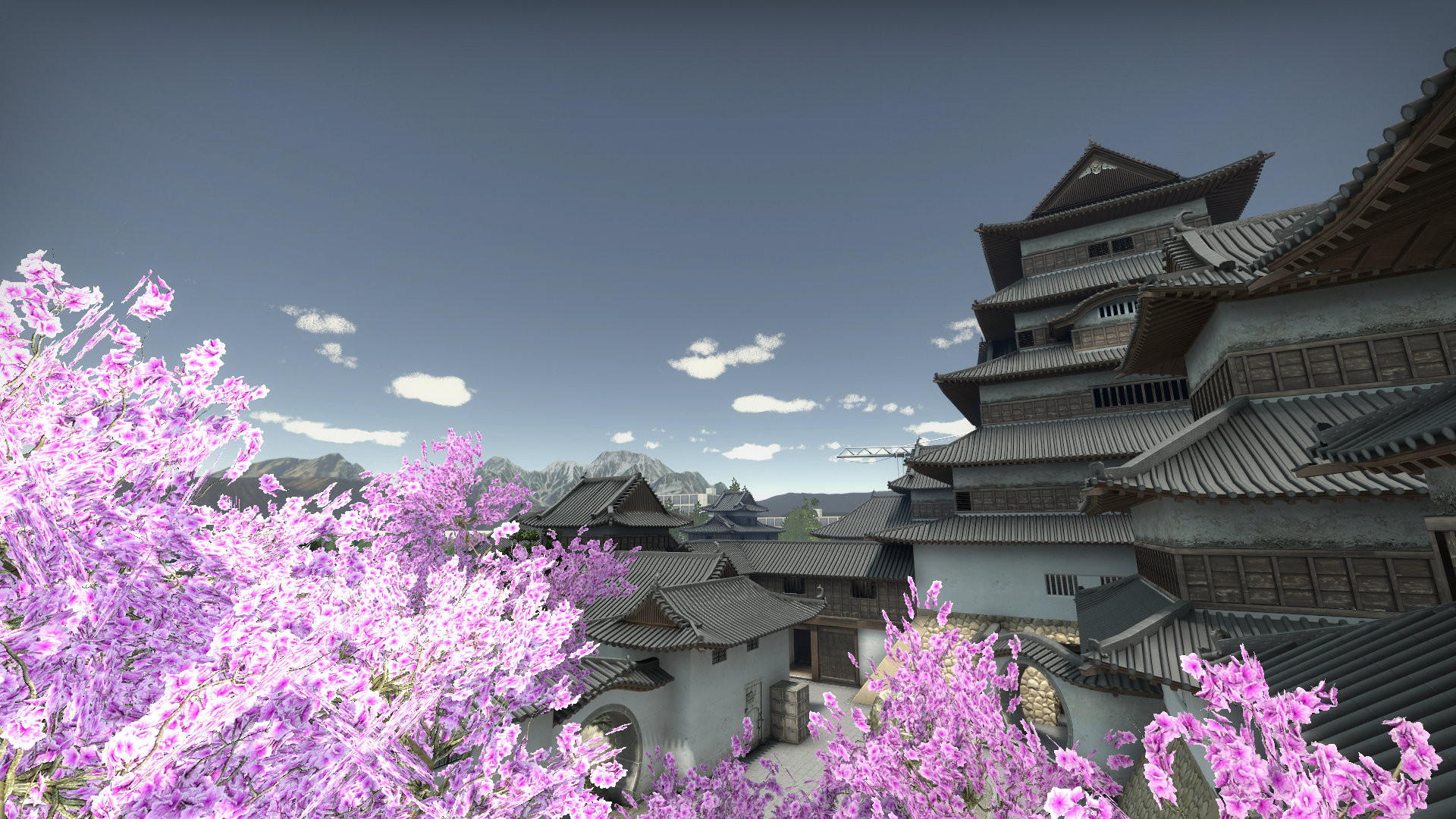
Zen (Bomb Defusal) - Released! It's taken a little over 5 years of development, but after numerous tests and changes I can finally present Zen in a satisfactory state. Workshop link: https://steamcommunity.com/sharedfiles/filedetails/?id=2954659602 Zen takes place in a medieval Japanese castle, where terrorists want to destroy the historical sites and monuments within the castle boundaries. As restoration is already underway, they see an opportunity to halt the process. It's up to the Counter-Terrorists to stop them! Credits Joris Ceoen (Artwork & Level Design) Shawn Olson (Technical assistance on 3DS Max & Wall Worm Model Tools) Used assets, creditted according to their license Monument to Hijikata Toshizo (by 3Dystopia (Sketchfab)) Buddha Statue (by AliceVision (Sketchfab)) Additional assets were used under a bought license Pindola Bharaddvaja (by 3Dystopia (Sketchfab)) Testing and assistance Mapcore testing hub Roald for in-game showcase of numerous problems Rebze for testing guidance and impossible amounts of patience (literally years) Final note It's been a long journey, and the map has undergone a lot of changes since it's original concept. While it's been quite simplified from its roots, it finally has some polish regarding the gameplay and basic detailing. The map still requires some touching up, such as further optimization and improved artwork (and preferrably also some thematic colouring). However, with the release of Source 2 in sight, I will await the new techniques and tools in order to continue the next iterations of Zen.
-
Changelog for version b2_4:


-
CSGO maps containing high-level artistic finish?
JorisCeoen replied to haymaker's topic in Level Design
Artistically Insertion 2 is even more impressive than 1 (unlike as suggested above). But basically, all maps from catfood or FMPone should give you a good indication. Anubis who’s now in the game is also amazing… and most of Valve’s latest maps (Nuke or Dust 2). -
It is not possible to revert this process, as autocombine simply compiles the initially seperate props into one large and new .mdl file. Decompiling would thus leave you with that same combined prop. The information of the seperate props being combined is not being stored somewhere, so unfortunately you cannot see and operate these seperatly.
-
You can. Most of them are short enough that without airacceleration you can map quite a distance. During playtesting, it was occasionally useful, although I will have to make sure that you cannot actually 'climb' up them (currently you can but it's extremely slow, as per usual Source behaviour). An angled trigger_push should do the job. There's still progress to be made on the layout. During playtesting we've been able to pinpoint the most troublesome areas, and I'm working on getting a new playtest version ready asap. I'll keep the thread updated
-
Changelog for version b2_2: Changelog for version b2_3:
-
Official version released as Zen: Workshop link Please note: This version is still for testing purposes (not final), although major changes have happened between v2_1 and the current one. The full changelog can be found here. Daigo takes place in a medieval Japanese castle: Terrorists want to destroy the historical sites and monuments within the castle boundaries. An earthquake has already dealt some damage, so they see an opportunity to finish the job. It's up to the Counter-Terrorists to stop them! Credits: @JorisCeoen (Artwork & Level Design) @shawnolson (Technical assistance on 3DS Max & Wall Worm Model Tools) Used assets, credited according to their license: Monument to Hijikata Toshizo by 3Dystopia (Sketchfab) Buddha by AliceVision (Sketchfab) Testing and assistance: @Mapcore testing hub @Roald for in-game showcase of numerous problems @Rebze for testing guidance and impossible amounts of patience (literally years) In preparation of the final version, V2_2 will be playtested by Mapcore's playtesting group. Feel free to leave feedback in the comments section below, as I will take note of criticism and reflect changes accordingly for the future. Here's a list of the most important things to be done yet: Improved color palette for readability Many, many amounts of detailing (lowly present) Addition of thematic material (next-to-none present) Addition of labels and overlays/decals (next-to-none present) Alpha-blending of displacements (ironically, it's all prepared and available, but I didn't have the time to do it yet) Finalising the radar and navigation mesh (the radar has one small indoor area that I saw missing after release) Additional optimization in the form of: hint/skip/areaportal and removing many roofing details on less visible roof models (nodraw blocks have been optimized, and most models with the inclusion of 3 roof models) Fixing lightmap issues on displacements (can someone help with this? See the broken wall at B as a good example)
.jpg.e85ec0017338bd56d18d19cf077d06e6.jpg)
.jpg.6aae704dc91c3125ddc1e8e22bd80f7e.jpg)
.jpg.f2239683ba15b5dec19761cbb7a576fc.jpg)
.jpg.3c04a6208588a034f92f38f232949667.jpg)
.jpg.71b0b799f37eab0464d64f9ece9149d9.jpg)
.jpg.4da97fec194718cf756ec63fb29d0332.jpg)
.jpg.0faf7a116b826d37b518c515af767f60.jpg)
.jpg.b551d2b88ca9c057608ca862eeb84569.jpg)
.jpg.93ab36490cefee9fdd5d97db67c8b9e8.jpg)
.jpg.ed428440685d18037e09387a98077399.jpg)

-
To determine actual causes during compile, it's best to compile in full (with all the options, like -staticproplighting -staticproppolys -textureshadows), to see if the problem also appears there. If not, it might just be due to fast compile settings. If it also happens there, then you have another problem at hand. From your description and compile log, I can't immediatly determine anything, but you can always hit Alt+P and see if Hammer shows you any problems that need to be fixed. Are all these props inside that specific segment of your map? If so, it's likely the cause of your problem. I don't think it should be, I've never seen a compile fail due to incorrect use of a prop type (as the compiler tells you, Hammer literally deletes these from the map), but that could be a start.
-
[CSS] How to connect metallic, roughness and other textures?
JorisCeoen replied to AoHeaven's topic in Level Design
You're talking about the specular map (= roughness/metallic in modern software) for $phong and $envmapmask, both of which can be added into the alpha channel of the basetexture or normalmap. More information can be found here. The most common method is to add it to the alpha channel of the normal if you have it, as it has more options. Using the alpha channel of the basetexture works, but won't work on translucent materials in CS:GO. -
If the purpose is to make a defusal map that follows the same general principles as the competitive scene, then you don't want to do that. Players will be expecting to kill players that are just around a corner or prefire them, and will get frustrated when this is not possible. Only in very rare cases (for example to avoid an insane wallbang that can go across the map) will you need to use blockbullets. Unfortunately, the toolsblockbullets_cs variant cannot be found in the VPK of the game. The original blockbullets .vmt has this parameter on it: I assume the CS:GO variant also has this parameter, which is why your decals don't show, no matter what you do. The only workaround is to have the thin wall behind the geometry you're trying to block bullets through, so bullets still cast on the collision mesh or brush/displacement, but don't register through behind.
-
That final image looks pretty dope with a much better feeling of depth and especially lighting! Do you intend to release this as a competitive/casual map in the future? I assume you actually live near the building to get these reference photo's, or do you manually recreate them? Very curious to see the final result ?
-
No freakin way.. are you using Wall Worm to design your level? That's amazing ? finally a congener!
-
[CS:GO] The making of de_kikacitu(remake) Changelog
JorisCeoen replied to Foolcloud's topic in Level Design
In order to not flood your own thread and keep things organised, how about making a changelog after you've done a bunch of changes. You keep updating the thread with IMO pointless changes that could all be consolidated into one post. We also see no screenshots to understand any of the updates, which removes the entire point of updating the thread in the first place. Just a suggestion ? -
Pretty nice results! However, if anyone has 3DS Max 2017+ you can achieve these effects very easily by simply using some Data Channel map settings (along with displacement modifier). Just letting people know in case you want a 'free' way of doing it ?
-
The battle for Danger Zone maps has really kicked off lately ? Nice work man!
- 1 reply
-
- 1
-

-
Pretty amazing, once again... I think the overall atmosphere and theme are great! Perhaps if I were to say one thing, the motel looks like the only area that's most 'slapped together' (so to speak). The overall idea is nice, but it currently looks too clean and misses some fine detail compared to the rest of the map. There's something about those big pillars that should be more worn in my opinion. I really love the quarry, however, probably my favorite part of the map! Congratulations on your release, and I don't doubt this will already be included in the next operation ?
-
"The road may be rough, the journey may be tough and the experience may be bitter, but they are stepping stones to our future thrones." is sorta how I experienced going into the journey of making custom assets. Once you get past all the technical stuff and you can free your mind, your imagination is at that point literally the limit. And it's totally worth it ?
-
In CS:GO you don't want to have -both enabled, as it doesn't use LDR any longer (it automatically compiles with HDR). Basically if all your prop_static's have default settings, they should start lighting properly in the scene 'as is'. The difference since 2016 is that now, props with a normal bumpmap will have correct per-vertex lighting, whereas before it would not and thus end up with big splotches of black faces etc. Your scene might benefit from better placed lights. No matter how you turn it, Source still handles lighting a bit odd. Thus if you have a ton of props clustered together and little light to cover it, the ambient shadowing around it might end up looking average. TIP: Don't use info_lighting in case you did (used to be a thing in the older days when this new lighting didn't exist). It disables per-vertex lighting, and thus might cause errors with your new compile.
-
Altitude - (formerly named Turbulence) (Prodeus)
JorisCeoen replied to Paws's topic in [Prodeus] Official Mapping Contest
When you're working on another game but are still influenced by Counter-Strike ?