1. Forums
  2. Discord
  3. About Mapcore
  4. Patreon Supporters
  • Login
  • Register
  • Search
This Thread
  • Everywhere
  • This Thread
  • This Forum
  • Articles
  • Pages
  • Forum
  • More Options
  1. Mapcore
  2. Discussions
  3. Level Design

CS:GO - Shadows on slim surfaces are very dark

  • MikeGon
  • August 31, 2018 at 2:12 PM
  • MikeGon
    • August 31, 2018 at 2:12 PM
    • #1

    Hey guys!

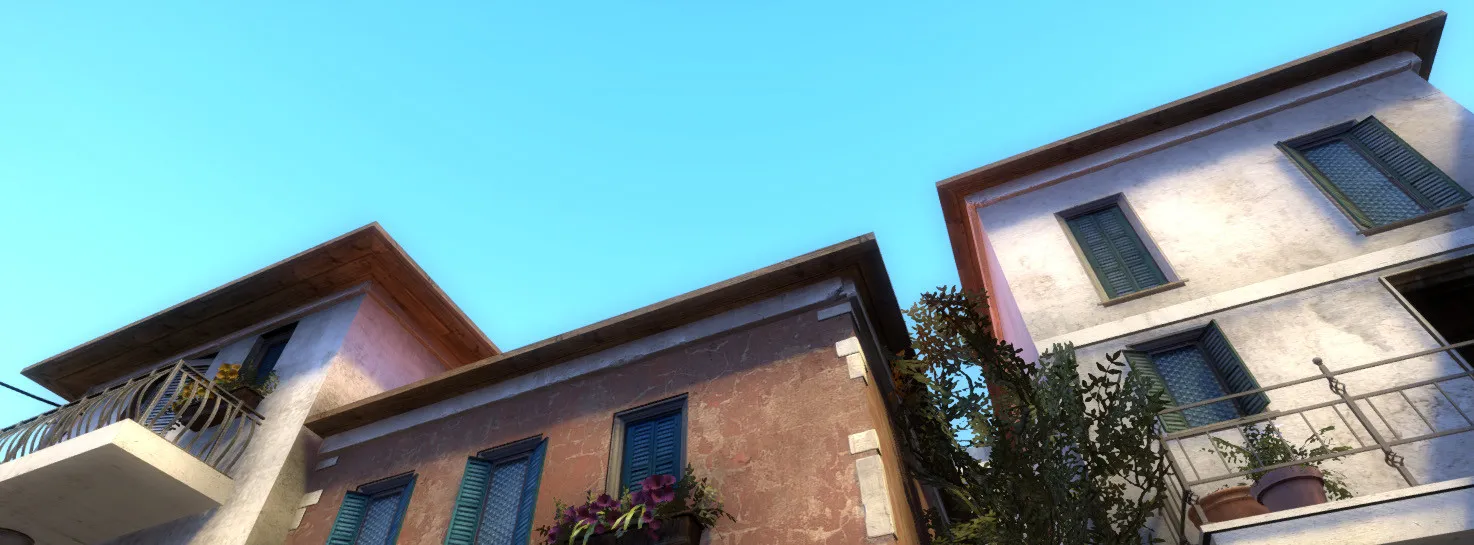
    Title says it all. Here's what I'm talking about:
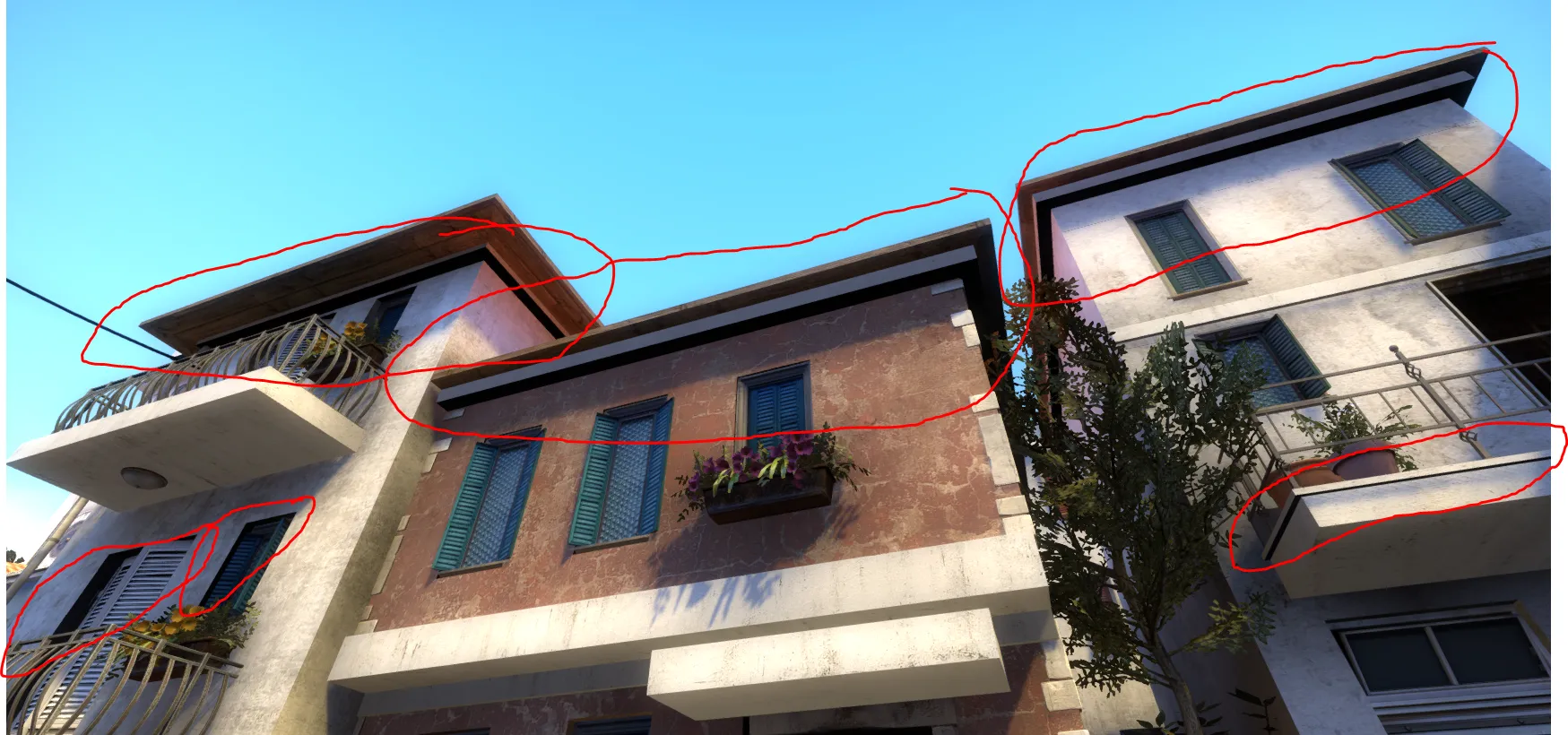
    It looks like shit ?

    This happens on faces that have a large surface that's in contact with another brush. These trims under the roofs there are a large, flat brushes that touch the brush below them.


    I found a couple methods for approaching this, but all of them have major downsides:

    • Increasing Lightmap scale: Helps mitigating the issue, but doesn't fix it, at the cost of larger shadowmaps
    • Adding a light source close to it: Helps but difficult to justify most of the time, increases compile time
    • Split them into 4 parts, one for each side: Fixes the issue completely, but increases brush count for the map, which is dangerously close to the limit...

    Have you guys seen this issue before? I don't remember seeing this on other maps in the past...

    Do you know a "golden solution" I'm not aware of? How would you approach this?

    Help would be greatly appreciated❤️

    Cheers!

    -Mike

  • poLemin
    • August 31, 2018 at 2:24 PM
    • #2

    I don't know if it's a typo or if you acutally approached it incorrectly, but you might want to lower the Lightmap scale of such surfaces. Try values of 4 or 2 for such thin brushes. This should not be done for large brushes where only a tiny part is visible to the player tho.

    My general advice however would be to replace some of these detailed brushes with trim or frame models. Especially, since you are scratching the brush limit already. BSP based detailing should not be a thing anymore. At least not of this magnitude.

    For the "larger" surfaces like the downside of the roof, I would suggest splitting the brushes accordingly and adjust the lightmap scale if necessary.

    Hope that helps!

  • Harry Poster
    • August 31, 2018 at 3:50 PM
    • #3

    Agreed with polemin, but I'd give some of my advice. I was using this method in de_tangerine until I made everything in displacement.

    Make these brushes the "func_brush" entity, set ''Disable Shadows' to yes. Don't worry, it won't delete shadows completely it will only remove this kind of black shadows, this works well with foliage props too.

    This works in 80% so I hope it will help you.

  • morozov
    • August 31, 2018 at 6:15 PM
    • #4

    mb convert to displacment?

  • ElectroSheep
    • August 31, 2018 at 6:45 PM
    • #5

    The 3rd solution is the best (you should be banned from this website if you use the 2 others) It cost more brushes but reduce the memory usage from lighmaps.

    Also you could probably replace those geometries by props (balcony_edge_trim for example)

    Also if you merge several brushes together as one func_detail, the connected faces between the different brushes will disapeared.

  • MikeGon
    • September 1, 2018 at 8:06 PM
    • #6

    Wow those are great answers! Thank you so much! ?


    Quote from poLemin

    On 8/31/2018 at 6:24 AM, poLemin said: I don't know if it's a typo or if you acutally approached it incorrectly, but you might want to lower the Lightmap scale of such surfaces. Try values of 4 or 2 for such thin brushes. This should not be done for large brushes where only a tiny part is visible to the player tho.

    My general advice however would be to replace some of these detailed brushes with trim or frame models. Especially, since you are scratching the brush limit already. BSP based detailing should not be a thing anymore. At least not of this magnitude.

    Yes I did mean to increase the resolution of those lightmaps, but I never though about decreasing it- Great idea, I'll try that!

    It totally agree, BSP shouldn't be used for micro, looks horrible anyways. I didn't want to make too much custom art for this project since I want to focus on design, but it looks like I might have to, if I can't find a basic CSGO prop that looks decent...


    Quote from Harry Poster

    On 8/31/2018 at 7:50 AM, Harry Poster said: Make these brushes the "func_brush" entity, set ''Disable Shadows' to yes. Don't worry, it won't delete shadows completely it will only remove this kind of black shadows, this works well with foliage props too.

    This works in 80% so I hope it will help you.

    Neat trick! I do have this problem with some brushes that are already func_brush, I'll use that for those!


    Quote from untor

    On 8/31/2018 at 10:15 AM, untor said: mb convert to displacment?

    Is there some cost to that though? I'm surprised we are so limited with brushes, and not with displacements even if they seem to be a lot more complex... ?


    Quote from ElectroSheep

    On 8/31/2018 at 10:45 AM, ElectroSheep said: Also if you merge several brushes together as one func_detail, the connected faces between the different brushes will disapeared.

    Wow I didn't know that groups could have an impact on performance- I though it was only an editor tool... With this info I can now optimize a lot of stuff across the map- Thank you!!


    Thanks again for the great answers people, I'll recompile and keep you posted!

  • poLemin
    • September 1, 2018 at 9:01 PM
    • #7
    Quote from MikeGon

    51 minutes ago, MikeGon said: Wow I didn't know that groups could have an impact on performance- I though it was only an editor tool... With this info I can now optimize a lot of stuff across the map- Thank you!! 

    Groups do not have an impact. What @ElectroSheep probably suggested is to tie several brushes into one func_detail. func_detail, like most brush entities, can consist of several brushes. So select for example all trims around a certain building, hit CTRL+T and tie them to one func_detail. If you want to manipulate single pieces of it later on, use the ignore group function (the "ig" button on top), to be able to select them individually.

  • grapen
    • September 2, 2018 at 6:17 AM
    • #8

    Displacements are only marginally more expensive, but looks nicer and lets you vertex paint. I prefere keeping architecture mostly models and displacements.

  • ElectroSheep
    • September 2, 2018 at 10:10 AM
    • #9

    If you take a look at the new Dust2, most of the building are made of displacements. And not just a few ^^

  • MikeGon
    • September 5, 2018 at 5:06 AM
    • #10

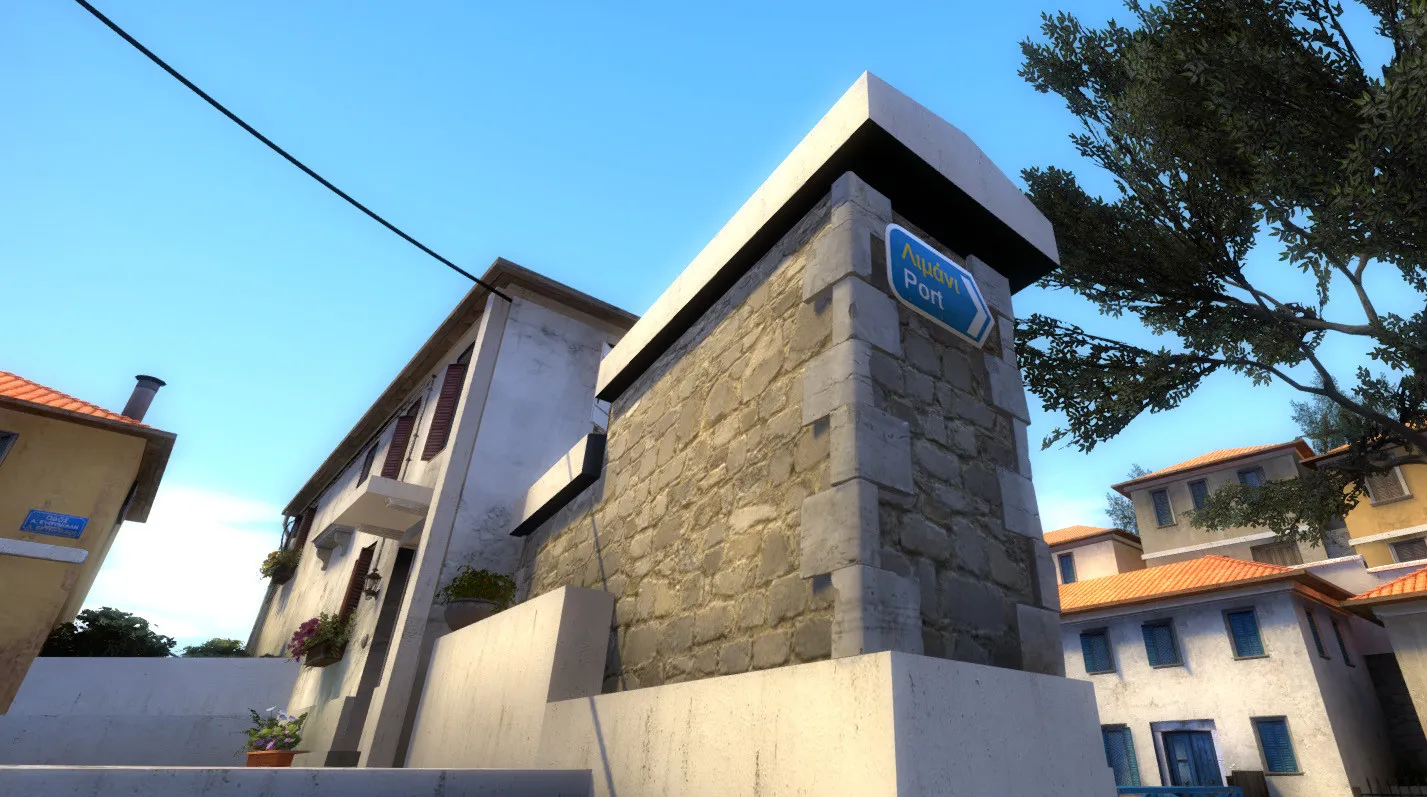
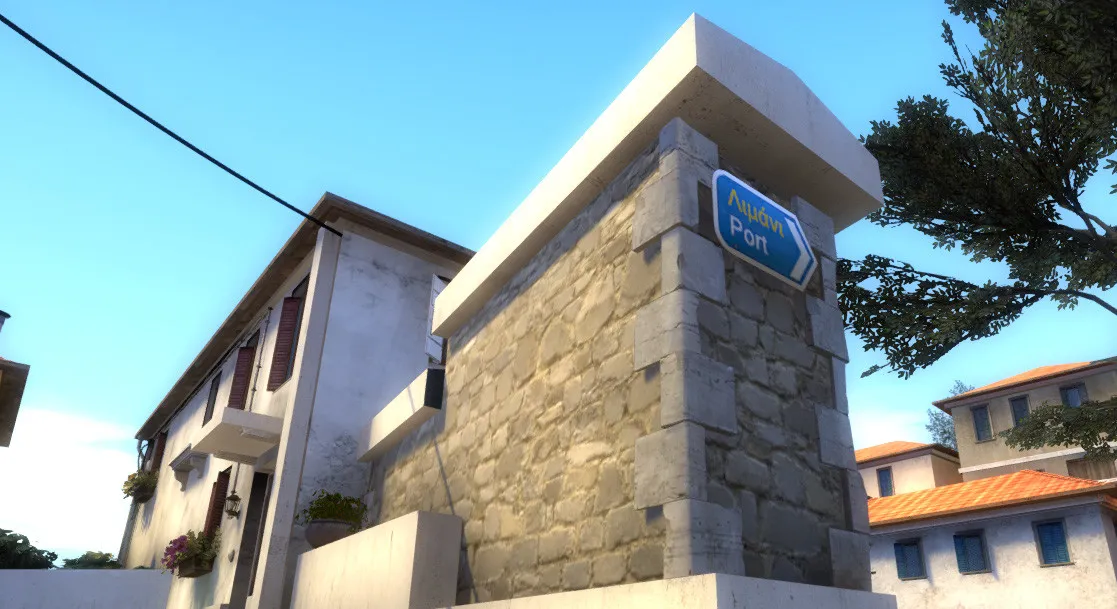
    I managed to get away with replacing a lot of these trims with static_props. It not only fixed the issue for these particular cases, but also looks better (Thanks @poLemin and @ElectroSheep) :

    I other cases, with large brushes, I simply split the brushes and that fixed it- but like I said I can't do that too much though (Thanks again @poLemin !)


    Unfortunately @Harry Poster, the Disable Shadows trick didn't seem to work on any of the func_brushes I tried it on... ?

    Bad shadows are still visible on all of them- Was there another value that needed to be set perhaps?


    For the lightmap scale trick, I'm happy to say that it worked like a charm!


    Quote from grapen

    On 9/1/2018 at 10:17 PM, grapen said: Displacements are only marginally more expensive, but looks nicer and lets you vertex paint. I prefere keeping architecture mostly models and displacements.

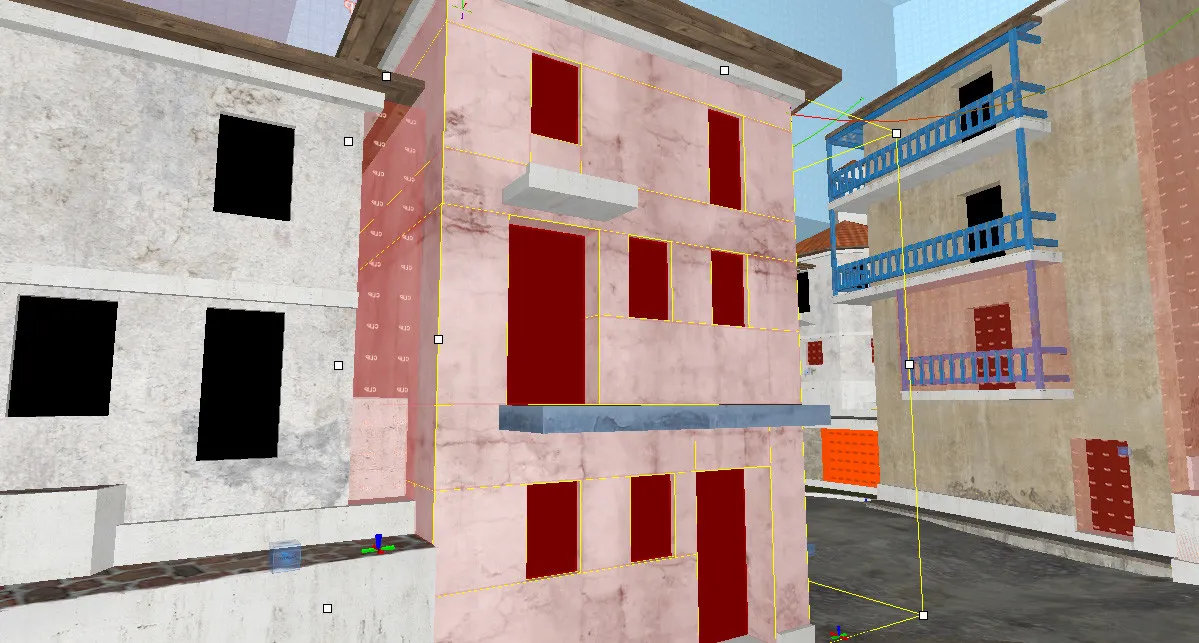
    I agree. The challenging thing with these buildings in particular though is that they're made of so many brushes, to create negative spaces to fit the doors and windows:

    ...a decision which I'm kind of regretting now though, I'm thinking of reworking them all from scratch...? They're likely the #1 reason why my brush count is so high is the first place

    But yeah converting all those to displacements would be one hell of a mess right now... I have to simplify them first! (Thanks @grapen and @untor)


    I really didn't want this to become an art project, but the more I work on it, the more I realize that I must step back in 3ds Max and make tons of new props- otherwise it'll never look like what I want it to...

    Thanks so much for your help people, I really appreciate it!

  • Radu
    • September 5, 2018 at 8:58 AM
    • #11

    @MikeGon in case you're wondering how to break them into displacements, this is how I'd go about it:

    [Blocked Image: https://i.imgur.com/qrqNAul.jpg]

    That's how I split mine when working on my doi map. It's a bit more time consuming because you have to work with the vertex tool, but this ensures the least lighting and texturing issues. @Squad pls confirm ;)

    [Blocked Image: https://i.imgur.com/MvA7bP5.jpg]

  • Squad
    • September 5, 2018 at 11:22 AM
    • #12
    Quote from Radu

    2 hours ago, Radu said: @MikeGon in case you're wondering how to break them into displacements, this is how I'd go about it:

    [Blocked Image: https://i.imgur.com/qrqNAul.jpg]

    That's how I split mine when working on my doi map. It's a bit more time consuming because you have to work with the vertex tool, but this ensures the least lighting and texturing issues. @Squad pls confirm ;)

    Yeah, pretty much. Not sure why you got the extra set of displacements on every corner of the buildings. Could do without it imo, unless you want more accurate control when painting blend materials. If it's for CSGO, you can go pretty nuts with the amount of displacements.

    [Blocked Image: https://i.imgur.com/MB5X8an.png]

  • Radu
    • September 5, 2018 at 1:53 PM
    • #13
    Quote from Squad

    2 hours ago, Squad said: Yeah, pretty much. Not sure why you got the extra set of displacements on every corner of the buildings. Could do without it imo, unless you want more accurate control when painting blend materials. If it's for CSGO, you can go pretty nuts with the amount of displacements.

    Yeah, you get better results when painting the edges. If you eliminate those, you'll get noticeable stretches around.

  • morozov
    • September 5, 2018 at 2:06 PM
    • #14

    For a more rigid transition between surfaces, make the division at the corners, like mine. This will make the smoothing between the corners less active.

    [Blocked Image: https://pp.userapi.com/c849524/v849524464/70f56/lzwLm7M6vv0.jpg]

  • Squad
    • September 5, 2018 at 2:25 PM
    • #15
    Quote from Radu

    29 minutes ago, Radu said: Yeah, you get better results when painting the edges. If you eliminate those, you'll get noticeable stretches around.

    True. Last time I made displacement buildings like this was for DoI and the luxury of upped displacement limit was not present ? But in CSGO you shouldn't let that hold you back.

  • blackdog
    • September 5, 2018 at 3:15 PM
    • #16
    Quote from poLemin

    On 9/1/2018 at 11:01 PM, poLemin said: Groups do not have an impact. What @ElectroSheep probably suggested is to tie several brushes into one func_detail. func_detail, like most brush entities, can consist of several brushes. So select for example all trims around a certain building, hit CTRL+T and tie them to one func_detail. If you want to manipulate single pieces of it later on, use the ignore group function (the "ig" button on top), to be able to select them individually.

    Or use the vertex tool(?)

    My thought when I read that was, tho, if making it all func_detail would cause it to possibly pop in-out of view more easily/in less manageable way (VIS goodness & co.)

    Quote from MikeGon

    10 hours ago, MikeGon said: I agree. The challenging thing with these buildings in particular though is that they're made of so many brushes, to create negative spaces to fit the doors and windows:

    ...a decision which I'm kind of regretting now though, I'm thinking of reworking them all from scratch...? They're likely the #1 reason why my brush count is so high is the first place

    But yeah converting all those to displacements would be one hell of a mess right now... I have to simplify them first! (Thanks @grapen and @untor)

    Can’t see @Radu‘s screens… can you not select all those faces and convert to displacement, wouldn’t it be treated as one? (Or the gaps fuck it up?)

    Is it possible to make the whole facade of the building a func_detail, the thickness of the door/windows?

    Also making buildings instances, would it help at all with performance?

  • MikeGon
    • September 8, 2018 at 12:20 AM
    • #17
    Quote from Squad

    On 9/5/2018 at 6:22 AM, Squad said: Yeah, pretty much. Not sure why you got the extra set of displacements on every corner of the buildings. Could do without it imo, unless you want more accurate control when painting blend materials. If it's for CSGO, you can go pretty nuts with the amount of displacements.

    @Radu @Squad But adding displacement brushes counts towards the overall brush count right? What you guys are suggesting involves multiplying the amount of brushes on facades that are already complex... Are you sure its okay to do this? I'll start by backing up my stuff, then try it with one buildings and post it here!

    These buildings really need rounded corners like the ones you're showing @untor, I will try to get similar results!


    Quote from blackdog

    On 9/5/2018 at 10:15 AM, blackdog said: Also making buildings instances, would it help at all with performance?

    All the buildings that are outside the play area are instances, and apparently they act the same as if they were in the main vmf file. They don't really help with performance (from what I can tell)

    Thanks guys!

  • Radu
    • September 8, 2018 at 9:20 AM
    • #18
    Quote from MikeGon

    8 hours ago, MikeGon said: @Radu @Squad But adding displacement brushes counts towards the overall brush count right? What you guys are suggesting involves multiplying the amount of brushes on facades that are already complex... Are you sure its okay to do this? I'll start by backing up my stuff, then try it with one buildings and post it here!

    Displacements don't count towards the brush limit. They have their own category.

  • Squad
    • September 8, 2018 at 11:57 AM
    • #19

    Have a look at inferno and dust2, they make extensive use of displacements.

    Displacements have their own max limit. Not sure if that means they're also counted as regular brushes or not tbh.

  • Radu
    • September 8, 2018 at 2:02 PM
    • #20
    Quote from Squad

    2 hours ago, Squad said: Have a look at inferno and dust2, they make extensive use of displacements.

    Displacements have their own max limit. Not sure if that means they're also counted as regular brushes or not tbh.

    Did a quick test, to be extra sure, where I turned a brush face into a displacement. They don't count as regular brushes.

Participate now!

Don’t have an account yet? Register yourself now and be a part of our community!

Register Yourself Login
Discord

The Mapcore Discord is our lively IRC channel of the 2000s reborn. Chat about level design, gaming, and more.

Latest Posts

  1. Tangerine

    Harry Poster
    July 18, 2026 at 11:10 AM
  2. Any of the old guard still around? D:

    Warby
    July 12, 2026 at 8:23 PM
  3. About our archived forums

    Thrik
    June 30, 2026 at 2:12 PM
  4. Mapcore Discord

    mason_fan123
    June 24, 2026 at 8:52 PM
  5. [CS2] Valley

    Serialmapper
    June 22, 2026 at 11:56 AM
  6. Free Music / SFX Resource - Over 2500 Tracks

    Eric Matyas
    June 18, 2026 at 12:32 PM
  7. Pango [WIP]

    Elowen
    June 11, 2026 at 10:13 AM
  8. [CS2] Dvina

    Jeremy Rivera
    June 11, 2026 at 10:03 AM
  9. Bridges 2.0 by NEXSIDE, MAP SHOWCASE. ( Steam Workshop )

    MrTrane18
    June 1, 2026 at 7:46 PM
  10. Classic Maps Reborn For CS2

    SillySpaceCat
    May 31, 2026 at 10:33 PM

Users Viewing This Thread

  • 1 Guest
  1. Privacy Policy
  2. Contact
Powered by WoltLab Suite™