1. Forums
  2. Discord
  3. About Mapcore
  4. Patreon Supporters
  • Login
  • Register
  • Search
This Thread
  • Everywhere
  • This Thread
  • This Forum
  • Articles
  • Pages
  • Forum
  • More Options
  1. Mapcore
  2. Discussions
  3. Level Design

Level Design Help Files

  • von*ferret
  • December 13, 2005 at 8:01 AM
  • Serialmapper
    • December 24, 2018 at 8:00 PM
    • #161

    I finally did it ?. Works only for "WorldVertexTransition" i don't know yet how to make it work for "Lightmapped_4WayBlend". (the sprites have a gentle swinging motion, no special masks required)
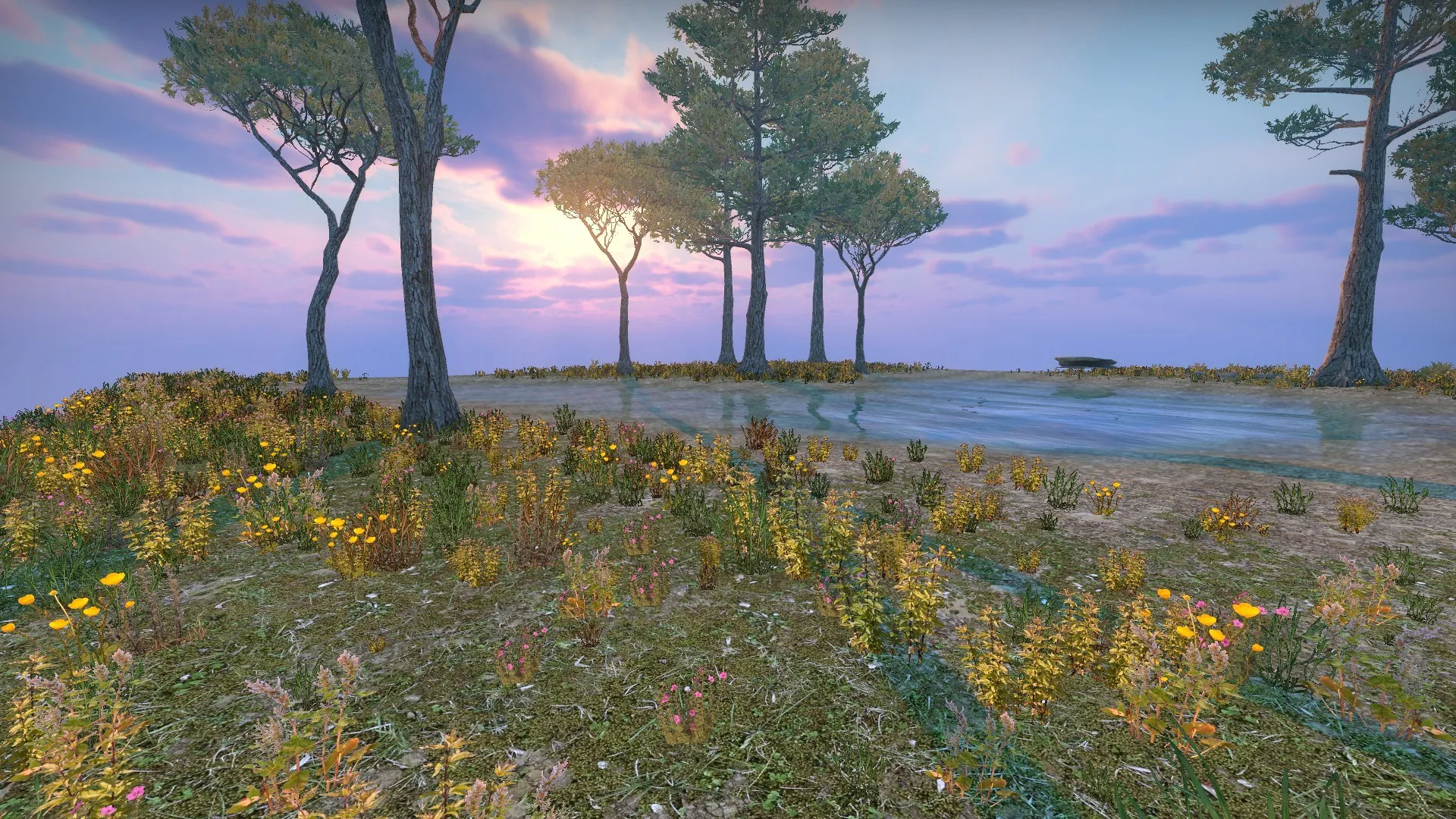

    Basically follow @TopHATTwaffle guide, but use this code provided below for the .vbsp ( you can name it whatever you want, for example custom.vbsp )


    detail {custom_weeds_1 //Set detail material file for map to my_custom_sprites.vtf to use. { "density" "3000" //how often they appear inside material Group1 { "alpha" "1.0" //dark dirt } Group2 { "alpha" "0.9" } Group3 { "alpha" ".1" //grass Model1 //weed_a { "sprite" "12 26 508 490 2048" "spritesize" "0.5 0 5 5" "spriterandomscale" "0.3" "amount" "0.25" "detailOrientation" "2" } Model2 //weed_b { "sprite" "584 4 346 514 2048" "spritesize" "0.5 0 5 5" "spriterandomscale" "0.5" "amount" "0.25" "detailOrientation" "2" } Model3 //weed_c { "sprite" "984 2 512 520 2048" //(X, Y) coord. of upper left corner, w & h of sprite, size of the detailsprite.vtf texture in pixels. "spritesize" "0.5 0 5 5" //x & y of rotational center of sprite (approx .5 0), x y world size of sprite "spriterandomscale" "0.2" //randomness of sprite sizes "amount" "0.15" //relative amount of sprite...keep in thirds for three. if four sprites, would be .25 "detailOrientation" "2" //1 faces player. 0 would not rotate. 2 faces camera. } Model4 //weed_d { "sprite" "1610 92 384 310 2048" //(X, Y) coord. of upper left corner, w & h of sprite, size of the detailsprite.vtf texture in pixels. "spritesize" "0.5 0 5 5" //x & y of rotational center of sprite (approx .5 0), x y world size of sprite "spriterandomscale" "0.2" //randomness of sprite sizes "amount" "0.25" //relative amount of sprite...keep in thirds for three. if four sprites, would be .25 "detailOrientation" "2" //1 faces player. 0 would not rotate. 2 faces camera. } Model5 //weed_e { "sprite" "30 522 472 508 2048" //(X, Y) coord. of upper left corner, w & h of sprite, size of the detailsprite.vtf texture in pixels. "spritesize" "0.5 0 5 5" //x & y of rotational center of sprite (approx .5 0), x y world size of sprite "spriterandomscale" "0.5" //randomness of sprite sizes "amount" "0.5" //relative amount of sprite...keep in thirds for three. if four sprites, would be .25 "detailOrientation" "2" //1 faces player. 0 would not rotate. 2 faces camera. } Model6 //weed_f { "sprite" "552 544 416 482 2048" //(X, Y) coord. of upper left corner, w & h of sprite, size of the detailsprite.vtf texture in pixels. "spritesize" "0.5 0 5 5" //x & y of rotational center of sprite (approx .5 0), x y world size of sprite "spriterandomscale" "0.3" //randomness of sprite sizes "amount" "0.1" //relative amount of sprite...keep in thirds for three. if four sprites, would be .25 "detailOrientation" "2" //1 faces player. 0 would not rotate. 2 faces camera. } Model7 //weed_g { "sprite" "1028 632 410 396 2048" //(X, Y) coord. of upper left corner, w & h of sprite, size of the detailsprite.vtf texture in pixels. "spritesize" "0.5 0 5 5" //x & y of rotational center of sprite (approx .5 0), x y world size of sprite "spriterandomscale" "0.3" //randomness of sprite sizes "amount" "0.2" //relative amount of sprite...keep in thirds for three. if four sprites, would be .25 "detailOrientation" "2" //1 faces player. 0 would not rotate. 2 faces camera. } Model8 //weed_h { "sprite" "1536 488 492 540 2048" //(X, Y) coord. of upper left corner, w & h of sprite, size of the detailsprite.vtf texture in pixels. "spritesize" "0.5 0 5 5" //x & y of rotational center of sprite (approx .5 0), x y world size of sprite "spriterandomscale" "0.5" //randomness of sprite sizes "amount" "0.25" //relative amount of sprite...keep in thirds for three. if four sprites, would be .25 "detailOrientation" "2" //1 faces player. 0 would not rotate. 2 faces camera. } } } }


    And this is an example of blend material using the custom sprites.


    "WorldVertexTransition" { "$baseTexture" "nature/hr_c/hr_grass_001_color" "$bumpmap" "grass/hr_grass/grass_a_normals" "$blendmodulatetexture" "nature/hr_c/hr_grass_001_blend"

    "$baseTexture2" "de_dust/hr_dust/hr_dust_ground_dirt_rough_01_color" "$bumpmap2" "de_dust/hr_dust/hr_dust_ground_dirt_rough_01_normal" "$surfaceprop" "grass" "$surfaceprop2" "gravel" "%detailtype" "custom_weeds_1"

    "%keywords" "ground,dirt,blend" }

    The vmt for the custom sprites example:

    Grass { $baseTexture "detail\my_custom_sprites" $alphatest 1 $vertexcolor 1 $WorldSpaceScale 3 }

    At map properties put your custom.vbsp and my_custom_sprites instead of the default ones.

    save and compile.

    Merry Christmas! ;)

  • Serialmapper
    • January 20, 2019 at 12:25 PM
    • #162

    I want to update my map however after the last update, i encounter some lightning bugs (some props become darker, even if they have the shadows and the self shadowing disabled). I'm using the same compile settings, same everything. Does anyone have the same problems?

    [Blocked Image: https://i.imgur.com/CjWbhYw.png]

    [Blocked Image: https://i.imgur.com/8G2wK9Y.png]

  • Radix
    • January 20, 2019 at 12:53 PM
    • #163
    Quote from Serialmapper

    26 minutes ago, Serialmapper said: Does anyone have the same problems?

    Yes...

  • Serialmapper
    • January 20, 2019 at 2:18 PM
    • #164

    Is there any solution to this problem, or i will have to wait for Valve to fix the vrad.exe? ?

  • Vaya
    • January 20, 2019 at 8:18 PM
    • #165

    use the older vrad. someone left the details on r/csmapmakers

  • Radix
    • January 21, 2019 at 12:35 AM
    • #166
    Quote from Vaya

    17 hours ago, Vaya said: use the older vrad. someone left the details on r/csmapmakers

    I guess you mean this:


    Maybe using the old vrad helps with the new problem but brings back the lighting issue we had before (static props were too bright when affected by light/light_spot; see here: https://imgur.com/a/xpi7j ).

    I'm currently trying to find out what's causing the issue... It seems to be a little inconsistent. ? Mostly props that are touching (or are surrounded by) brushes like windows/corner bricks, but not all of them somehow...

  • Vaya
    • January 21, 2019 at 2:44 PM
    • #167

    sorry I was compiling at the time so didn't fancy fighting against my PC to find the link...


    looks you can't win here..

  • esspho
    • March 20, 2019 at 11:49 PM
    • #168

    This website is great for generating heightmaps from real world terrain:

    https://tangrams.github.io/heightmapper/

  • MikeGon
    • March 21, 2019 at 8:18 PM
    • #169
    Quote from esspho

    1 hour ago, esspho said: This website is great for generating heightmaps from real world terrain:

    https://tangrams.github.io/heightmapper/

    Very cool, that could be useful as a starting point for large scale worlds!

  • text_fish
    • May 19, 2019 at 10:28 AM
    • #170

    I'm sure there's some sort of simple explanation, but it's alluding me. Anybody had this problem before? Please tell me I've just accidentally turned on a weird setting that I never knew about? ?

    I'm using the transform tool in Hammer to try and rotate brushes and for some reason it rotates the brush in all axis' rather than just the selected axis. It's not the end of the world, but it's quite annoying whilst I'm just trying to block out a quick test layout.

    weirdrotation.mp4

  • esspho
    • May 19, 2019 at 1:57 PM
    • #171
    Quote from text_fish

    3 hours ago, text_fish said: I'm sure there's some sort of simple explanation, but it's alluding me. Anybody had this problem before? Please tell me I've just accidentally turned on a weird setting that I never knew about? ?

    I'm using the transform tool in Hammer to try and rotate brushes and for some reason it rotates the brush in all axis' rather than just the selected axis. It's not the end of the world, but it's quite annoying whilst I'm just trying to block out a quick test layout. 

    This happened to me a few weeks ago. Very annoying indeed. Eventually it went away but i have no idea how and why.

    If you haven't allready you could try verifying the game's and tool's files.

  • Serialmapper
    • May 19, 2019 at 4:10 PM
    • #172

    Try cut and paste special

  • text_fish
    • May 19, 2019 at 6:50 PM
    • #173

    Thanks both. Good to know I'm not the only one who's experienced this, and that's a neat little workaround in the short term Serial!

  • Squad
    • June 17, 2019 at 7:51 PM
    • #174

    I'm sure this has been shared before somewhere on Mapcore, but couldn't really find it.

    Optimization in Source: a practical demonstration

    And an interview with Iikka (Valve) about designing CTF_DoubleCross (includes some nice sketches).

    Impromptu Interview: Iikka Keranen

  • Interfearance
    • June 18, 2019 at 5:43 PM
    • #175

    Isn't likka the guy behind canals?

  • text_fish
    • April 30, 2020 at 2:58 PM
    • #176

    I'm doing some ground detail on my current csgo map. I'm using various rock and curb props to add visual interest, but I've made them non-solid so as not to obstruct player movement. The downside of this is that when a grenade, weapon or bomb gets dropped in these areas it's liable to be hidden by the prop. What's "best practice" in these situations? Is there a clip tool I'm missing that only blocks weapons/bomb?

  • Serialmapper
    • April 30, 2020 at 4:00 PM
    • #177

    Bomb its blocked by clip default, weapons by invisible, grenade by clipgrenade. But all are blocking the player so...?

  • text_fish
    • April 30, 2020 at 4:09 PM
    • #178

    Ahaa, I hadn't considered invisible, cheers! I guess I'll have to raise the player above the details, and place them with that in mind.

  • leplubodeslapin
    • April 30, 2020 at 8:59 PM
    • #179

    I tried it a little bit and the grenade clip texture doesn't collide with the player. But the bomb goes through it and so do dropped weapons ?

  • +Rusty+
    • July 30, 2020 at 9:41 PM
    • #180

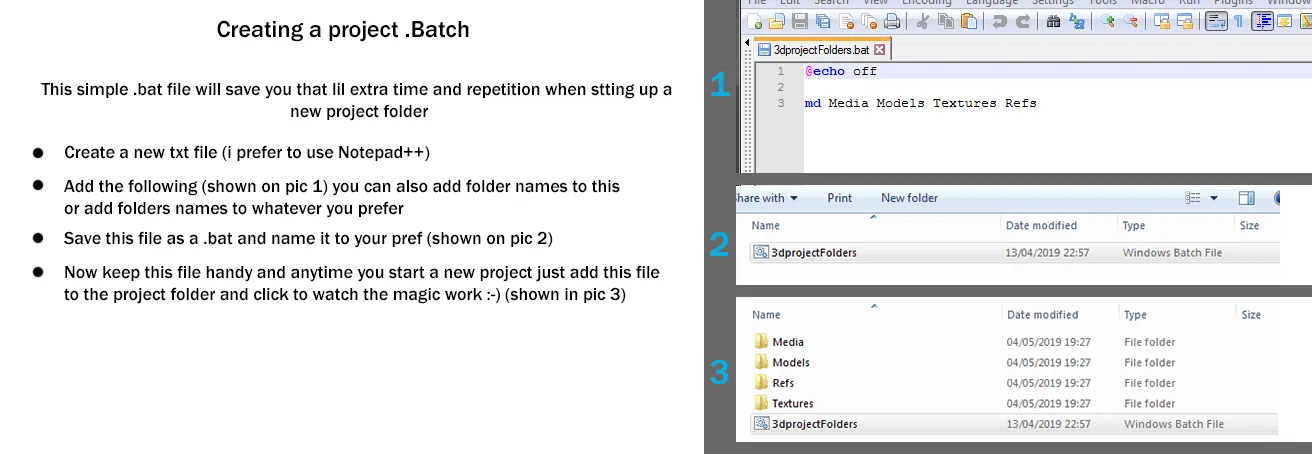
    Here's a little random & simple tip iv used for a while when setting up any kind of project that can save clicks with a simple pre-made .bat file

Participate now!

Don’t have an account yet? Register yourself now and be a part of our community!

Register Yourself Login
Discord

The Mapcore Discord is our lively IRC channel of the 2000s reborn. Chat about level design, gaming, and more.

Latest Posts

  1. Tangerine

    Harry Poster
    July 18, 2026 at 11:10 AM
  2. Any of the old guard still around? D:

    Warby
    July 12, 2026 at 8:23 PM
  3. About our archived forums

    Thrik
    June 30, 2026 at 2:12 PM
  4. Mapcore Discord

    mason_fan123
    June 24, 2026 at 8:52 PM
  5. [CS2] Valley

    Serialmapper
    June 22, 2026 at 11:56 AM
  6. Free Music / SFX Resource - Over 2500 Tracks

    Eric Matyas
    June 18, 2026 at 12:32 PM
  7. Pango [WIP]

    Elowen
    June 11, 2026 at 10:13 AM
  8. [CS2] Dvina

    Jeremy Rivera
    June 11, 2026 at 10:03 AM
  9. Bridges 2.0 by NEXSIDE, MAP SHOWCASE. ( Steam Workshop )

    MrTrane18
    June 1, 2026 at 7:46 PM
  10. Classic Maps Reborn For CS2

    SillySpaceCat
    May 31, 2026 at 10:33 PM
  1. Privacy Policy
  2. Contact
Powered by WoltLab Suite™