1. Forums
  2. Discord
  3. About Mapcore
  4. Patreon Supporters
  • Login
  • Register
  • Search
This Thread
  • Everywhere
  • This Thread
  • This Forum
  • Articles
  • Pages
  • Forum
  • More Options
  1. Mapcore
  2. Discussions
  3. Level Design

Level Design Help Files

  • von*ferret
  • December 13, 2005 at 8:01 AM
  • blackdog
    • May 15, 2016 at 9:17 AM
    • #121

    Oh I have that course as well! I bought it in December I think, when was on a good discount.

    Unfortunately I haven't watched more than the first 4-5 lessons (and didn't practice any of it), but seems a thorough explanation. Goes deep into the basics of the UI and basic command/functions.

    Watching video content on Steam is a drag though, until now is implemented very poorly, there's no playlist of sorts, there's no "watched" label that tells you where you left, every video you click opens a new window/player.

    I hope they have improved since then, since it was just a few days ago they announced they are starting to provide movies in the catalog.


  • JSadones
    • May 15, 2016 at 1:13 PM
    • #122
    Quote from blackdog

    3 hours ago, blackdog said: Oh I have that course as well! I bought it in December I think, when was on a good discount.

    Unfortunately I haven't watched more than the first 4-5 lessons (and didn't practice any of it), but seems a thorough explanation. Goes deep into the basics of the UI and basic command/functions.

    Watching video content on Steam is a drag though, until now is implemented very poorly, there's no playlist of sorts, there's no "watched" label that tells you where you left, every video you click opens a new window/player.

    I hope they have improved since then, since it was just a few days ago they announced they are starting to provide movies in the catalog.

    I'm having some minor problems as well, but everything is running smooth for me.

  • blackdog
    • May 15, 2016 at 5:58 PM
    • #123

    Don't get me wrong, it was smooth for me as well, just the experience is poor, but is a Steam fault.

  • R-C-MAN
    • December 8, 2016 at 9:14 PM
    • #124

    Hey Guys I have a question about stairs in Hammer.

    I know when making stairs example 8x12 and you attach them at the corners and make how many you need. Group them and then use the clipping tool to cut the bottom half off, place a NODRAW brush underneath so they don't leak if open to the world. What happens when you create metal stairs as I've created here, since they do no need a nodraw brush underneath but are a func_detail do I need to do anything else. I was thinking of placing a player clip on top so the bots don't have issues with them.

    http://imgur.com/GFCcnE1

    is there anything I am missing?

    Thanks

    RC

  • Squad
    • December 8, 2016 at 11:11 PM
    • #125
    Quote from R-C-MAN

    1 hour ago, R-C-MAN said: I was thinking of placing a player clip on top so the bots don't have issues with them.

    http://imgur.com/GFCcnE1

    is there anything I am missing?

    Always clip stairs :)

    Other than that, seems like it's good to go.

  • text_fish
    • January 25, 2017 at 4:29 PM
    • #126

    Does anyone else ever get this funny texture glitch in Hammers' 3D view?

    External Content www.youtube.com
    Content embedded from external sources will not be displayed without your consent.
    Through the activation of external content, you agree that personal data may be transferred to third party platforms. We have provided more information on this in our privacy policy.

  • Freaky_Banana
    • January 26, 2017 at 4:53 PM
    • #127
    Quote from text_fish

    On 25.1.2017 at 5:29 PM, text_fish said: Does anyone else ever get this funny texture glitch in Hammers' 3D view?

    External Content www.youtube.com
    Content embedded from external sources will not be displayed without your consent.
    Through the activation of external content, you agree that personal data may be transferred to third party platforms. We have provided more information on this in our privacy policy.

    Yea, I get this too. No idea what it's down to though :D .

  • poLemin
    • January 26, 2017 at 5:14 PM
    • #128
    Quote from text_fish

    On 25.1.2017 at 5:29 PM, text_fish said: Does anyone else ever get this funny texture glitch in Hammers' 3D view?

    External Content www.youtube.com
    Content embedded from external sources will not be displayed without your consent.
    Through the activation of external content, you agree that personal data may be transferred to third party platforms. We have provided more information on this in our privacy policy.

    Yep, happens every now and then. It will not appear when using "3D Textured" instead of "3D Shaded Textured Polygons" in the 3D viewport.

  • Squad
    • January 27, 2017 at 7:39 AM
    • #129

    What poLemin said. It happens with quite some textures from train iirc.

    Most of the time I'm in 3D Textured mode, so I don't really notice it anyway :)

  • text_fish
    • June 28, 2017 at 11:19 AM
    • #130

    I need water at different heights within the same PVS. As far as I understand it this is very illegal in Source, however the higher body of water is not in the playable area and is only a visual thing, so I think I should be able to hack something together. My current thinking is to create an animated refract texture to sit on a brush face just above a fairly plain opaque texture, though I've no idea how costly this would be performance wise or whether it would even look any good.

    Any ideas?

  • leplubodeslapin
    • June 28, 2017 at 1:56 PM
    • #131
    Quote from text_fish

    2 hours ago, text_fish said: I need water at different heights within the same PVS. As far as I understand it this is very illegal in Source, however the higher body of water is not in the playable area and is only a visual thing, so I think I should be able to hack something together. My current thinking is to create an animated refract texture to sit on a brush face just above a fairly plain opaque texture, though I've no idea how costly this would be performance wise or whether it would even look any good.

    Any ideas?

    You can use water at different heights, you just can't use the real-time reflection shader that Source uses on 2 separate plans.

    That's why you can find 2 types of water texture : Expensive and Cheap. The cheap type can still have reflections but it will be cubemap based (which can be fine if it's not a playable area !). So, try to read some water VMT files and create 2 water texture using the same diffuse and stuff, just use the cheap cubemap reflections shader for the higher water brush.

    Also, most of the time you don't need to use a refract texture but a normalmap mask.

  • text_fish
    • June 28, 2017 at 2:24 PM
    • #132
    Quote from leplubodeslapin

    28 minutes ago, leplubodeslapin said: You can use water at different heights, you just can't use the real-time reflection shader that Source uses on 2 separate plans.

    That's why you can find 2 types of water texture : Expensive and Cheap. The cheap type can still have reflections but it will be cubemap based (which can be fine if it's not a playable area !). So, try to read some water VMT files and create 2 water texture using the same diffuse and stuff, just use the cheap cubemap reflections shader for the higher water brush.

    Also, most of the time you don't need to use a refract texture but a normalmap mask.

    Thanks for the reply Lep, I had thought that was the case as well but it stopped the expensive water from rendering correctly and when I looked in to it on the VDC I found out that expensive and cheap water can't be used within the same PVS. As a temporary workaround I've placed a brush with a semi-transparent watery-looking texture at the height I want the non-playable water and I've got an expensive water volume underneath at the same height as the playable water, which sort of gives some movement to the area. It's still far from ideal, but I think I'll move on to another part of the map for now and hopefully in time I'll come up with a better solution.

  • Serialmapper
    • November 4, 2017 at 5:11 PM
    • #133

    Does anyone know how to properly use the new compound HR overlays like those in the picture?

    For example i want to use only the part where it's written "kasbah". When i want to resize the overlay in half it always ends up only with the other half that i don't want to use, no matter the side where i drag to. I had tried with texture lock but only deforms the overlay.

    The content cannot be displayed because it is no longer available.

  • Rad
    • November 4, 2017 at 9:46 PM
    • #134

    Maybe try to copy values from the original one?

  • Serialmapper
    • November 5, 2017 at 9:45 AM
    • #135

    It worked for that specific overlay. Anyway from that i observed that the following parameters were altered, and by playing with them, plus using texture lock i finally found a way to properly use the complex HR overlays.

    The content cannot be displayed because it is no longer available.

  • Serialmapper
    • April 8, 2018 at 10:52 AM
    • #136

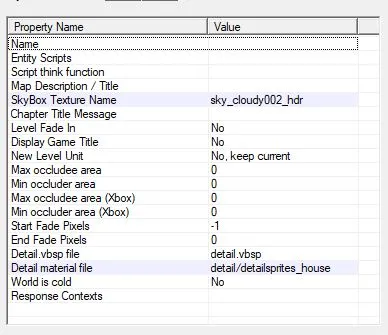
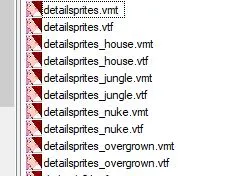
    Long story short: Since CSGO has a detail.vbsp file by default and has nice default detailesprites, I would like to use them on my custom blend materials. However from some unknown reason they don't work. Does anyone know how to make them work?

    the vmt i use is:

    "WorldVertexTransition" { "$baseTexture" "nature/hr_c/hr_grass_001_color" "$bumpmap" "grass/hr_grass/grass_a_normals" "$blendmodulatetexture" "nature/hr_c/hr_grass_001_blend"

    "$baseTexture2" "de_dust/hr_dust/hr_dust_ground_dirt_rough_01_color" "$bumpmap2" "de_dust/hr_dust/hr_dust_ground_dirt_rough_01_normal" $NEWLAYERBLENDING 1 $BLENDSOFTNESS 0.2 $LAYERBORDERSTRENGTH 0.3 $LAYERBORDEROFFSET 0 $LAYERBORDERSOFTNESS 0.2 $LAYERBORDERTINT "{94 68 47}" "$surfaceprop" "grass" "$surfaceprop2" "gravel" "%detailtype" "detailsprites_house"

    "%keywords" "ground,dirt,blend" }

    the map properties are:

    the default detailsprites are:

  • Serialmapper
    • April 10, 2018 at 11:24 AM
    • #137

    bump

  • zombi
    • April 10, 2018 at 11:34 AM
    • #138

    Make sure you have detail.vbsp in your game folder. Valve removed it long time ago for no reason. If you don't have, you can download it from TopHattWaffle website - https://www.tophattwaffle.com/downloads/detail-vbsp-pack/

  • Serialmapper
    • April 11, 2018 at 8:26 AM
    • #139

    The default detail.vbsp file is located in the csgo folder, it hasn't been removed at all. I tried to use the ones from l4d2 provided in your link, but they don't work either. In CS:S they work and older versions of source engine, but in CSGO apparently they don't, and i want to find out why.

  • Vilham
    • June 5, 2018 at 3:26 PM
    • #140

    Hey a bit of a necro but the first post in the thread now auto embeds stuff which totally breaks everything.

Participate now!

Don’t have an account yet? Register yourself now and be a part of our community!

Register Yourself Login
Discord

The Mapcore Discord is our lively IRC channel of the 2000s reborn. Chat about level design, gaming, and more.

Latest Posts

  1. Tangerine

    Harry Poster
    July 18, 2026 at 11:10 AM
  2. Any of the old guard still around? D:

    Warby
    July 12, 2026 at 8:23 PM
  3. About our archived forums

    Thrik
    June 30, 2026 at 2:12 PM
  4. Mapcore Discord

    mason_fan123
    June 24, 2026 at 8:52 PM
  5. [CS2] Valley

    Serialmapper
    June 22, 2026 at 11:56 AM
  6. Free Music / SFX Resource - Over 2500 Tracks

    Eric Matyas
    June 18, 2026 at 12:32 PM
  7. Pango [WIP]

    Elowen
    June 11, 2026 at 10:13 AM
  8. [CS2] Dvina

    Jeremy Rivera
    June 11, 2026 at 10:03 AM
  9. Bridges 2.0 by NEXSIDE, MAP SHOWCASE. ( Steam Workshop )

    MrTrane18
    June 1, 2026 at 7:46 PM
  10. Classic Maps Reborn For CS2

    SillySpaceCat
    May 31, 2026 at 10:33 PM

Users Viewing This Thread

  • 2 Guests
  1. Privacy Policy
  2. Contact
Powered by WoltLab Suite™