

Question: Where are Workshop maps and their files stored?
Answer: ...\Steam\steamapps\workshop\content\730\

Question: Where are Workshop maps and their files stored?
Answer: ...\Steam\steamapps\workshop\content\730\
Backup post for me in case I mess it up... 
Spoiler
Quote from RadixDisplay MoreOn 12/9/2023 at 6:32 PM, Radix said: CS2 Workshop Q&A
Porting a map from CS:GO to CS2
- How to port a CS:GO map to CS2? ->(Answer1)
- I can't open the old CS:GO tools anymore since CS2 was released. How to fix this? ->(Answer1)
- Why are my custom sprites missing?
- Why are special clip textures like toolsclip_wood missing? ->(Answer1)
- The script creates three vmap files of my map (*map_name*.vmap, *map_name*_environment_prefab.vmap and *map_name*_prefab.vmap). Why?
Questions about the Workshop Tools
Questions about the new Hammer
- How to set up the new Hammer properly? (Which toolbars do I need? etc.)
- The fonts and buttons in Hammer are too small because I'm using a high screen resolution. How to fix this?
- How to change grid size? (keyboard shortcuts) -> (Answer1)
- Custom Vis groups? -> (Answer1)
- Is there an equivalent to "shift+drag" duplicate of the old Hammer?
- Meshes
- Texture Tool
- Displacement Tool
- Is there a way to "sew" displacements like in CSGO Hammer? -> (Answer1)
- How can I raise a displacement to a specific level ("Raise To" function in CSGO Hammer)?
- Props
- Smart Props? -> (Link)
- Entities
- Overlay Tool
- Some features of the Overlay Tool -> (Answer1)
- ...
Questions about Source2/CS2
- Source2 documentation? -> (Link)
- CS2 Workshop Tools documentation? -> (Link)
- Where are all the files stored (textures, models, maps, ...)? And how to open/edit them?
- Where are Workshop maps and their files stored? -> (Answer1)
- Does S2 support detail sprites (as used in CS:GO Dangerzone maps) or detail props?
- Weather effects (rain/snow) in S2?
- 3d skybox? -> (Answer1)
- Developer Console
- CS2 console command list? -> (Link)
- "mat_wireframe" console command doesn't work for me...
- Is there a console command to show clipping (something like CSGO's "r_drawclipbrushes")?
- Props
Asset creation in Source2
- Materials
- How to create a custom material?
- How do I decompile a stock material? -> (Answer1)
- Models
- Particles
- How to create particles? -> (Link1)
Compiling a map
- Is a GPU capable of raytracing now required? -> (Answer1)
Decompiling a map
- Is it possible to decompile maps and assets? -> (Link)
- After decompiling a map with Source2Viewer...
- ...all geometry is turned into models. Did I do something wrong? How to fix this quickly?
- ...nearly all geometry using tool textures (clip, nodraw, sky, ...) is missing. Did I do something wrong?
Bugs (and workarounds/fixes)
- (Q) When I start CS2, the launch option "Counter-Strike 2 Workshop Tools" is gone. How to fix this? -> (Answer1)
Misc
- Are there any example map files (from Valve) to learn from?
- Map overview/radar?
- Bots?
- How to publish a map
- Tutorial: Cloth simulation in S2 -> (Link1)
Question: Map overview/radar?
Question1: Where are all the files stored (textures, models, maps, ...)? And how to open/edit them?
Question2: Which file formats do materials, models etc. have?
Answer:
Maps:
Textures:
Models:
Question: Are there any example map files (from Valve) to learn from?
Answer: Not much atm (early 2024), no complete maps. But there are a couple of interesting *.vmaps here:
...\Steam\steamapps\common\Counter-Strike Global Offensive\content\csgo\maps\editor
For example this small part of dust2: "toolscene_lighting_de_dust_day.vmap"
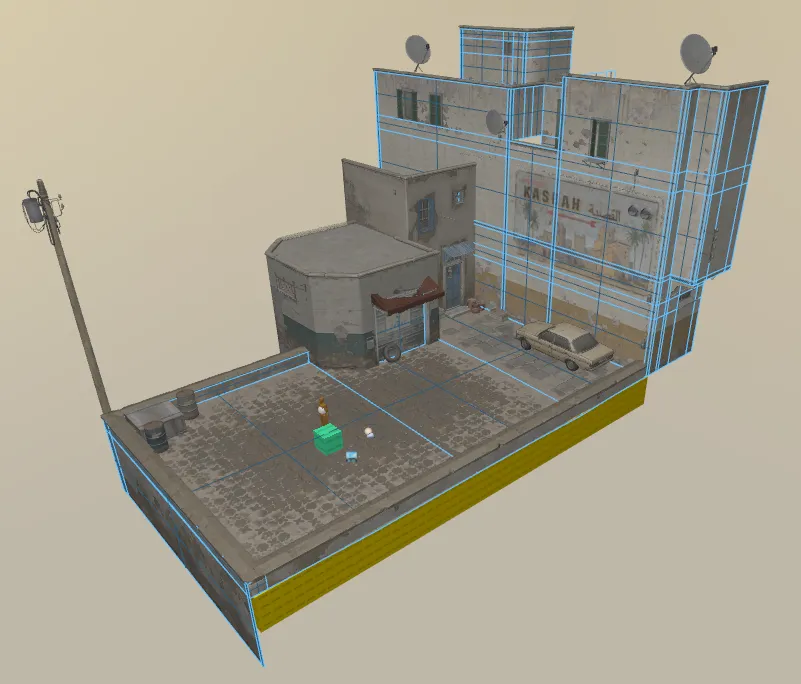
Smart Props Zoo:
...\Steam\steamapps\common\Counter-Strike Global Offensive\content\csgo\maps\editor\zoo
Some basic entities that you might want to use in your map:
...\Steam\steamapps\common\Counter-Strike Global Offensive\content\csgo\maps\templates
Some information about lighting:
...\Steam\steamapps\common\Counter-Strike Global Offensive\content\csgo_addons\*your_addon_name*\maps\content_examples
Question: How to quickly remove the triangulation of the meshes after porting a map?
Answer:
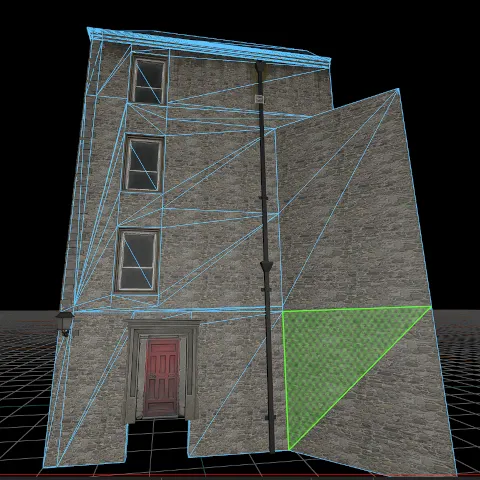
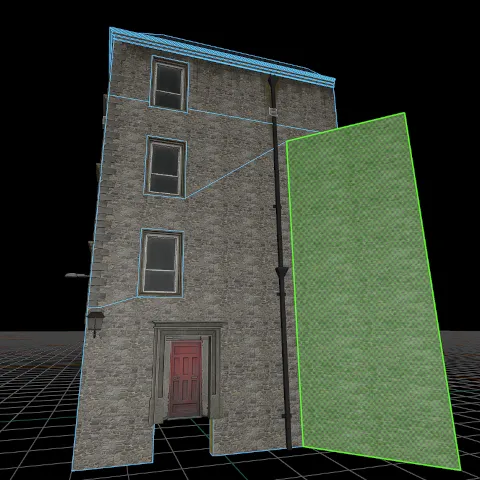
Select the faces (double click selects all connected faces), then hit "backspace" (=combine faces)
Don't forget to check these before:
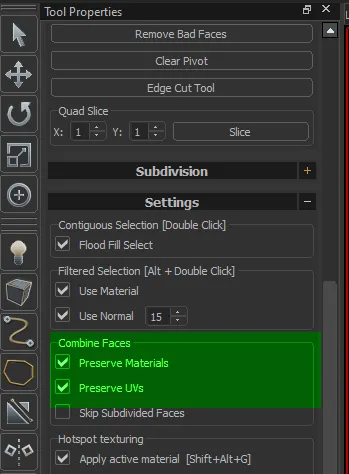
But be careful, sometimes this collapses some faces...
In any case some manual cleanup will be needed afterwards.
Question: (Porting maps from CS:GO to CS2) The script creates three vmap files of my map (*map_name*.vmap, *map_name*_environment_prefab.vmap and *map_name*_prefab.vmap). Why?
So when I port a map, these 3 vmaps are created:
What is that good for?
Question: Is there an equivalent to "shift+drag" duplicate of the old Hammer?
Answer: It's still the same, but be aware that "Translate" mode is active. 
Then just hold "shift" while click+drag the arrows/squares.
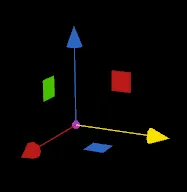
You can also use shift+arrow keys of your keyboard.
Question: Console command to directly load a Workshop map?
Answer: map_workshop *ID* *mapname*
So you will need the exact map ID. Every workshop map has a unique ID number. You can find it here: ...\Steam\steamapps\workshop\content\730
Example: map_workshop 3121217565 de_thera
Backup post for me
Spoiler
Quote from RadixDisplay MoreOn 12/9/2023 at 6:32 PM, Radix said: CS2 Workshop Q&A
Porting content from CS:GO to CS2
- Maps (+used assets)
- How to port a CS:GO map to CS2? ->(Answer1)
- I can't open the old CS:GO tools anymore since CS2 was released. How to fix this? ->(Answer1)
- Post import fixup -> (Link1)
- Why are special clip textures like toolsclip_wood missing? ->(Answer1)
- How to quickly remove the triangulation of the meshes after porting a map? -> (Answer1)
- Why are my custom sprites missing?
- The script creates three vmap files of my map (*map_name*.vmap, *map_name*_environment_prefab.vmap and *map_name*_prefab.vmap). Why?
- Materials
- How to port legacy materials to S2? -> (Link1)
- Models
- How to port legacy models to S2? -> (Link1)
Questions about the Workshop Tools
Questions about the new Hammer
- How to set up the new Hammer properly? (Which toolbars do I need? etc.)
- The fonts and buttons in Hammer are too small because I'm using a high screen resolution. How to fix this?
- How to change grid size? (keyboard shortcuts) -> (Answer1)
- Custom Vis groups? -> (Answer1)
- Instances vs. Prefabs? -> (Link1)
- Is there an equivalent to "shift+drag" duplicate of the old Hammer? -> (Answer1)
- Meshes
- Texture Tool
- Displacement Tool
- Is there a way to "sew" displacements like in CSGO Hammer? -> (Answer1)
- How can I raise a displacement to a specific level ("Raise To" function in CSGO Hammer)?
- Props
- Smart Props? -> (Link1)
- Entities
- Overlay Tool
- Some features of the Overlay Tool -> (Answer1)
- ...
Questions about Source2/CS2
- Documentation
- Files and directories
- Developer Console
- Props
- Misc
- Does S2 support detail sprites (as used in CS:GO Dangerzone maps) or detail props?
- Weather effects (rain/snow) in S2?
- 3d skybox? -> (Answer1)
Asset creation in Source2
- Materials
- How to create a custom material?
- How do I decompile a stock material? -> (Answer1)
- Models
- Particles
Compiling a map
- Is a GPU capable of raytracing now required? -> (Answer1)
Decompiling a map
- Is it possible to decompile maps and assets? -> (Link1)
- After decompiling a map with Source2Viewer...
- ...all geometry is turned into models. Did I do something wrong? How to fix this quickly?
- ...nearly all geometry using tool textures (clip, nodraw, sky, ...) is missing. Did I do something wrong?
Publishing a map
- How to publish a map?
- Map overview/radar? -> (Answer1)
- Bots?
Bugs (and workarounds/fixes)
- (Q) When I start CS2, the launch option "Counter-Strike 2 Workshop Tools" is gone. How to fix this? -> (Answer1)
Misc
Thanks for putting all this together! You da' real mvp @Radix
 Quote from Radu
On 2/4/2024 at 6:58 PM, Radu said: Thanks for putting all this together! You da' real mvp @Radix
Thanks! But I have to say that this didn't work as intended. Originally I hoped to get some people involved to get some answers for my own questions while doing the tedious work of putting it all together. But obviously people/communities have changed in the last years.
But I will keep this thread up for everybody or even just for me in case I need to look up something.
Question: Many entities have unused keyvalues after porting a map. Can I just delete these?
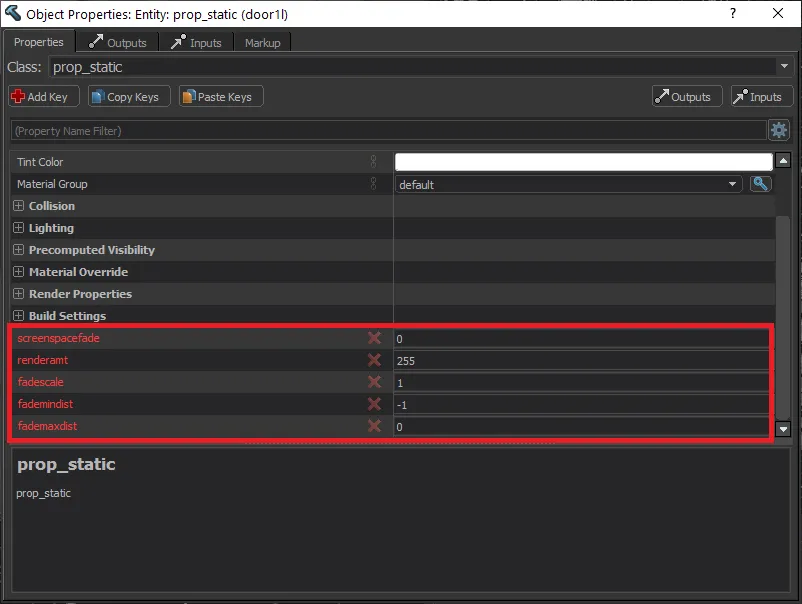
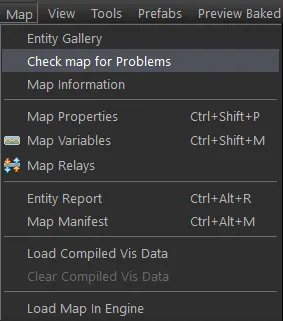
Answer: (Edit: This answer is probably wrong) These keys are obsolete and not used anymore (?). If you want, you can remove all of them by clicking 'Map'->'Check for problems' and then hitting 'Fix':
Question: Some entities have an 'obsolete' icon after porting. What's up with that?

Answer: These entities are not used anymore. You can remove or replace them.
Question: (Porting CS:GO maps to CS2) All the instances that I had in my CS:GO map don't exist in the ported map (as a prefab). They are only inside the maps/prefabs folder, but all func_detail geometry is missing. How to fix this?
Answer: If you want to preserve your func_instances, replace "-usebsp" with "-usebsp_nomergeinstances" in the Python script parameters:
python import_map_community.py <s1gameinfopath> <s1contentpath> <s2gameinfopath> <s2addon> <mapname> -usebsp_nomergeinstances
Question: How to upload a map to the Workshop?
Answer: Open the CS Workshop Tools and select the project you want to publish. Then open the Tools tab (top right) and select "Counter-Strike 2 Workshop Manager"
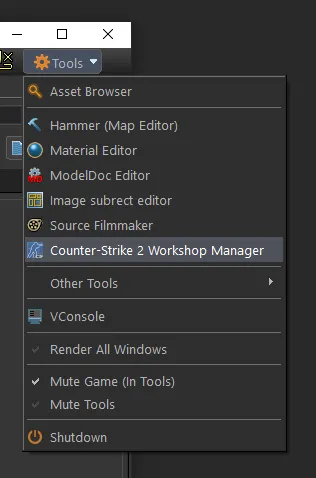
The rest is self-explanatory...
Question: How to achieve a seamless transition between the water in your map an the water in the skybox? (like in de_anubis)
(water texture scale in skybox; cubemaps?)
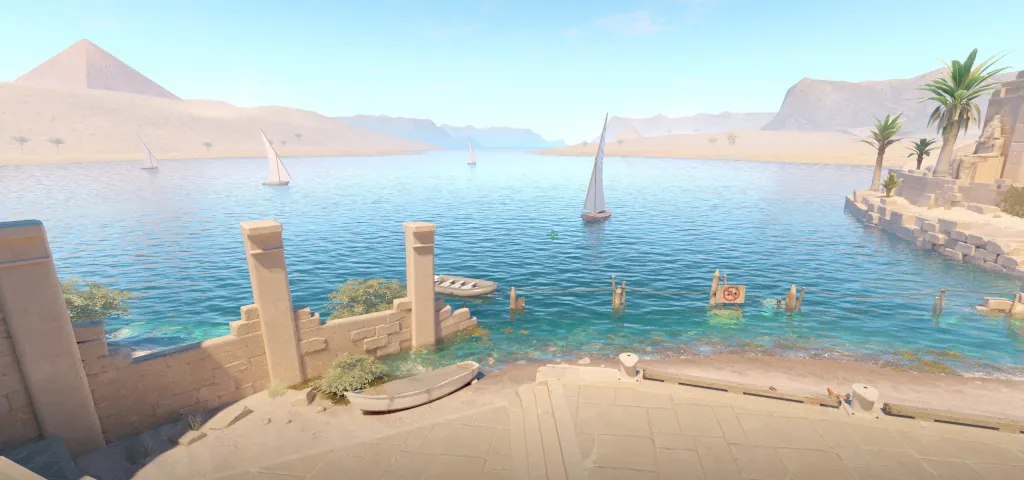
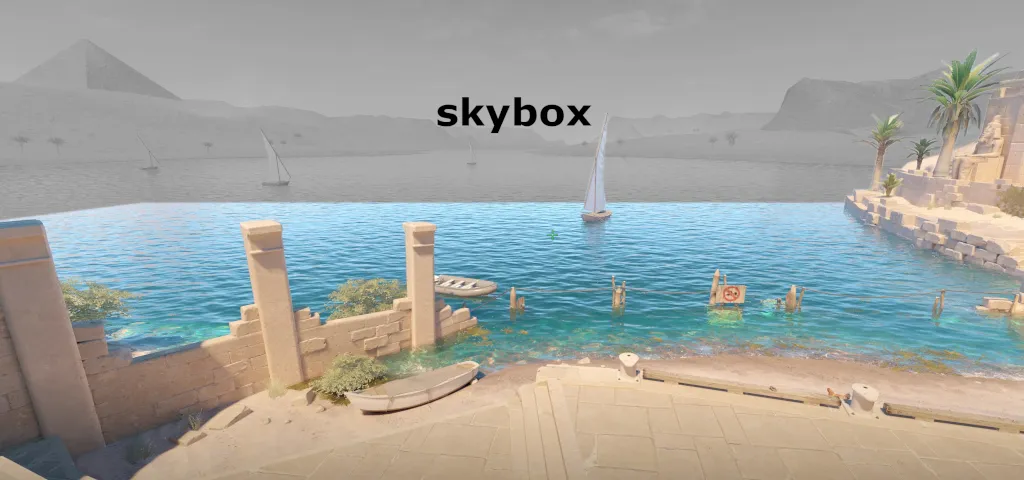
I've been struggling with this for a while now. I tried to decompile de_anubis map, because it works pretty well there. There the skybox map uses the exact same water texture as the actual map. But in my map the skybox water looks scaled too large (=> larger waves) compared to the water in the actual map. It seems like the texture scale of the water texture doesn't have an effect (like in Source1).
Also I'm not sure how to get the cubemaps right, since I can't assign a cubemap to a specific face anyore (Can I?).
Question: Where are the compile logs saved?
Question: How to create water in CS2?
Answer1:
Quote from RadixOn 4/15/2024 at 10:45 PM, Radix said: Question: How to achieve a seamless transition between the water in your map an the water in the skybox? (like in de_anubis)
de_anubis water uses a material that fades at a certain distance in the skybox.
How to make a water material that fades at the distance you want:
1. make a water material using the "CSGO water fancy" shader, or decompile a water material using the source2viewer (i did the last method since i had no ideea how the shader really worked)
2. in your fancy water material settings look for these parameters:
[Blocked Image: https://i.imgur.com/3RjQVu8.png]
Those values don´t have to be equal, or the mesh a square, they just dictate the distance from the center of the editor to where the material fades into the skybox.
[Blocked Image: https://i.imgur.com/bSOyv89.png]
3. Place a big cubemap or a combined light probe volume on your water.
4. do not place other materials besides nodraw or solidblocklight beneath the water in the distance.
Here are some results: the first is the desired one, the others if you place other materials beneath the water in the distance. (Also in the 3d skybox map place a cubemap or a combine light probe cubemap right in the center of the skycamera, end extend it to cover all the water´s surface.)
[Blocked Image: https://i.imgur.com/HKgzD7A.jpg]
[Blocked Image: https://i.imgur.com/8RAnk4b.jpg]
[Blocked Image: https://i.imgur.com/go8KcCn.jpg]
Don’t have an account yet? Register yourself now and be a part of our community!