

1. Forums
  2. Discord
  3. About Mapcore
  4. Patreon Supporters
  • Login
  • Register
  • Search
This Thread
  • Everywhere
  • This Thread
  • This Forum
  • Articles
  • Pages
  • Forum
  • More Options
  1. Mapcore
  2. Discussions
  3. Level Design

Collision mesh for source models in blender

  • Geno
  • May 2, 2019 at 5:24 PM
  • Geno
    • May 2, 2019 at 5:24 PM
    • #1

    Hey, I have recently started using blender. In 3ds Max, Wallworm did the job just fine. Is there anything in blender that could help me create collision mesh? I know you can start off with a cube and make it envelop the mesh etc. but for complex mesh, it isn't always possible to do that while keeping the mesh convex.

    I also know about "Convex hull" in edit mode that can be found in the search menu, but it doesn't eliminate unnecessary details. The image below is just a small example, it's a lot of tedious work for the whole model.
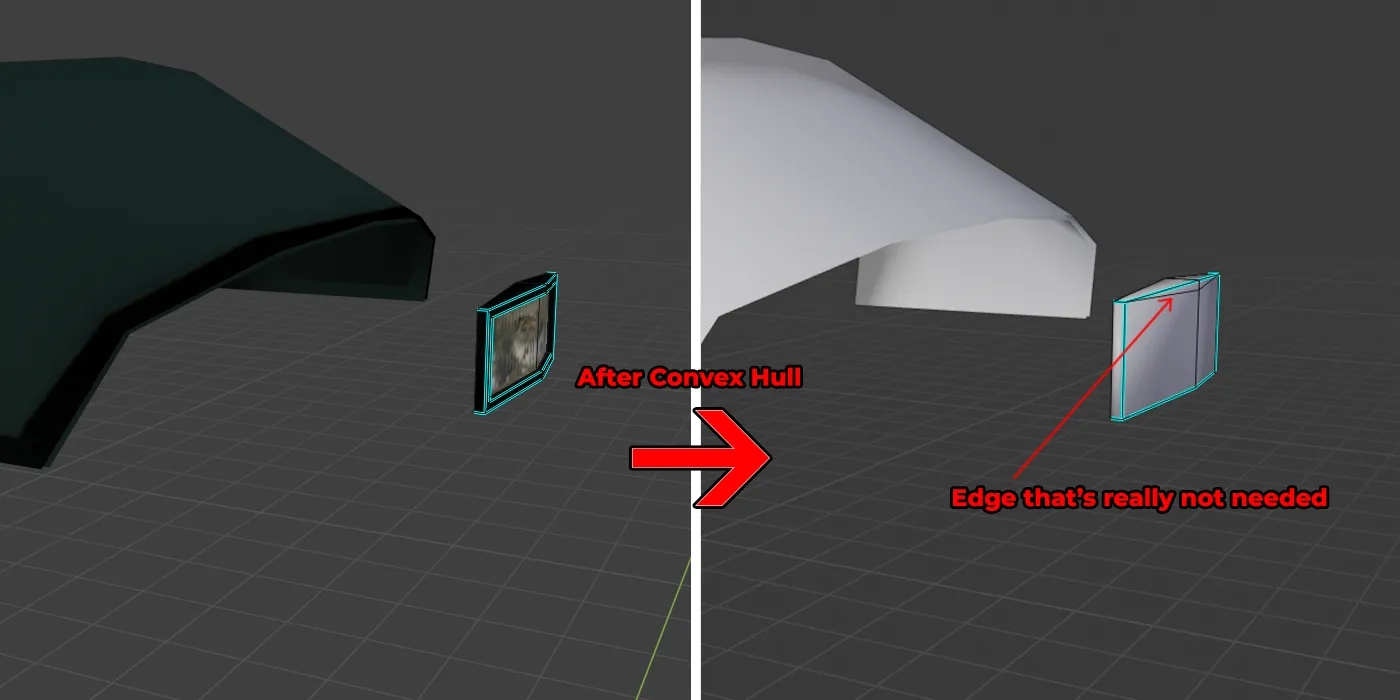
    So is there anything else that I could try?

  • neptune
    • May 2, 2019 at 7:04 PM
    • #2

    You can find this link how to make collision mesh with each 3D modelling program for Source Engine.

    Collision mesh wiki page

  • Geno
    • May 3, 2019 at 7:41 AM
    • #3
    Quote from neptune

    12 hours ago, neptune said: You can find this link how to make collision mesh with each 3D modelling program for Source Engine.

    Collision mesh wiki page

    Yes, those are the basics, I know about that. I have been making models in max for my maps, I was just looking for a better approach if there is any. Thank you anyway :)

  • leplubodeslapin
    • May 3, 2019 at 8:03 AM
    • #4

    I don't really understand your issue, what's the problem here with creating just a basic collision shape like this ?

    [Blocked Image: https://i.imgur.com/n0fGOsg.png] → [Blocked Image: https://i.imgur.com/2daBD8z.png] OR [Blocked Image: https://i.imgur.com/CABQPSc.png]

    Also if you have unecessary geometry like that and you don't want to destroy the faces and rebuild everything by hand, you can select the edges like this :

    [Blocked Image: https://i.imgur.com/XpBkU91.png]

    Press DELETE (or X) and pick "Dissolve Edge". It will reconstruct geometry without these edges.


    EDIT

    Can you show us the complex geo that you struggle with ?

    Most of the time, I think it's just about the amount of elements I use in my collision meshes. By using multiple you can create concave geometry but you'll quickly hit the limit amount of elements (don't remember how high this limit is but it's pretty low)

  • Geno
    • May 3, 2019 at 5:46 PM
    • #5
    Quote from leplubodeslapin

    On 5/3/2019 at 12:33 PM, leplubodeslapin said: Most of the time, I think it's just about the amount of elements I use in my collision meshes. By using multiple you can create concave geometry but you'll quickly hit the limit amount of elements (don't remember how high this limit is but it's pretty low)

    Making collisions of concave models or hitting the limit isn't my issue. The limit issue can be resolved by increasing the threshold, there is a QC class for that. The limit is 40 convex hulls for CSGO and you can use $maxconvexpieces <int> to increase it. The problem is, deleting the extra edges manually, which is tedious as compared to the wall worms plugin's work in 3ds max.[Blocked Image: https://i.imgur.com/Z6Oine6.png]

    This is the model I am working on.

    Edit: I guess for costly convex hulls, you can apply decimate modifier. That helps a bit.

  • text_fish
    • May 6, 2019 at 12:09 PM
    • #6

    Why not just stick with Wallworm if it works better? ?

Participate now!

Don’t have an account yet? Register yourself now and be a part of our community!

Register Yourself Login
Discord

The Mapcore Discord is our lively IRC channel of the 2000s reborn. Chat about level design, gaming, and more.

Latest Posts

  1. How to Use a Free Kundali Maker for Accurate Future Predictions

    astr09
    July 23, 2026 at 6:35 AM
  2. Tangerine

    Harry Poster
    July 18, 2026 at 11:10 AM
  3. Any of the old guard still around? D:

    Warby
    July 12, 2026 at 8:23 PM
  4. About our archived forums

    Thrik
    June 30, 2026 at 2:12 PM
  5. Mapcore Discord

    mason_fan123
    June 24, 2026 at 8:52 PM
  6. [CS2] Valley

    Serialmapper
    June 22, 2026 at 11:56 AM
  7. Free Music / SFX Resource - Over 2500 Tracks

    Eric Matyas
    June 18, 2026 at 12:32 PM
  8. Pango [WIP]

    Elowen
    June 11, 2026 at 10:13 AM
  9. [CS2] Dvina

    Jeremy Rivera
    June 11, 2026 at 10:03 AM
  10. Bridges 2.0 by NEXSIDE, MAP SHOWCASE. ( Steam Workshop )

    MrTrane18
    June 1, 2026 at 7:46 PM
  1. Privacy Policy
  2. Contact
Powered by WoltLab Suite™