


 Quote from YanzlDisplay More
On 12/12/2018 at 8:33 PM, Yanzl said: Alright, I did some testing with the new detail sprites and found out how more specifically how they work. @Mamorex was on the right track but there's a few key things you left out.
Removing $alphatest from the material or adding $translucent
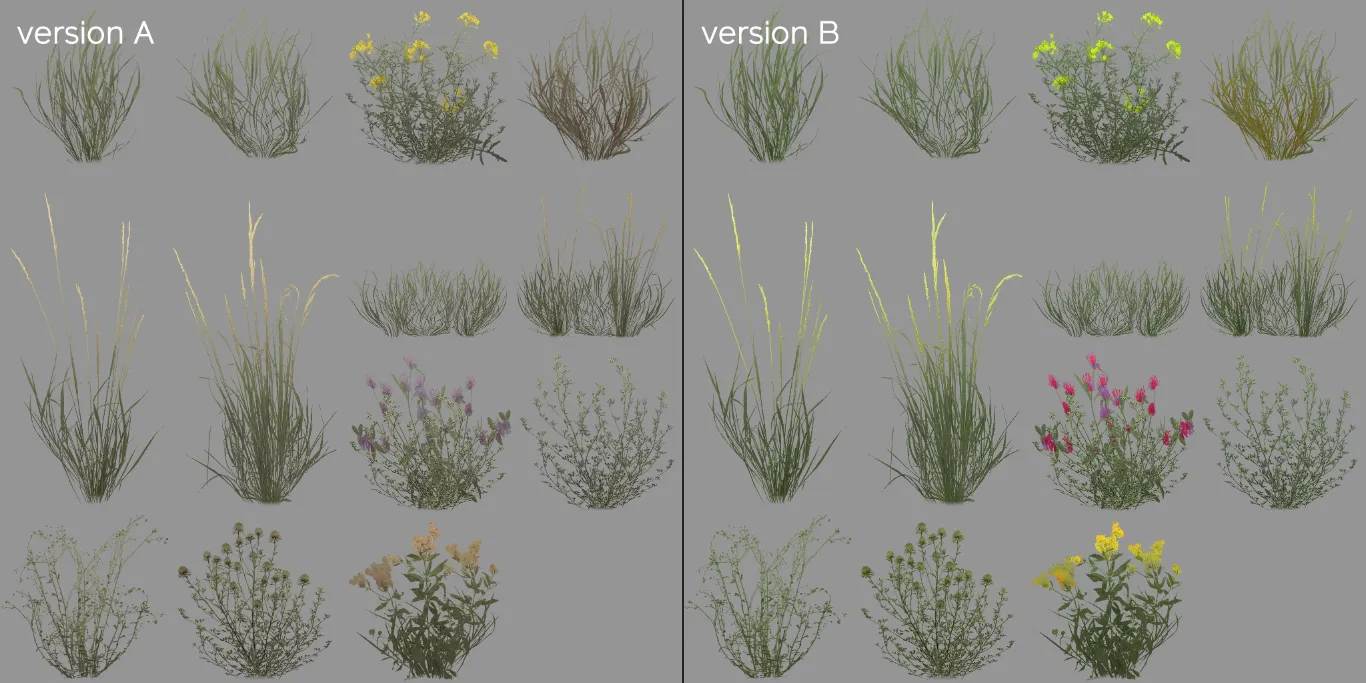
First, the detail sprites material - it's 2 detail sprite sheets side by side, so version A and version B. The different versions have to have same sprite positions and sizes. You only specify version A coordinates in the .vbsp.
Next up, the detail sprites masks. Red and blue are for wind offset -- so you can have different parts of the sprites sway in the wind differently, you can see Valve isolated some blades of grass for this effect. The green channel is a tint mask and controls how much the sprites are affected by the $worldspacetint.
That brings us to the world space textures. They seem to automatically get resized to fit the whole map area, so it you resize the map you'd have to resize the textures too.
The world space tint texture is pretty self explanatory, controls what color to tint the grass, 127 grey means no tint.
The world space masks texture uses the red channel to select which version of the sprites to use -- 0 is version A and anything more is version B.
The green channel of the texture controls the sprite size -- 127 is default, with darker making the sprites smaller and brighter making the sprites larger. The vmt command $minimumspritesize controls the cutoff point for the sprites, so the sprites smaller than the specified value don't get rendered which can act as a placement mask.
I don't know what the blue channel of this texture does, changing it had no effect on the sprites for me.
All this means sprites still get placed by vbsp on map compile, so they still use displacement alpha for the placement, but the new masks can manipulate sprites size and color after map compile.
Hello Yanzl, what is the name of version B? In the detail-folder there is only: detailsprites_survival.vtf. Or must I draw a virtual line in the middle that cuts this sheet into two? And you wrote: The world space masks texture uses the red channel to select which version of the sprites to use -- 0 is version A and anything more is version B. - do you mean with world space mask texture: test_massive9_grass_type.vtf?
And my last question: If I make a small map that is for example only 1024*1024 in hammer, what will the tint.vtf and type.vtf look like? Is the hole hammer-grid the reference and I only can paint where my playable area will be? How does the game otherwise know, how big my map is? Thanks a lot.