

1. Forums
  2. Discord
  3. About Mapcore
  4. Patreon Supporters
  • Login
  • Register
  • Search
This Thread
  • Everywhere
  • This Thread
  • This Forum
  • Articles
  • Pages
  • Forum
  • More Options
  1. Mapcore
  2. Discussions
  3. Level Design

[decompiled] dz_blacksite | dz_sirocco

  • T-Rexer
  • December 6, 2018 at 11:32 PM
  • Vanx
    • May 30, 2019 at 8:36 PM
    • #21
    Quote from Yanzl

    On 12/12/2018 at 8:33 PM, Yanzl said: Alright, I did some testing with the new detail sprites and found out how more specifically how they work. @Mamorex was on the right track but there's a few key things you left out.

    Removing $alphatest from the material or adding $translucent

    First, the detail sprites material - it's 2 detail sprite sheets side by side, so version A and version B. The different versions have to have same sprite positions and sizes. You only specify version A coordinates in the .vbsp.
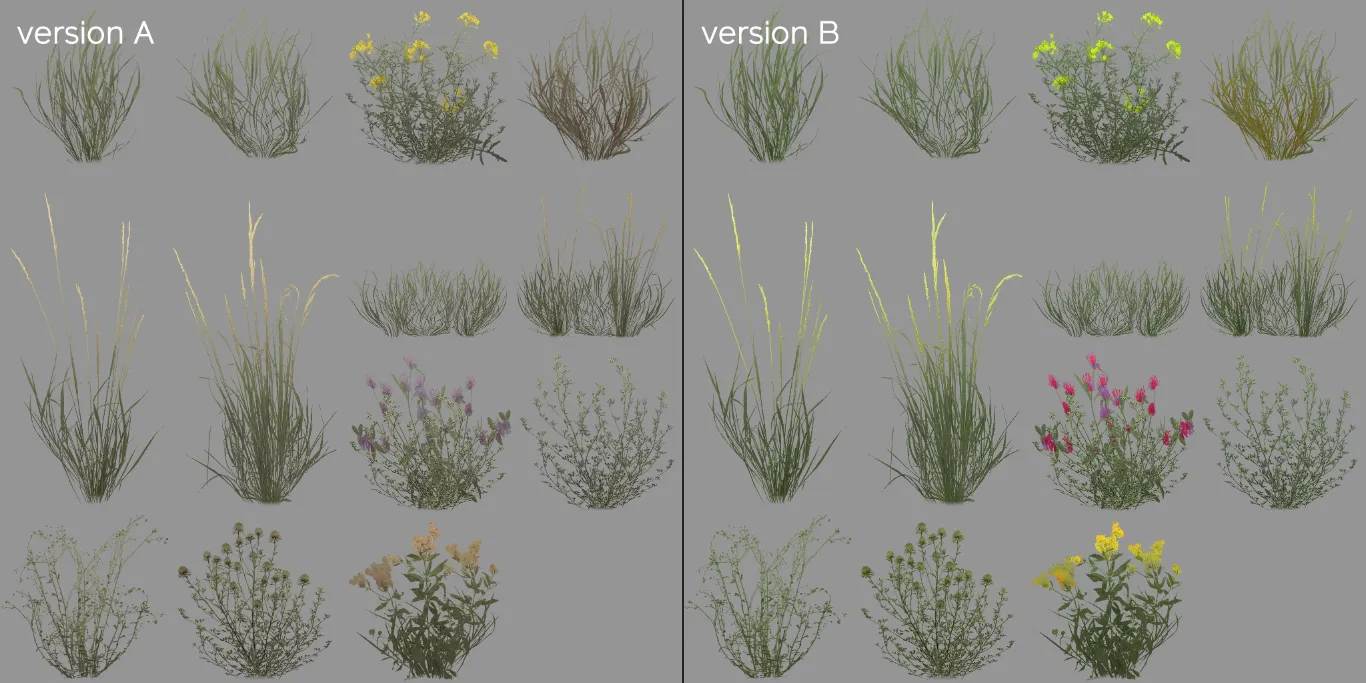
    Next up, the detail sprites masks. Red and blue are for wind offset -- so you can have different parts of the sprites sway in the wind differently, you can see Valve isolated some blades of grass for this effect. The green channel is a tint mask and controls how much the sprites are affected by the $worldspacetint.

    That brings us to the world space textures. They seem to automatically get resized to fit the whole map area, so it you resize the map you'd have to resize the textures too.

    The world space tint texture is pretty self explanatory, controls what color to tint the grass, 127 grey means no tint.

    The world space masks texture uses the red channel to select which version of the sprites to use -- 0 is version A and anything more is version B.

    The green channel of the texture controls the sprite size -- 127 is default, with darker making the sprites smaller and brighter making the sprites larger. The vmt command $minimumspritesize controls the cutoff point for the sprites, so the sprites smaller than the specified value don't get rendered which can act as a placement mask.

    I don't know what the blue channel of this texture does, changing it had no effect on the sprites for me.


    All this means sprites still get placed by vbsp on map compile, so they still use displacement alpha for the placement, but the new masks can manipulate sprites size and color after map compile.

    [Blocked Image: https://media.discordapp.net/attachments/193863930693550080/522458842559152129/unknown.png?width=1347&height=758]

    Display More

    Hello Yanzl, what is the name of version B? In the detail-folder there is only: detailsprites_survival.vtf. Or must I draw a virtual line in the middle that cuts this sheet into two? And you wrote: The world space masks texture uses the red channel to select which version of the sprites to use -- 0 is version A and anything more is version B. - do you mean with world space mask texture: test_massive9_grass_type.vtf?

    And my last question: If I make a small map that is for example only 1024*1024 in hammer, what will the tint.vtf and type.vtf look like? Is the hole hammer-grid the reference and I only can paint where my playable area will be? How does the game otherwise know, how big my map is? Thanks a lot.

  • Georgi1K
    • June 12, 2019 at 3:53 PM
    • #22

    Hi there, I wanted to edit this map so it can be used in other game modes since its all physical spawn points (CT&T) are at the same location. I edited them did all new locations for CT and T but cant seem to get it compiled. I don't know whats the problem I don't even get an error message after trying. If some of you is willing to just compile the map for me I will be verry thankful. The log changed twice since the first try here is the latest.

    log.txt

    Files

    log.txt 2.82 kB – 111 Downloads
  • Vaya
    • June 13, 2019 at 12:28 PM
    • #23

    @Georgi1KHi dude, this thread really isn't about recompiling the map, there would be a HEFTY amount of work involved in doing so

  • JorisCeoen
    • July 8, 2020 at 4:25 PM
    • #24
    Quote from Yanzl

    On 12/12/2018 at 8:33 PM, Yanzl said: That brings us to the world space textures. They seem to automatically get resized to fit the whole map area, so it you resize the map you'd have to resize the textures too

    Yanzl, can you create those world space textures from the radar? In other words, does the radar form a 1:1 reference for the worldspace textures, or do you need to calculate the size in a different way?

  • Yanzl
    • July 9, 2020 at 6:48 PM
    • #25

    I haven't found a reliable way to make it, when I last used it I took the radar image with some high visibility markers drawn on top and scaled it in photoshop, exported and tweaked until it lined up.

    It seems that it stretches the texture across all the displacements in the map, including the 3d skybox as if it was in the main part of the map.

  • Squinky
    • March 17, 2021 at 7:52 AM
    • #26

    (sorry for necro, but me and I'm sure some other people sometimes refer back to this thread occasionally when doing detail stuff, since there's yet a page on the VDC.)

    So I've done some testing on the world space masks and how exactly they line up with your hammer grid.

    Scenario One: Square Map

    This is pretty simple. Your tint/type mask is a square texture, and Source creates a bounding box around your map. If your map is square, this works out pretty simple and your world space mask will cover the entire map. It is aligned to the bottom left of the bounding box created (when looking down from the 2d top view in Hammer).

    Scenario Two: 'L' shaped map

    This is pretty similar to the square map - Hammer creates a bounding box around your map and aligns the world space mask to the bottom left. Even if your map has the corner of the 'L' in the top right, your world space mask is still aligned to the bottom left corner of your maps bounding box.

    Scenario Three: Rectangular Map

    The world space masks are still aligned to the bottom left of your maps bounding box, however it's important to note that they do not stretch aspect ratio!

    Scenario Four: Unconnected sections

    If your map has different sections (completely separated by void/skybox), a bounding box is created over your whole map and the tint mask is still aligned to the bottom left.

    Scenario Five: Map with large amounts of 'void' at the borders.

    So I've talked a lot about the bounding box of your map, however its also important to note that this bounding box is only created from the corners of textured displacements - the void does not count! This means if your map has a box skybox from one corner of the hammer grid to the other, but only has one small displacement in the middle, the bounding box only counts for that displacement.

    Scenario Six: 3d skybox next to your main map (not above or below)

    If there is a sky_camera in part of your level, that part of the level does not count towards the bounding box created. This means you don't have to put your 3d skybox under or below your level and it's perfectly fine being next to it. It's also important to note that I'm not sure exactly how the world space masks line up with 3d skybox, seems to be a bit different from a regular level (but who's gonna put detail sprites in the 3d sky anyway lol).

Participate now!

Don’t have an account yet? Register yourself now and be a part of our community!

Register Yourself Login
Discord

The Mapcore Discord is our lively IRC channel of the 2000s reborn. Chat about level design, gaming, and more.

Latest Posts

  1. Tangerine

    Harry Poster
    July 18, 2026 at 11:10 AM
  2. Any of the old guard still around? D:

    Warby
    July 12, 2026 at 8:23 PM
  3. About our archived forums

    Thrik
    June 30, 2026 at 2:12 PM
  4. Mapcore Discord

    mason_fan123
    June 24, 2026 at 8:52 PM
  5. [CS2] Valley

    Serialmapper
    June 22, 2026 at 11:56 AM
  6. Free Music / SFX Resource - Over 2500 Tracks

    Eric Matyas
    June 18, 2026 at 12:32 PM
  7. Pango [WIP]

    Elowen
    June 11, 2026 at 10:13 AM
  8. [CS2] Dvina

    Jeremy Rivera
    June 11, 2026 at 10:03 AM
  9. Bridges 2.0 by NEXSIDE, MAP SHOWCASE. ( Steam Workshop )

    MrTrane18
    June 1, 2026 at 7:46 PM
  10. Classic Maps Reborn For CS2

    SillySpaceCat
    May 31, 2026 at 10:33 PM
  1. Privacy Policy
  2. Contact
Powered by WoltLab Suite™