1. Forums
  2. Discord
  3. About Mapcore
  4. Patreon Supporters
  • Login
  • Register
  • Search
This Thread
  • Everywhere
  • This Thread
  • This Forum
  • Articles
  • Pages
  • Forum
  • More Options
  1. Mapcore
  2. Discussions
  3. Level Design

Question: How to correctly import rigged mesh with animation in Source?

  • MikeGon
  • December 26, 2017 at 9:07 PM
  • MikeGon
    • December 26, 2017 at 9:07 PM
    • #1

    So I've been trying to correctly import a custom animated mesh into source, in and out for a few weeks now...

    I've looked through countless guides, wiki pages, tutorials etc. and I could not get the animation to look correct in Source :(. I hope some of you wizards can help me out here!


    Let me illustrate what's going on. I made this rigged animation in 3ds max:
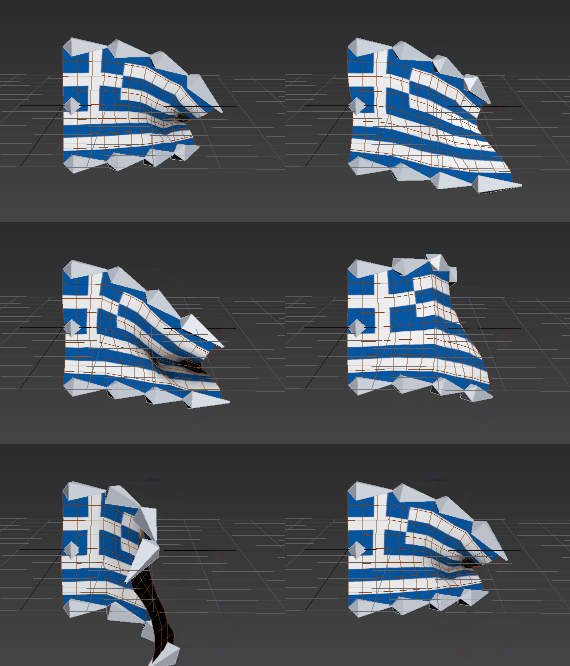
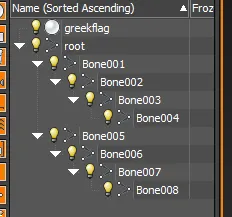
    the scene setup looks like this:
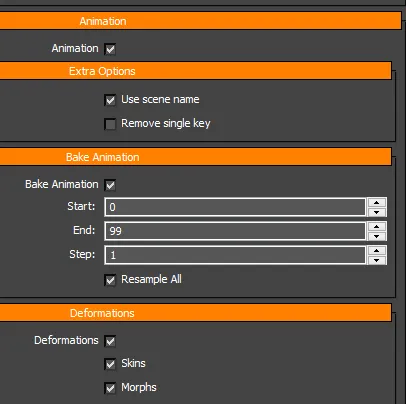
    When I export it to fbx, I have these flags checked:
    Here's what the animation looks like in Blender:
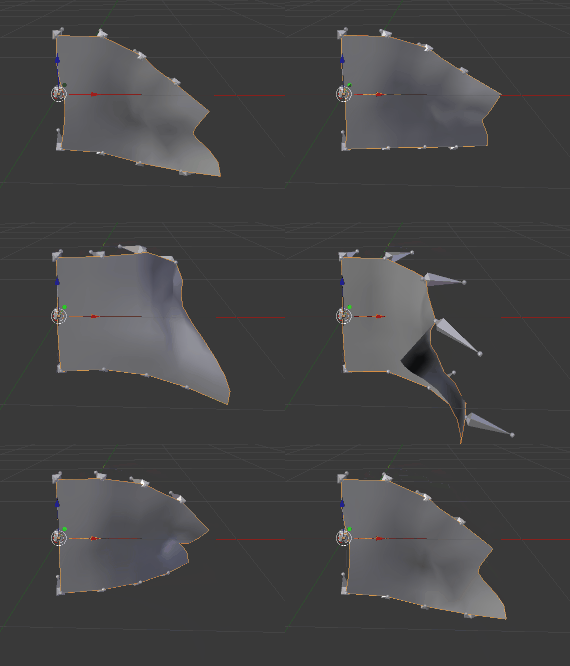
    Still good! Now here's my setup for the Source Engine Export plugin:
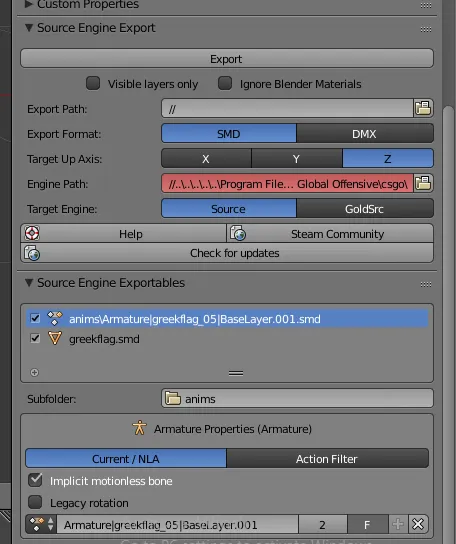
    I scale the flag to a specific size before exporting, because I need 2 versions of the flag in my map - a small and a large one. Then I hit "Export".

    Here's what my .QC file looks like:

    $modelname "de_opal/greekflag.mdl" $model "body" "greekflag.smd" //$root "root"

    $cdmaterials "models/de_opal/" $surfaceprop "greekflag"

    $sequence "greekflag_05" "anims/Armature_greekflag_05_BaseLayer.smd"


    I then drag the .qc file over studiomdl.bat, and open Hammer to see what it looks like:
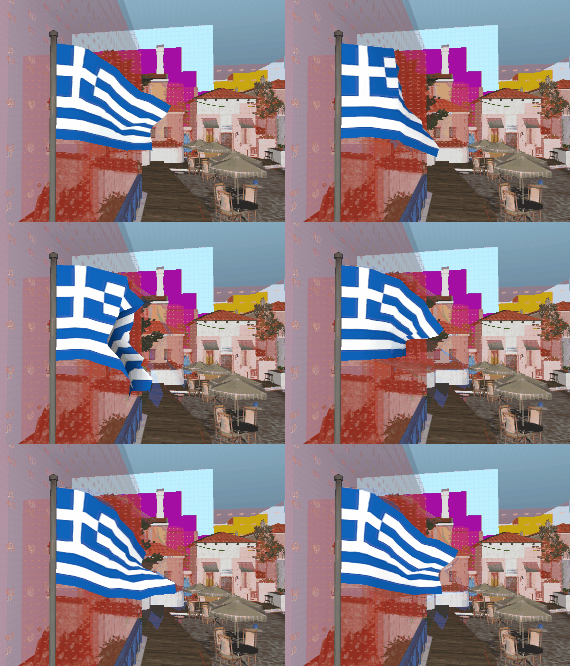
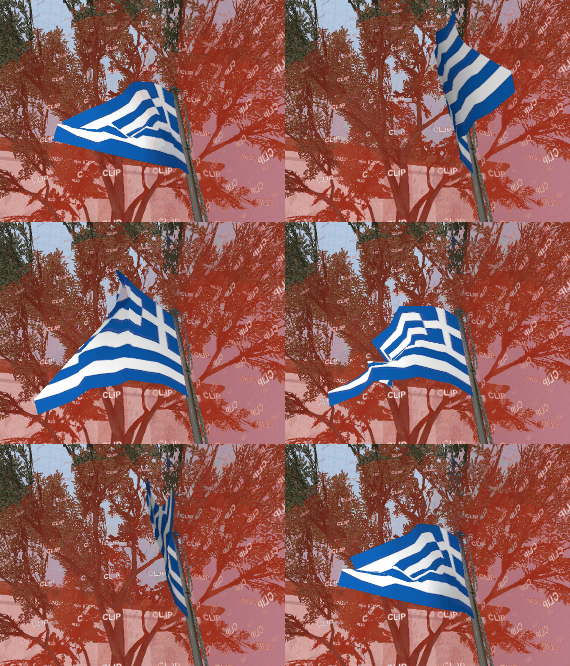
    Notice how rough the movement is, and how "jagged" the vertices are. It looks horrible!

    (and it looks just as bad in H-L Model Viewer)


    Here's a few thing I tried so far, off the top of my head:

    • In Blender, set "Legacy Rotation" in Source Engine Export plugin to true
    • In Blender, set "Implicit motion less bone" in Source Engine Export plugin to false
    • Scale it up in 3ds max before exporting to Blender
    • Exporting the SMD with a scale of 1.0, and scaling it using the $scale command in the .qc instead
    • In 3ds max, attach the mesh to the root bone, and make it part of the hierarchy

    ...and none of that worked! The model would either act the same, or not be visible at all!


    I really need some help figuring that out - Have you guys seen this issue before?


    Cheers!

    -Mike

  • Pampers
    • December 30, 2017 at 1:45 PM
    • #2

    looks like your bones get wrong rotation after importing to blender

  • MikeGon
    • August 7, 2018 at 7:29 PM
    • #3
    Quote from Pampers

    On 12/30/2017 at 8:45 AM, Pampers said: looks like your bones get wrong rotation after importing to blender

    hmm well the animation looks correct in Blender though... it's really just broken after its imported in Hammer...

    The pipeline I'm using is tedious, surely there's a simpler way to do that, right?

    Can someone show me step by step how they correctly import an animated mesh in Hammer? ?

Participate now!

Don’t have an account yet? Register yourself now and be a part of our community!

Register Yourself Login
Discord

The Mapcore Discord is our lively IRC channel of the 2000s reborn. Chat about level design, gaming, and more.

Latest Posts

  1. Tangerine

    Harry Poster
    July 18, 2026 at 11:10 AM
  2. Any of the old guard still around? D:

    Warby
    July 12, 2026 at 8:23 PM
  3. About our archived forums

    Thrik
    June 30, 2026 at 2:12 PM
  4. Mapcore Discord

    mason_fan123
    June 24, 2026 at 8:52 PM
  5. [CS2] Valley

    Serialmapper
    June 22, 2026 at 11:56 AM
  6. Free Music / SFX Resource - Over 2500 Tracks

    Eric Matyas
    June 18, 2026 at 12:32 PM
  7. Pango [WIP]

    Elowen
    June 11, 2026 at 10:13 AM
  8. [CS2] Dvina

    Jeremy Rivera
    June 11, 2026 at 10:03 AM
  9. Bridges 2.0 by NEXSIDE, MAP SHOWCASE. ( Steam Workshop )

    MrTrane18
    June 1, 2026 at 7:46 PM
  10. Classic Maps Reborn For CS2

    SillySpaceCat
    May 31, 2026 at 10:33 PM
  1. Privacy Policy
  2. Contact
Powered by WoltLab Suite™