

1. Forums
  2. Discord
  3. About Mapcore
  4. Patreon Supporters
  • Login
  • Register
  • Search
This Thread
  • Everywhere
  • This Thread
  • This Forum
  • Articles
  • Pages
  • Forum
  • More Options
  1. Mapcore
  2. Discussions
  3. Level Design

[CS:GO] Layout creator for Photoshop!

  • Roald
  • February 28, 2017 at 2:12 PM
  • Roald
    • February 28, 2017 at 2:12 PM
    • #1

    Hey Mapcore, I hope this is the right place to put this.

    I had this idea in mind to make it more easy to create layouts for CS:GO maps. I have no idea how this will work out so for those who are going to try it out, please leave some feedback.

    Some of you may know I love creating layouts myself for CS:GO and I thought by myself, there should be a way to make things easier.

    Normally I was drawing a basic layout on paper and once in hammer it become completely different and not as I wanted it to be.

    So I thought of making a standard photoshop format to use.

    How does it work? 1.Open the Paths.psd file/format in photoshop. 2.Open a new file in photoshop, any size you wish. 3.Grab and drag the paths you want from the Paths.psd to the new file (you can remove the background for a better visibillity).

    You can drag the paths in the new file and rotate them the way you want with the hotkey control+T
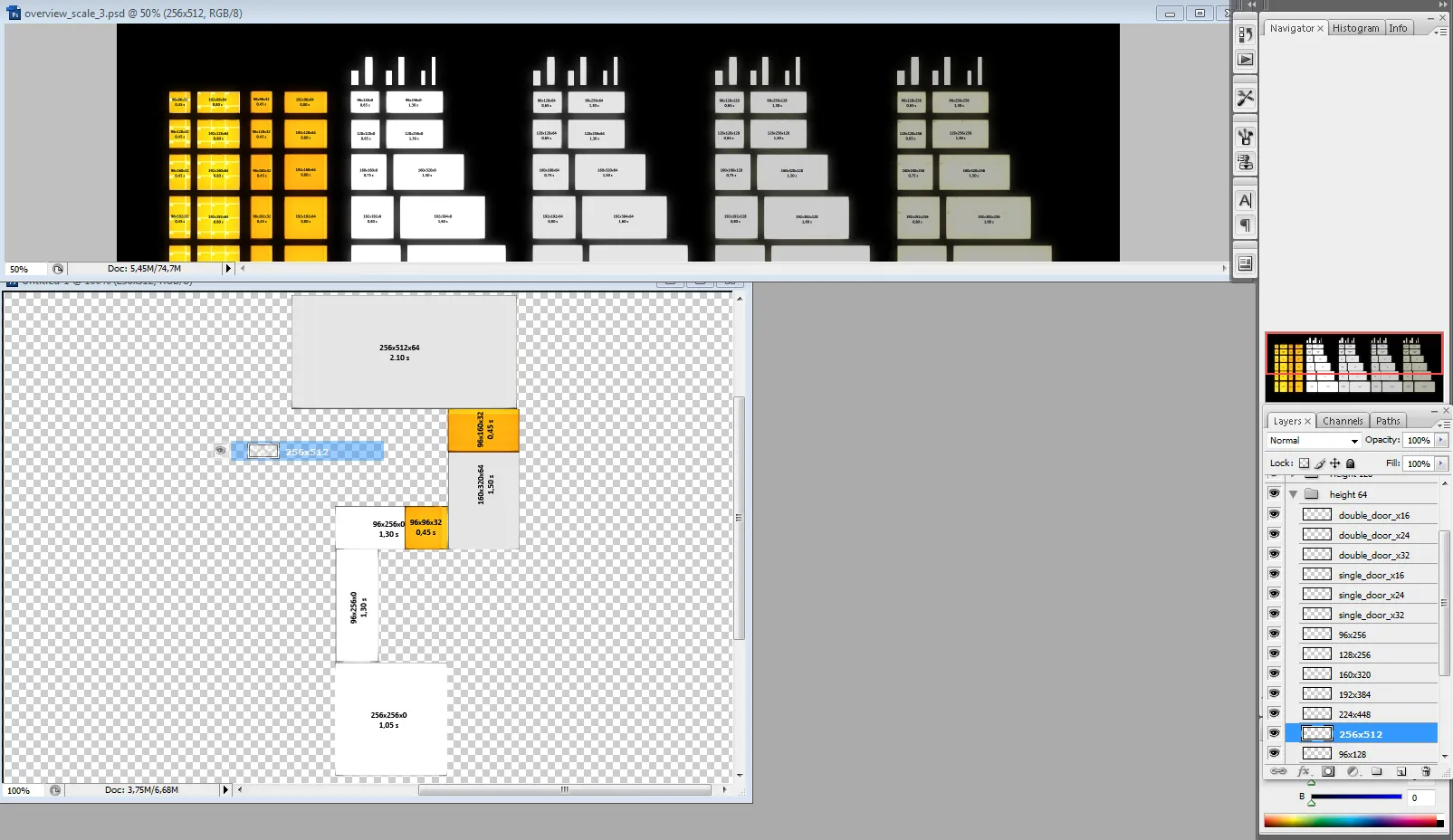
    Text on the paths Length (horizontal) x Width (vertical) x Height (color shade) and Seconds (s) All sizes are calculated in units as there are on hammer. The timing of the paths are NOT precisely calculated! But it will give a good indication of the length of the paths. I hope this can help you on the timings while building your first version layout.

    Download link: http://www.filedropper.com/layoutcreatorbyroald_1 (Including all JPEG's of the paths, photoshop file and a vmf)

  • tomm
    • February 28, 2017 at 2:25 PM
    • #2

    interesting idea, but it's probably faster to just grab a pen and scribble the layout on a piece of paper.

  • poLemin
    • February 28, 2017 at 2:26 PM
    • #3

    As much as I appreciate the share of resources, I think this system very restricting to the creative process of designing a level. At least for me. This is actually something you can work out pretty easily within Hammer itself, if you use the top view exclusively. The rough timings for certain distances might be very helpful for beginners tho! No question about that.

    In my opinion it is important for the process to have things changed up from paper to editor. That is totally natural and can/should not be avoided completely in order to achieve the best design possible.

  • esspho
    • February 28, 2017 at 6:42 PM
    • #4

    I tryed this myself once and can tell you that it's just hindering your creativity. Not recommended.

  • Roald
    • February 28, 2017 at 6:49 PM
    • #5

    Well it was a impulse to make work of the idea I had haha

    I have been trying to use it but It takes some time. Also to organise the layers in folders and stuff to make it all work.

    It's hard to make a layout out of nothing, because u need to get used to working with this, so it's recommented to draw ur idea first. Because then u can directly draw what's in your head. That´s way easier.

    So no, not recommented to advanced mappers, it´s easier to draw and make it work in hammer directly. For beginners it can be usefull because of the sizes of the paths and stuff, but not ideal either I guess.It takes alot of time, it´s not really easy and pretty much static.

    What good use has it? Mmm not sure haha. It could have been usefull when something would have been programmed for it to make a 2D overview or maybe even in 3D. But then in a smaller scale, so u get a better overview of the map then u have in hammer. That was kinda the point for me. So there are like standard paths with scuares, traingles, curves and etc in the most used sizes with maybe 2D props you can place and something that can automaticly count the timings of the paths you created, but yeahh it will always stay static while using tools I guess

  • MikeGon
    • February 28, 2017 at 9:47 PM
    • #6

    I think this could be a great time-saving tool for starting off a map, but as long as you can still edit everything afterwards...

  • poLemin
    • February 28, 2017 at 11:34 PM
    • #7
    Quote from Roald

    4 hours ago, Roald said: Well it was a impulse to make work of the idea I had haha

    I have been trying to use it but It takes some time. Also to organise the layers in folders and stuff to make it all work.

    It's hard to make a layout out of nothing, because u need to get used to working with this, so it's recommented to draw ur idea first. Because then u can directly draw what's in your head. That´s way easier.

    So no, not recommented to advanced mappers, it´s easier to draw and make it work in hammer directly. For beginners it can be usefull because of the sizes of the paths and stuff, but not ideal either I guess.It takes alot of time, it´s not really easy and pretty much static.

    What good use has it? Mmm not sure haha. It could have been usefull when something would have been programmed for it to make a 2D overview or maybe even in 3D. But then in a smaller scale, so u get a better overview of the map then u have in hammer. That was kinda the point for me. So there are like standard paths with scuares, traingles, curves and etc in the most used sizes with maybe 2D props you can place and something that can automaticly count the timings of the paths you created, but yeahh it will always stay static while using tools I guess

    There is nothing wrong about trying out ideas and sharing it with others to get some feedback. As said before, I appreciate the effort done. The thing is, it restricts mappers to stay on a 90° grid. If you'd advance a little further maybe 45°. To make the pipeline a little more valid to usual processes: scan a hand-drawn layout, put it into Photoshop and try to fit the displayed structures/shapes into the drawn layout. I imagine this might be very useful for some people!

  • Roald
    • March 1, 2017 at 8:16 AM
    • #8

    Yea u can simply edit stuff. Especially while working with folders. You can just drag whole pieces of the map and such or replace one path with another

    Mmm maybe Polemin. You can use control+T and hold shift for a nice 45 degrees. If there is interrest I could expand the paths with also 15, 30 and 45 degrees paths and maybe some more but it is alot of extra work so yeah..

    The current problem for me is that u cant just click and drag the paths like in a map editor. A simple program where u can do this would be great. Where paths automaticly line up. Something like the trackmania map editor but then in 2d and more simple. With functions like:

    - So you can select a size 'map' and insert a background image if you like and/or change the color (maybe the drawing). With a minimum 16 grid on top of it

    - You can choose from different objects that are devined in categories (straight paths, rotated paths, curves, traingles, ramps, stairs, props and etc).

    - You just click the object and they will appear with 50% opacity and you can place them anywhere on grid into the map. A calculation will tell you if you can place it there or not. So u can't place a ground floor on another one, but you can place a 128 unit higher floor on a ground floor for an example. Or you can't place (or better get a error) a 32 height stair/ramp against a 64 height path.

    - Then you can select the object in the map to change the size/height, rotate, drag, copy or delete them.

    - You can swipe a line trough the map on the path that calculated the timing of a player running with his knife.

    - You can place CT and T players with seightlines and maybe cover spots and or path corners (which u may have to add as 'walls' that block their seight to implent tactics already into your map. And able to place smoke illustrations troughout the map to see what size path you like to use on a particulair part.

    This is kinda the idea I had, but I can't make it, so I made on a way I could ;)

Participate now!

Don’t have an account yet? Register yourself now and be a part of our community!

Register Yourself Login
Discord

The Mapcore Discord is our lively IRC channel of the 2000s reborn. Chat about level design, gaming, and more.

Latest Posts

  1. Tangerine

    Harry Poster
    July 18, 2026 at 11:10 AM
  2. Any of the old guard still around? D:

    Warby
    July 12, 2026 at 8:23 PM
  3. About our archived forums

    Thrik
    June 30, 2026 at 2:12 PM
  4. Mapcore Discord

    mason_fan123
    June 24, 2026 at 8:52 PM
  5. [CS2] Valley

    Serialmapper
    June 22, 2026 at 11:56 AM
  6. Free Music / SFX Resource - Over 2500 Tracks

    Eric Matyas
    June 18, 2026 at 12:32 PM
  7. Pango [WIP]

    Elowen
    June 11, 2026 at 10:13 AM
  8. [CS2] Dvina

    Jeremy Rivera
    June 11, 2026 at 10:03 AM
  9. Bridges 2.0 by NEXSIDE, MAP SHOWCASE. ( Steam Workshop )

    MrTrane18
    June 1, 2026 at 7:46 PM
  10. Classic Maps Reborn For CS2

    SillySpaceCat
    May 31, 2026 at 10:33 PM
  1. Privacy Policy
  2. Contact
Powered by WoltLab Suite™