

1. Forums
  2. Discord
  3. About Mapcore
  4. Patreon Supporters
  • Login
  • Register
  • Search
This Thread
  • Everywhere
  • This Thread
  • This Forum
  • Articles
  • Pages
  • Forum
  • More Options
  1. Mapcore
  2. Discussions
  3. Creative Chat

How to properly apply Phong to my textures? (Source Engine)

  • Edude
  • February 13, 2017 at 11:53 PM
  • Edude
    • February 13, 2017 at 11:53 PM
    • #1

    Hello everybody!

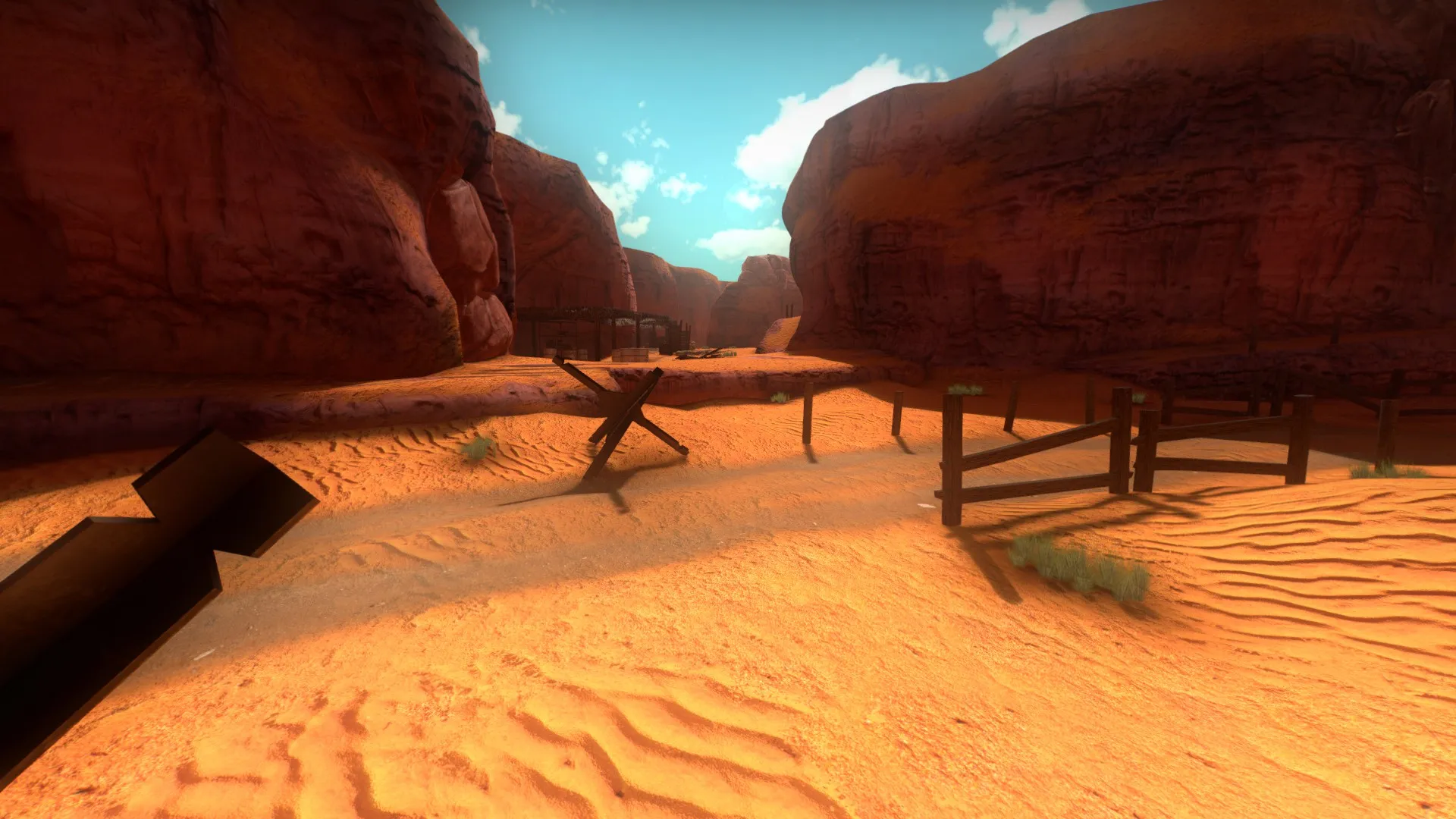
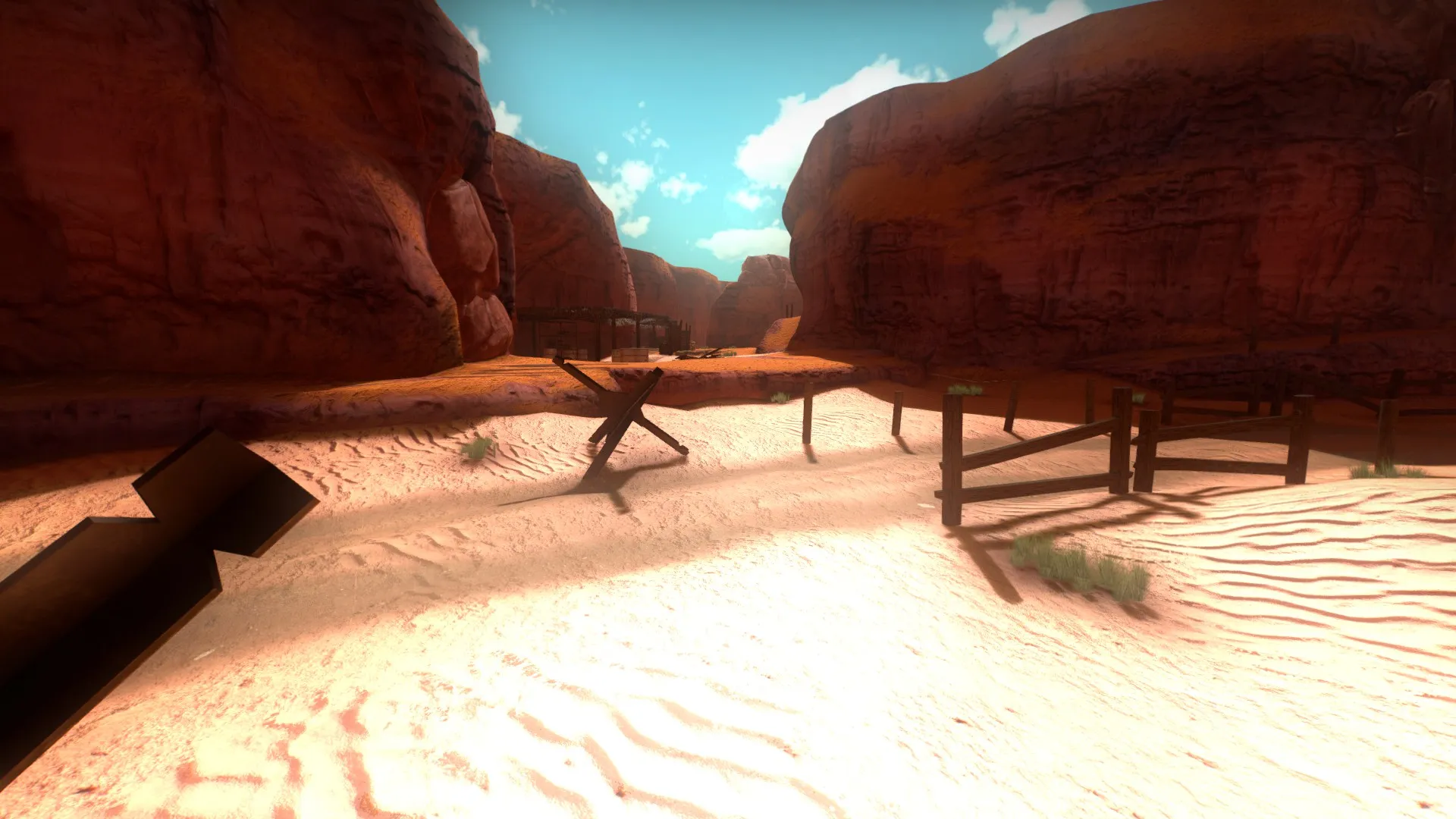
    Lately I've been making a desert map; to fulfill my idea I did some sand and canyon textures. To increase their realism and detail I tried to adding phong to simulate those glowing grains present in the sands. So I made a specular map for the grains and put in the alpha channel of my Bumpmap and added the Phong parameters to the VMT file. But whenever I try the whole texture gets shiny:


    Without Phong

    With Phong

    Specular Map


    As you can see, the whole texture is affected by phong and not just grains. How can I fix this? I believe that I confused myself in the VMT parameters but I'm not sure:

    "WorldVertexTransition" { "$baseTexture" "tunisia/tun_sand_01" "$bumpmap" "tunisia/tun_sand_01_normal" "$surfaceprop" "sand" "$baseTexture2" "tunisia/tun_sand_02" "$bumpmap2" "tunisia/tun_sand_02_normal" "$surfaceprop2" "sand" "$blendmodulatetexture" "nature/blend_texture_01" "$blendmasktransform" "center .5 .5 scale 1 1 rotate 0 translate 0 0"

    "$normalalphaenvmask" "1" "$envmap" "env_cubemap" "$phong" "1" "$phongExponentTexture" "252" }


    Thank you in advice!

  • tomm
    • February 14, 2017 at 4:01 AM
    • #2

    try to put your alpha in your base texture and add this parameter in your vmt

    Quote

    Quote $BasemapAlphaPhongMask 1

    hope this helps

  • Edude
    • February 14, 2017 at 8:22 PM
    • #3

    I'm going to test this right now. Thank you for your reply. I also would like to ask, is there any quality loss when converting TGA images to VTF and vice versa?

  • grapen
    • February 14, 2017 at 8:28 PM
    • #4
    Quote from Edude

    1 minute ago, Edude said: I'm going to test this right now. Thank you for your reply. I also would like to ask, is there any quality loss when converting TGA images to VTF and vice versa?

    DXT formats are lossy, yes. The reduced file size is definitely worth it though. A lossy compression can't be uncompressed to its former state.

  • Edude
    • February 14, 2017 at 10:12 PM
    • #5

    Hum I got it. I check here and my bumpmaps were in DXT. Now that I put them on BGR888 they have improved a lot. Thanks!

  • Edude
    • February 14, 2017 at 10:32 PM
    • #6
    Quote from tomm

    18 hours ago, tomm said: try to put your alpha in your base texture and add this parameter in your vmt

    hope this helps

    I did some more testing following your instructions but nothing has changed. The textures remain entirely bright, ignoring the specular map.


    Here's the VMT

    Quote

    Quote "WorldVertexTransition" { "$baseTexture" "tunisia/tun_sand_01" "$bumpmap" "tunisia/tun_sand_01_normal" "$surfaceprop" "sand" "$baseTexture2" "tunisia/tun_sand_02" "$bumpmap2" "tunisia/tun_sand_02_normal" "$surfaceprop2" "sand" "$blendmodulatetexture" "nature/blend_texture_01" "$blendmasktransform" "center .5 .5 scale 1 1 rotate 0 translate 0 0"

    "$envmap" "env_cubemap" "$phong" "1" "$BasemapAlphaPhongMask" "1" "$phongExponentTexture" "1" }

  • tomm
    • February 15, 2017 at 7:17 AM
    • #7
    Quote from Edude

    8 hours ago, Edude said: I did some more testing following your instructions but nothing has changed. The textures remain entirely bright, ignoring the specular map.

    That's strange, maybe it doesn't work with blend materials even though it should. I've only tried this on a regular VertexLitGeneric.

  • spa
    • February 15, 2017 at 9:30 AM
    • #8

    Are you sure that the alpha is working correctly in the base textures ? It needs to be dxt5 or BGRA8888 (BGR888 doesn't have alpha)

    You can view the channels in vtf edit.

  • WD
    • February 15, 2017 at 9:56 AM
    • #9

    I think $phong is only supported on VertexLitGeneric shader with HL2 ep2 engine.

    https://developer.valvesoftware.com/wiki/$phong

    You're currently trying to apply $phong to a WorldVertexTransition shader so that's why there's errors. Wiki says $phong would work for WorldVertexTransition on the CS:GO engine though.

    You could replace the ground with a model and it would shade correctly then.

  • Edude
    • March 7, 2017 at 12:17 AM
    • #10
    Quote from tomm

    On 15/02/2017 at 5:17 AM, tomm said: That's strange, maybe it doesn't work with blend materials even though it should. I've only tried this on a regular VertexLitGeneric.

    I thought the same thing, but I tested it as lightmapped generic and did not get good result. Sorry for the late reply

    Quote from spa

    On 15/02/2017 at 7:30 AM, spa said: Are you sure that the alpha is working correctly in the base textures ? It needs to be dxt5 or BGRA8888 (BGR888 doesn't have alpha)

    You can view the channels in vtf edit.

    It's very strange because I tried both alpha in the base texture and alpha in the bumpmap. I also tried both formats DXT5 for the base texture and BRGA8888 for bump. Probably Day of Infamy (game I'm mapping) do not support $phong.

    Quote from WD

    On 15/02/2017 at 7:56 AM, WD said: I think $phong is only supported on VertexLitGeneric shader with HL2 ep2 engine.

    https://developer.valvesoftware.com/wiki/$phong

    You're currently trying to apply $phong to a WorldVertexTransition shader so that's why there's errors. Wiki says $phong would work for WorldVertexTransition on the CS:GO engine though.

    You could replace the ground with a model and it would shade correctly then.

    Maybe I was mistaken a bit, I thought that Insurgency and Day of Infamy would be using the CSGO version of the source engine and with that $phong would works normally.

  • Vaya
    • March 12, 2017 at 11:24 PM
    • #11

    phong isn't supported in doi.

Participate now!

Don’t have an account yet? Register yourself now and be a part of our community!

Register Yourself Login
Discord

The Mapcore Discord is our lively IRC channel of the 2000s reborn. Chat about level design, gaming, and more.

Latest Posts

  1. Tangerine

    Harry Poster
    July 18, 2026 at 11:10 AM
  2. Any of the old guard still around? D:

    Warby
    July 12, 2026 at 8:23 PM
  3. About our archived forums

    Thrik
    June 30, 2026 at 2:12 PM
  4. Mapcore Discord

    mason_fan123
    June 24, 2026 at 8:52 PM
  5. [CS2] Valley

    Serialmapper
    June 22, 2026 at 11:56 AM
  6. Free Music / SFX Resource - Over 2500 Tracks

    Eric Matyas
    June 18, 2026 at 12:32 PM
  7. Pango [WIP]

    Elowen
    June 11, 2026 at 10:13 AM
  8. [CS2] Dvina

    Jeremy Rivera
    June 11, 2026 at 10:03 AM
  9. Bridges 2.0 by NEXSIDE, MAP SHOWCASE. ( Steam Workshop )

    MrTrane18
    June 1, 2026 at 7:46 PM
  10. Classic Maps Reborn For CS2

    SillySpaceCat
    May 31, 2026 at 10:33 PM
  1. Privacy Policy
  2. Contact
Powered by WoltLab Suite™