We've made it easier than ever to access the development tools for Unreal Tournament, in this guide I will share instructions, and some handy links for anyone who would like to build a level for the contest.
Downloading the game and editor
- Follow THIS link and click "Download UT for Free" (yes, it's free!)
- Sign in with your account or make one
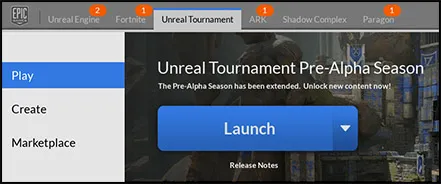
- With the launcher open, you should see Unreal Tournament up the top, click on this
- Download the game (play) and editor (create)
[Blocked Image: http://i63.tinypic.com/2dgrnu8.jpg]
Epic Games Launcher
The next step - Getting to know the game
Even if you are a Unreal veteran, before starting a level, it's wise to play the game for a bit to get a feel for it. Every Unreal Tournament game has it's unique feel, scale and pacing, and UT4 is no different. It is also a good idea to take a close look at the official levels, some have been finished, some are what we call "Shells", these are a great example of proving out a levels gameplay before investing time and effort with art,
Zaccabus has put together some wonderful guides, everything from basic movement to advanced weapon tips, this will be extremely useful for getting up to speed on what UT4 is all about. Click THIS to go to his YouTube channel.
Basics of the Editor
Unreal Editor has been widely documented, this should make it quite easy to find specific information you require, but I will provide some handy links for getting up to speed.
Epic's Map Making Tutorial - Good place to start.
Sid (Veteran UT level designer) demonstrating the editor - Tips from a pro.
Unreal Engine Tutorial Playlist - Everything but the kitchen sink (most of this is valid to some degree for UT4).
Jim Brown (Senior Designer) demonstrates the editor - Good summery of the editors core functionality.
What is Team Showdown Mode?
Epic was kind enough to provide us with a detailed guide on everything related to mapping for the Team Showdown mode. You can download the PDF version or the Word version.
Additionally, Nato just posted a guide and discussion over at the official forums, check it out HERE
We've made it easy to test and share your maps in the actual game, although you can play in the editor, it's always advisable to play it in the real game, we support BOT play which is incredibly useful in the early days of developing a level. Sharing a level will package all custom assets into a single file, making it easy to share with others.
- To add bot support for your level, simply add a "NavMeshBoundsVolume" around your entire level, when you hit build it will make the paths for you
- Once your level has been Built, you need to do the following to play in the game
- Click "Share", then "Share this level", in the bottom right of your editor you should see a message telling you the script is running, this can take anywhere from 30 seconds to 10 minuets depending on the complexity of your level.
- Once packaged, a prompt will appear asking if you would like to share, before doing this make a note of where the file is being saved, click "Open window to packaged Content Directory, then click no
- From the Epic Games Launcher, play the game, your map should show up in the list if you make Custom game. If it doesn't show up, you might need to revisit the "world settings" and make sure the game mode is set-up correctly.
[Blocked Image: http://i67.tinypic.com/ezhevt.jpg]
Share button location