1. Forums
  2. Discord
  3. About Mapcore
  4. Patreon Supporters
  • Login
  • Register
  • Search
This Thread
  • Everywhere
  • This Thread
  • This Forum
  • Articles
  • Pages
  • Forum
  • More Options
  1. Mapcore
  2. Discussions
  3. Level Design

[csgo] Lighting on props broken since Wildfire Update? (+ Possible fix)

  • February 18, 2016 at 4:02 PM
  • Deathy
    • February 25, 2016 at 7:04 AM
    • #41

    I don't even have a light_directional, only have light_environment, sunlight_shadow_control and shadow_control and have the same problem as MaanMan (blue tinted dynamic shadows with fade to black borders).

    Edit: I tried RZL's suggestion, light_env replacement didn't work. Compiling LDR/HDR seperately showed, that it's definitely on the HDR part. I tried to find out whether it might be affected by the shadow color specified in the shadow_control entity but it produces the same results.

  • leplubodeslapin
    • February 25, 2016 at 9:16 AM
    • #42
    Quote from Deathy

    I don't even have a light_directional, only have light_environment, sunlight_shadow_control and shadow_control and have the same problem as MaanMan (blue tinted dynamic shadows with fade to black borders).

    Edit: I tried RZL's suggestion, light_env replacement didn't work. Compiling LDR/HDR seperately showed, that it's definitely on the HDR part. I tried to find out whether it might be affected by the shadow color specified in the shadow_control entity but it produces the same results.

    What is your ambiant value ?

    Cascaded shadows used to be only grey, it was impossible to color them. Shadows were only colored in their static areas (in the lightmaps), that's why we had this weird blending between static and dynamic shadows before.

    Now, they should be the same, so maybe your ambiant is just too colorful/surrealist ?

    Check this out : http://blog.counter-strike.net/workshop/maps.php#cascade_shadow (it's all new ! <3)


    EDIT : Or maybe the other entities (sunligh_shadow_control and shadow_control) override the light_env ambiant value, but just for static shadows. Try to delete them maybe

  • Vaya
    • February 25, 2016 at 9:23 AM
    • #43

    @leplubodeslapin are you going to have time to review the new lighting? would be interesting/great getting an article about it... :)

  • leplubodeslapin
    • February 25, 2016 at 9:28 AM
    • #44

    @Vaya The article on the csgo blog seems clear already, no ?

    Maybe i should update the article instead, since some infos aren't up to date anymore

  • Deathy
    • February 25, 2016 at 11:29 AM
    • #45

    As I've stated in the Edit, I tried to change the color, but it doesn't affect it at all.

    Ambient is a purple-gray (196 185 208 200 [Blocked Image: http://abload.de/img/purple0osx6.jpg], very slightly), nothing extreme blueish. I removed all entities but the shadow_control, light_env and it still happens. I changed the shadow color for the shadow_control to 196 196 196 (grey, duh!) and still no change. This screenshot is compiled with HDR only but shows the effect pretty well. And yes, I compile with -StaticPropLighting

    Quote

    [Blocked Image: http://abload.de/img/2016-02-25_00001gesfx.jpg]

  • leplubodeslapin
    • February 25, 2016 at 12:37 PM
    • #46

    Why do you need a shadow_control entity ?
    It was used in Half-Life 2 and other games, when the dynamic shadows were only possible with dynamic/physics objects (they were very simple projections, not real projected shadows). But on CSGO, since the only dynamic shadows you can have are due to the cascaded shadows (for outside areas), it became useless. (i think)

  • 'RZL
    • February 25, 2016 at 1:57 PM
    • #47
    Quote from Deathy

    As I've stated in the Edit, I tried to change the color, but it doesn't affect it at all.

    Ambient is a purple-gray (196 185 208 200 [Blocked Image: http://abload.de/img/purple0osx6.jpg], very slightly), nothing extreme blueish. I removed all entities but the shadow_control, light_env and it still happens. I changed the shadow color for the shadow_control to 196 196 196 (grey, duh!) and still no change. This screenshot is compiled with HDR only but shows the effect pretty well. And yes, I compile with -StaticPropLighting

    Hidden Content

    Try to delete your light_env and add a new one with the same settings. That might solve your problem.

  • Deathy
    • February 25, 2016 at 5:02 PM
    • #48

    I already stated in my post before, that it didn't solve the problem. Anyways, I guess I'll fiddle this around with patience. ^^


    Okay, I've determined the cause of the problem. BrightnessScaleHDR and AmbientScaleHDR both had a value of 0.5. After setting both back to 1, the problem's gone. To be more precise: BrightnessScaleHDR cannot be lower than 1.

    Kinda suspected it.

  • leplubodeslapin
    • February 25, 2016 at 11:26 PM
    • #49

    both shadow_control and HDR brightness and ambiant values on any light entity are completely useless on CSGO anyway ...

  • w0llmart
    • February 26, 2016 at 3:10 PM
    • #50
    Quote from leplubodeslapin

    both shadow_control and HDR brightness and ambiant values on any light entity are completely useless on CSGO anyway ...

    i've noticed that reducing the ambient has an effect on the shadows

    brightness is negligible though...

  • Onur Kardelen
    • February 26, 2016 at 3:17 PM
    • #51
    Quote

    [Blocked Image: http://i.hizliresim.com/A7ALmX.jpg]

    It did after update. How can I solve this? Thanks.

  • Vaya
    • February 26, 2016 at 3:23 PM
    • #52

    Have you tried every fix mentioned above or did you skip to the end?... :)

  • leplubodeslapin
    • February 26, 2016 at 4:53 PM
    • #53
    Quote from jebus_c

    i've noticed that reducing the ambient has an effect on the shadows
    brightness is negligible though...

    Yes of course it will change but it doesn't mean it's useful !
    HDR Brightness and HDR Ambient were parameters used when the players had a choice of enabling HDR or not in the video options (on games such as Half-life 2, CSS, DOD:S, TF2 ... most of the Source games). Because then, the lighting of the whole map was compiled twice : once without HDR (↔ "LDR") and once with HDR. The compilation times were doubled, the file sizes of maps were a lot bigger ...

    They decided on CSGO to force every user to have the HDR enabled, you can not disable it in video options. Therefore, it's useless to compile your map in LDR (↔ non-HDR), because the players won't be able to see the map this way.


    HDR brightness and HDR ambiant parameters were used in case you have a light, that was looking good in LDR but too bright (for example) in HDR. It gave you the possibility to adjust the lighting on each version of the map. But if you don't configure the HDR values, it will use the default ones for both lighting compilations.

    So yes, if you change the HDR brightness and HDR Ambient values, it will change the lighting on your map but you could also have changed the default brightness and ambiant values, it would also have changed the lighting in the same way.


    Quote from Onur Kardelen

    Hidden Content

    It did after update. How can I solve this? Thanks.

    It's just a leak or something like that, no lighting is compiled here (it's in fullbright).

  • Onur Kardelen
    • February 26, 2016 at 5:21 PM
    • #54
    Quote from leplubodeslapin

    It's just a leak or something like that, no lighting is compiled here (it's in fullbright).

    I put standard lights and light_environment. And I didn't see *.lin (leak) file in my map folder.

    My expert parameters:

    -staticproppolys -textureshadows -staticproplighting -staticpropsamplescale 16 -game $gamedir $path\$file

  • esspho
    • February 26, 2016 at 6:10 PM
    • #55

    @Onur Kardelen this could caused by giving names to your lights. If you did so, you can try to delete the name(s) and recompile.

  • Onur Kardelen
    • February 26, 2016 at 8:17 PM
    • #56
    Quote from esspho

    @Onur Kardelen this could caused by giving names to your lights. If you did so, you can try to delete the name(s) and recompile.

    But I connected lights to buttons. When I pressed button, it opens named light. If I delete that names, how can I connect lights to buttons?

  • Shibou
    • February 27, 2016 at 4:11 PM
    • #57
    Quote

    Try to delete your light_env and add a new one with the same settings. That might solve your problem.

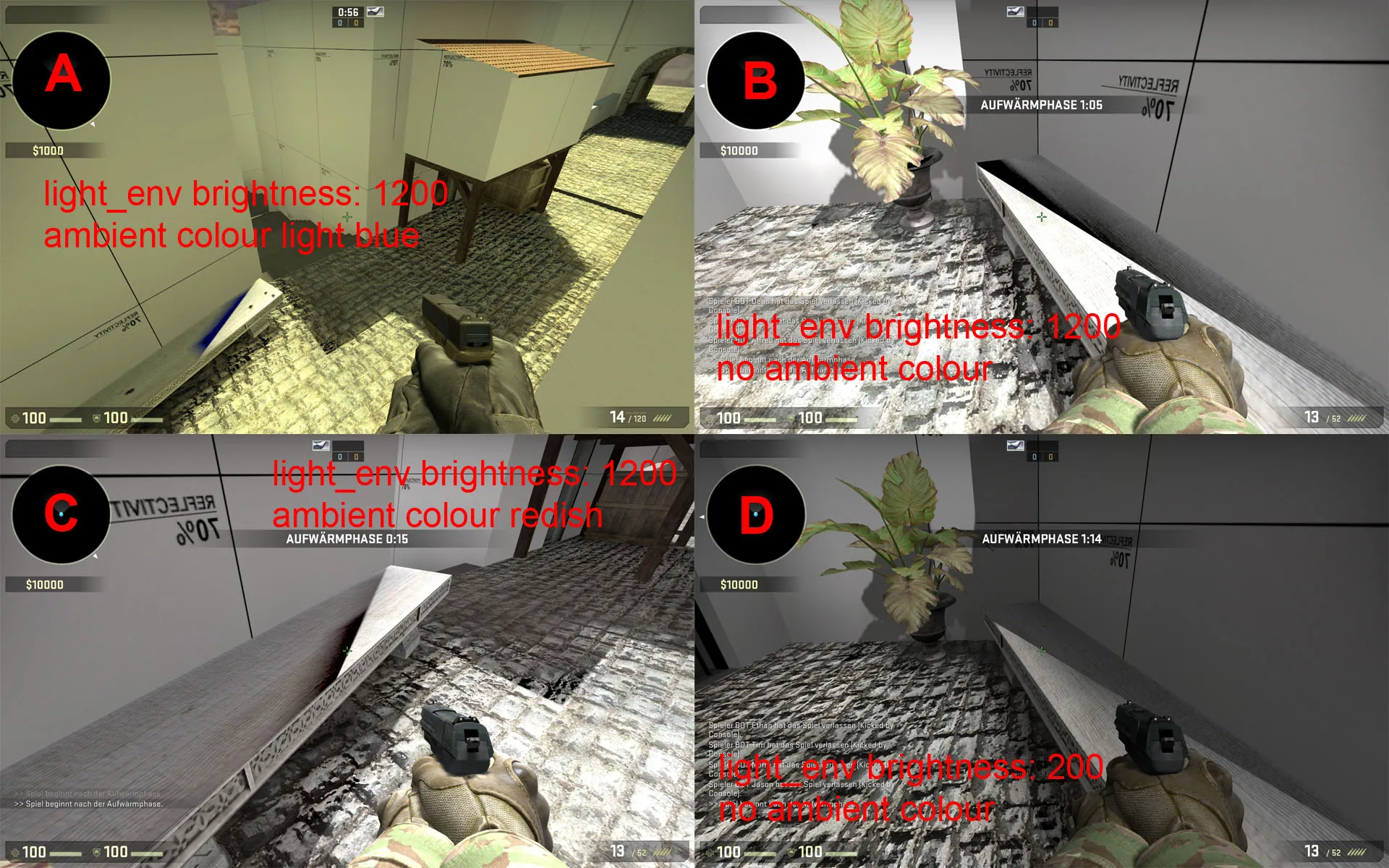
    I made some tests with the light_env. To me it seems that to intense light causes that problem. You can even change the colour of the strange shadow by selecting another ambient color. If no ambient colour is selected the strange shadow just remains black.

    Any other ways of compiling, even final, did not fix it for me.

    I lowered the brightness to a much lower value and got rid of these shadows.

  • esspho
    • February 28, 2016 at 11:54 AM
    • #58
    Quote from Onur Kardelen

    But I connected lights to buttons. When I pressed button, it opens named light. If I delete that names, how can I connect lights to buttons?

    Unfortunately there is no work around for this. I noticed that since the wildfire update switchable lights can cause this kind of thing you are having. I had a similar problem recently and got rid of it by replacing the lights with just env_sprites that can be turned on and off. It works okay in my case - hope that helps.


    [Blocked Image: http://i.imgur.com/PPotl9u.jpg]

  • Shibou
    • March 13, 2016 at 11:02 AM
    • #59

    3kliksphilip made a video on that topic: https://www.youtube.com/watch?v=IJCpXPq8Bhw

    Maybe this could be some help too.

  • Iceberg
    • March 15, 2016 at 2:44 PM
    • #60

    hi guys, I just got this tutorial to fix the problem, I followed him step by step and I could fix it.

    http://www.worldofleveldesign.com/categories/csg…fire-update.php

Participate now!

Don’t have an account yet? Register yourself now and be a part of our community!

Register Yourself Login
Discord

The Mapcore Discord is our lively IRC channel of the 2000s reborn. Chat about level design, gaming, and more.

Latest Posts

  1. Tangerine

    Harry Poster
    July 18, 2026 at 11:10 AM
  2. Any of the old guard still around? D:

    Warby
    July 12, 2026 at 8:23 PM
  3. About our archived forums

    Thrik
    June 30, 2026 at 2:12 PM
  4. Mapcore Discord

    mason_fan123
    June 24, 2026 at 8:52 PM
  5. [CS2] Valley

    Serialmapper
    June 22, 2026 at 11:56 AM
  6. Free Music / SFX Resource - Over 2500 Tracks

    Eric Matyas
    June 18, 2026 at 12:32 PM
  7. Pango [WIP]

    Elowen
    June 11, 2026 at 10:13 AM
  8. [CS2] Dvina

    Jeremy Rivera
    June 11, 2026 at 10:03 AM
  9. Bridges 2.0 by NEXSIDE, MAP SHOWCASE. ( Steam Workshop )

    MrTrane18
    June 1, 2026 at 7:46 PM
  10. Classic Maps Reborn For CS2

    SillySpaceCat
    May 31, 2026 at 10:33 PM

Users Viewing This Thread

  • 1 Guest
  1. Privacy Policy
  2. Contact
Powered by WoltLab Suite™