1. Forums
  2. Discord
  3. About Mapcore
  4. Patreon Supporters
  • Login
  • Register
  • Search
This Thread
  • Everywhere
  • This Thread
  • This Forum
  • Articles
  • Pages
  • Forum
  • More Options
  1. Mapcore
  2. Discussions
  3. Level Design

[csgo] Lighting on props broken since Wildfire Update? (+ Possible fix)

  • February 18, 2016 at 4:02 PM
  • Guest
    • February 18, 2016 at 4:02 PM
    • #1

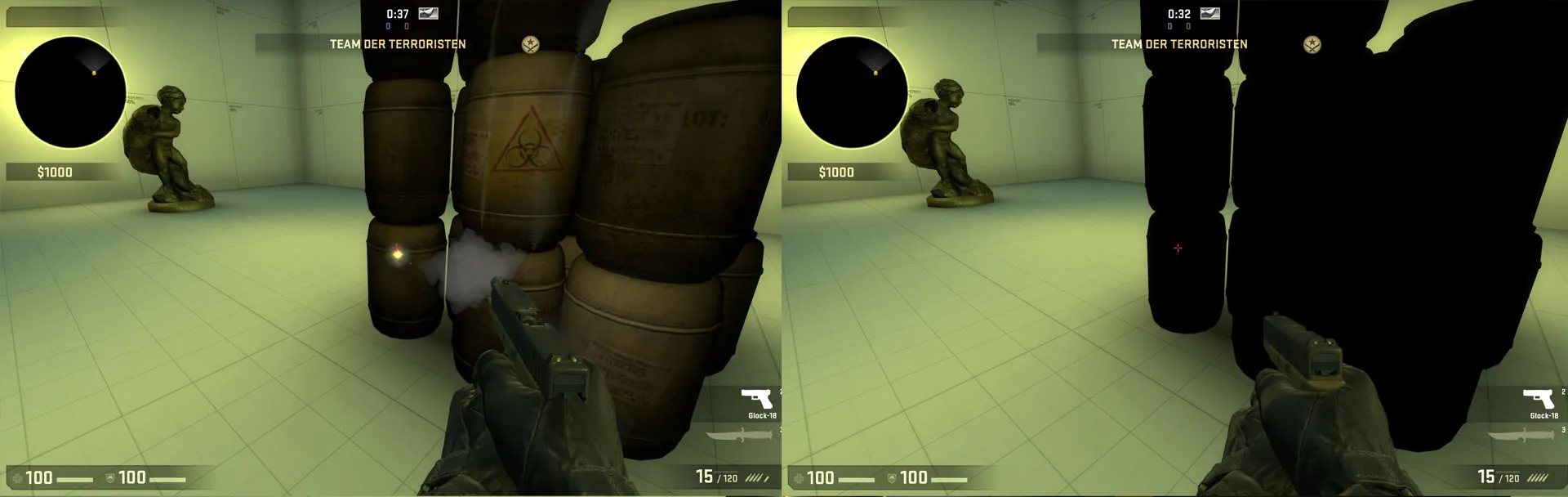
    With the new Wildfire Update came a whole new Nuke, which included a lot of new assets. So, I go into Hammer and place down a few of the new props, then compile. They're all completely black. I tried to just compile older props from other maps, and they are also all black. Anyone else having this problem?

    Pics:

    Quote

    [Blocked Image: http://i.imgur.com/UBPAv1y.png]

    [Blocked Image: http://i.imgur.com/UPiIkau.jpg]

  • baem123
    • February 18, 2016 at 4:29 PM
    • #2

    cumfirmed

    Quote

    [Blocked Image: http://images.akamai.steamusercontent.com/ugc/312242432477109163/967F73E84B4DD4F1A4FFF7D06EDF7835A9FD89CB/]

  • Aztk
    • February 19, 2016 at 12:30 PM
    • #3

    Unfortunately yes, i have this bug too :c

  • jackophant
    • February 19, 2016 at 12:35 PM
    • #4

    did a compile last night. My props were OK, but all my shadows were a weird harsh inky black.

  • Guest
    • February 19, 2016 at 1:01 PM
    • #5

    For some reason, this only happens with the default compile settings. Doing a full compile makes everything work again. Strange issue, considering default compiles always worked before.

  • ElectroSheep
    • February 19, 2016 at 1:08 PM
    • #6

    Default compile settings are forbidden on this website, sorry bro... :sad:

  • FMPONE
    • February 19, 2016 at 1:15 PM
    • #7

    I notice that this brings high quality and low quality visual settings in line with each other. Maybe this was intentional?

  • Quotingmc
    • February 19, 2016 at 1:32 PM
    • #8
    Quote from FMPONE

    I notice that this brings high quality and low quality visual settings in line with each other. Maybe this was intentional?

    That is an interesting idea. I presume you have some contact with VALVe due to Cache and Santorini having made the operation. Could you ask them?

  • Guest
    • February 19, 2016 at 1:54 PM
    • #9
    Quote from 3Dnj

    Default compile settings are forbidden on this website, sorry bro... :sad:

    I thought default was just faster to compile? I guess I'm nothing but a fool. A dirty, disgusting fool.

  • ElectroSheep
    • February 19, 2016 at 1:58 PM
    • #10

    Haha, ho you !

    You just need to know that when it's question of render, fast lighting make things really gross, but this case seemas a bit too far for a classic fast compile.

  • JustFredrik
    • February 19, 2016 at 3:20 PM
    • #11

    I just got a problem but the other way around, with brushes black and props normal. Maby not connected to the update but worth mentioning.

    Edit: After some compiles and changes to the map, it worked fine, And looks normal again. Still don't know if it was connected to the update or what fixed it.

  • tomm
    • February 19, 2016 at 4:49 PM
    • #12

    I've noticed static props aren't lit properly in my case, info_lighting seems to be ignored or not as effective as it used to.

    also computing static prop lighting takes a lot longer than it did before the update, yet the props look the same or maybe even worse.

  • JustFredrik
    • February 19, 2016 at 5:29 PM
    • #13

    After the update my shadows on the map is extreamly sharp, compared to pre-update compiles without changing any compile settings. They probably made some changes to make maps look better and on some systems this update resulted in broken lighting.

    But hey, it wouldn't be a true CSGO update without bugs and glitches!

  • MagnarJ
    • February 19, 2016 at 8:06 PM
    • #14

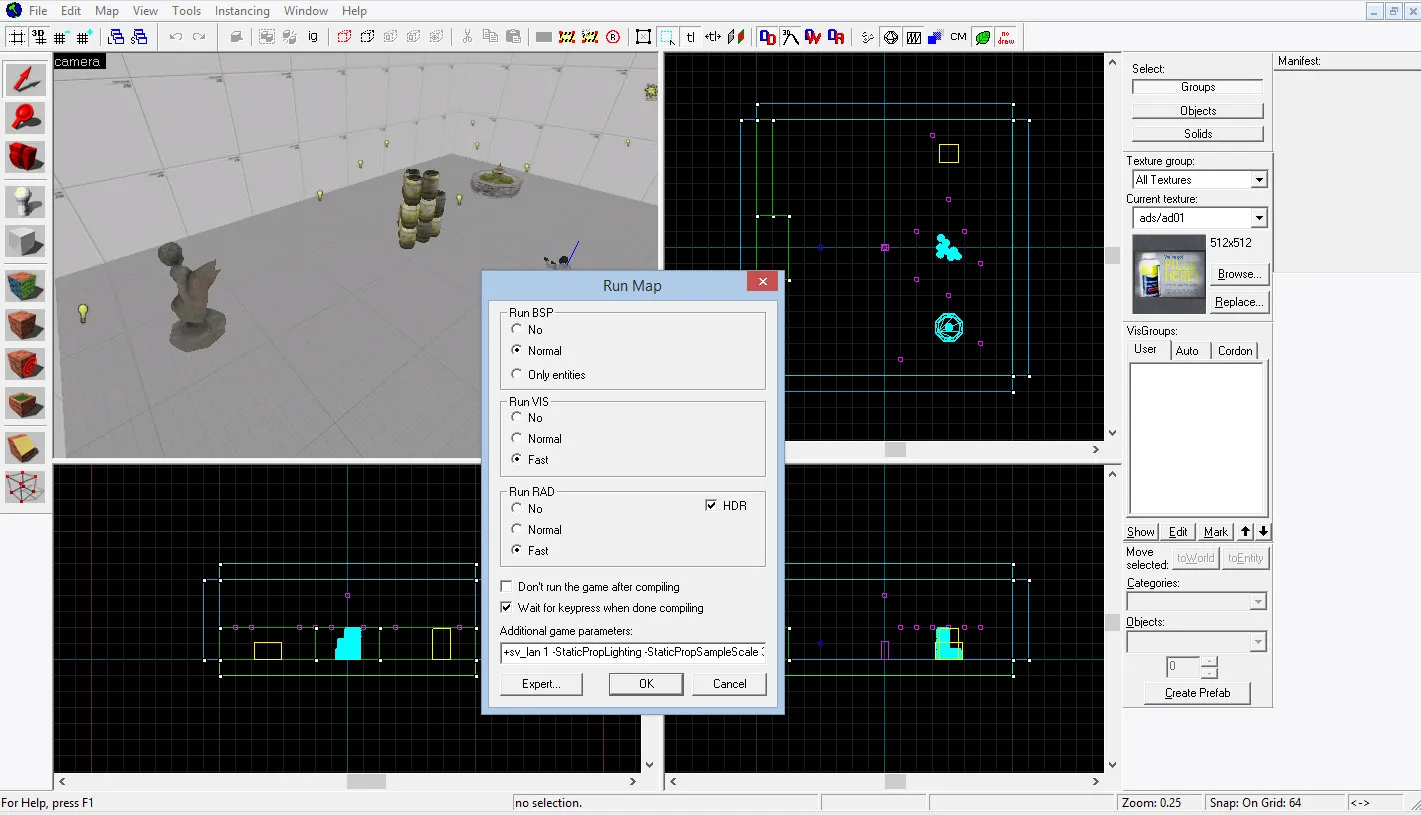
    Hi there! We released an update to VRAD in the latest update. To get proper lighting on static props, you will need to run with -StaticPropLighting in VRAD, which sadly isn't updated (yet) in Hammer for the default, quick compile settings.

    This flag will increase compile times, but to help with iteration we also included the ability to tweak the quality of the new lighting by adding -StaticPropSampleScale x parameter (16 = slow, high quality, 4 = default and 0.25 = fast, low quality) which is useful if you want to speed up compile times. Note that adding -final is the same as having -StaticPropLightingScale 16.


    We'll have the full documentation for the upgraded compile tools out early next week.

  • El Moroes
    • February 19, 2016 at 10:24 PM
    • #15

    Cool, thanks !
    And also, thanks for fixed the "3D Shaded Textures Polygons" view of Hammer

    [Blocked Image: http://i.imgur.com/ABgc9rU.jpg]

  • Endritv
    • February 19, 2016 at 10:56 PM
    • #16

    .

  • Serialmapper
    • February 19, 2016 at 11:38 PM
    • #17

    I had that unpleasant surprise too, seeing all of those prop_static rendered black at fast compile. I was starting to panic and curse Windows. :D

    By the way, on linux the prop_static aren't black at fast compile but are horribly lit with some weird rainbow like effects.

    An offtopic question to mr. MagnarJ: will it be possible for Hammer and Cs:go SDK to be ported on Linux? or should i remove that hope? (i'm dual booting just for mapping).

  • kinggambit
    • February 20, 2016 at 7:58 PM
    • #18

    wait, so all we have to do is add those -staticproplighting and -StaticPropSampleScale #[/b] [/b]parameters to our fast compile setting and it's all gravy? :D Was sitting here for 30 minutes on a hdr compile. Good thing I came across this post!

  • Shibou
    • February 21, 2016 at 3:39 PM
    • #19

    For some reason I am having the same problem but the compiling settings did not fix the issue.

    The props appear to be in a very dark enviroment, some of them could get back to life by adding light near them (the sculpture in the screenshot), others remained completely black even after setting up lights next to them. But at least the reveal their color if you fire your gun next to them.


    Anyone else is still haveing the problem and/or a potential fix ?

  • baem123
    • February 21, 2016 at 4:17 PM
    • #20

    You added it at "additional game parameters", cut it and click on "Expert..."

    Now choose the fast configuration in the top left drop down menu. Go to "$light_exe" and paste these parameters there. Then click "GO" to compile.

Participate now!

Don’t have an account yet? Register yourself now and be a part of our community!

Register Yourself Login
Discord

The Mapcore Discord is our lively IRC channel of the 2000s reborn. Chat about level design, gaming, and more.

Latest Posts

  1. About our archived forums

    Thrik
    June 30, 2026 at 2:12 PM
  2. Mapcore Discord

    mason_fan123
    June 24, 2026 at 8:52 PM
  3. [CS2] Valley

    Serialmapper
    June 22, 2026 at 11:56 AM
  4. Any of the old guard still around? D:

    Thrik
    June 20, 2026 at 10:11 PM
  5. Free Music / SFX Resource - Over 2500 Tracks

    Eric Matyas
    June 18, 2026 at 12:32 PM
  6. Pango [WIP]

    Elowen
    June 11, 2026 at 10:13 AM
  7. [CS2] Dvina

    Jeremy Rivera
    June 11, 2026 at 10:03 AM
  8. Bridges 2.0 by NEXSIDE, MAP SHOWCASE. ( Steam Workshop )

    MrTrane18
    June 1, 2026 at 7:46 PM
  9. Classic Maps Reborn For CS2

    SillySpaceCat
    May 31, 2026 at 10:33 PM
  10. [CS2] Dvina

    Pulbusha
    May 29, 2026 at 5:54 PM
  1. Privacy Policy
  2. Contact
Powered by WoltLab Suite™