


1. Forums
  2. Discord
  3. About Mapcore
  4. Patreon Supporters
  • Login
  • Register
  • Search
This Thread
  • Everywhere
  • This Thread
  • This Forum
  • Articles
  • Pages
  • Forum
  • More Options
  1. Mapcore
  2. Discussions
  3. Level Design

CounterStrike - Clipping Texture

  • hamilton5
  • February 6, 2015 at 2:43 PM
  • hamilton5
    • February 6, 2015 at 2:43 PM
    • #1

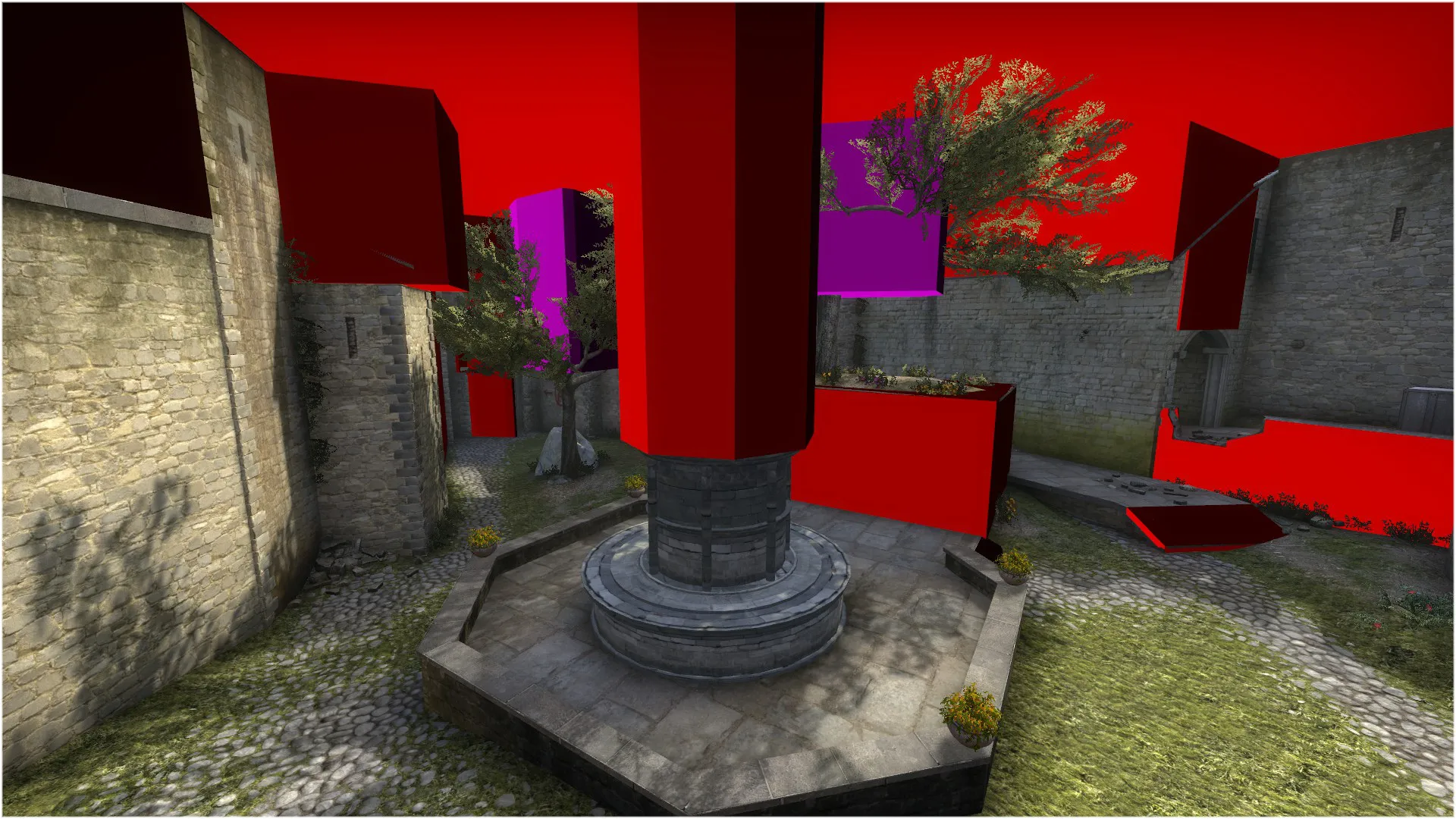
    Why do you need both of these in Counterstrike? Why would you mix two in the same map most importantly?


    I can think of one draw back to the player clip, and maybe this is a game bug I don't know. When you nav_generate, mesh will go outside of the player clip brushes. So why player clip?

  • Lynxx
    • February 6, 2015 at 2:57 PM
    • #2

    I have no experience with Hammer or whatsoever, but the only reason I could think about is for smokes/grenades/flashes. I could be completely wrong though

  • Vaya
    • February 6, 2015 at 3:05 PM
    • #3

    Nah clip doesn't block nades. It might block the bomb however?

  • Lynxx
    • February 6, 2015 at 3:07 PM
    • #4
    Quote from Vaya

    Nah clip doesn't block nades. It might block the bomb however?

    that could be it aswell, like I said I have no experience but blocking the bomb would make sense and these places look like spots you could get the bomb stuck on

  • onebit
    • February 6, 2015 at 3:13 PM
    • #5

    They have the same functions, so they're probably both there for the same reason that block bullets doesn't block bullets.

  • Vaya
    • February 6, 2015 at 3:14 PM
    • #6

    https://developer.valvesoftware.com/wiki/Tool_textures

  • will2k
    • February 6, 2015 at 5:25 PM
    • #7
    Quote from hamilton5

    Why do you need both of these in Counterstrike? Why would you mix two in the same map most importantly?


    I can think of one draw back to the player clip, and maybe this is a game bug I don't know. When you nav_generate, mesh will go outside of the player clip brushes. So why player clip?


    [Blocked Image: http://static.mapcore.org/public/style_i…/attachicon.gif]2015-02-06_00003.jpg

    They are the same in Counter-Strike with the added benefit of clip in preventing the nav meshes from overflowing outside the clip brushes.


    For this reason, use only clip brushes (unless you want to manually delete nav areas from the non playable area when using player clips)

  • MaanMan
    • February 6, 2015 at 8:38 PM
    • #8
    Quote from hamilton5

    Why do you need both of these in Counterstrike? Why would you mix two in the same map most importantly?


    I can think of one draw back to the player clip, and maybe this is a game bug I don't know. When you nav_generate, mesh will go outside of the player clip brushes. So why player clip?


    [Blocked Image: http://static.mapcore.org/public/style_i…/attachicon.gif]2015-02-06_00003.jpg

    Player clip is important for games such as L4D, where the ai spawns outside of the playable area. There is really no reason to use player clip in cs unless you are making a custom map with ai only areas.

  • blackdog
    • February 6, 2015 at 9:25 PM
    • #9

    Player clipping is important in every game because prevents the player to get stuck, in frantic situations as well as careful movement.


    Considering how much you backtrack without looking in CS (or most of shooters), smoothing minor corners/edges is important.


    Or what did I miss?

  • El_Exodus
    • February 6, 2015 at 9:28 PM
    • #10
    Quote from blackdog

    Player clipping is important in every game because prevents the player to get stuck, in frantic situations as well as careful movement.


    Considering how much you backtrack without looking in CS (or most of shooters), smoothing minor corners/edges is important.


    Or what did I miss?

    It's been about the difference of those 2 clip brushes It's obvious that games need those to work smooth.

  • blackdog
    • February 6, 2015 at 9:41 PM
    • #11

    Yeah but just above I read someone writing that clipping is not important.

    I also think initial question is a bit poorly formed and I see comments going in all directions.


    According to the guide, if i am reading correctly, a clip_brush will stop players AND bullets, while player_clip won't stop bullets? Which to me makes sense, cos you might want to have a fence but be able to shoot through it.

  • El_Exodus
    • February 6, 2015 at 10:36 PM
    • #12

    Clips are not blocking bullets. You can also throw your weapon through them. But Clips are blocking the C4 for example. The only difference between Player_Clip and Clip is, that one is blocking bots and the other one not.

  • blackdog
    • February 7, 2015 at 3:04 AM
    • #13

    Then I'd say it's explained badly in the guide…

  • El_Exodus
    • February 7, 2015 at 3:09 AM
    • #14

    While we are at it: Is the "Block Bullets" texture also blocking nades? I always want to throw nades bouncing of stairs like on ramps, but instead, they come back to me I'd really like to be able to do that.

  • spence
    • February 7, 2015 at 3:22 AM
    • #15

    Pretty sure blockbullets also blocks nades and works similar to a nodraw brush (but due to the way bullet penetration works in csgo neither of these will unconditionally block bullets unless the brush is thick enough!)

  • Radix
    • February 11, 2015 at 1:20 PM
    • #16

    It's probably just this:


    Quote from will2k

    They are the same in Counter-Strike with the added benefit of clip in preventing the nav meshes from overflowing outside the clip brushes.


    For this reason, use only clip brushes (unless you want to manually delete nav areas from the non playable area when using player clips)


    Or maybe it just doesn't work as intended...

    That's what I found out:


    [Blocked Image: http://i.imgur.com/Klf61sc.jpg]


    Well, humans=chickens>bots


    [Blocked Image: http://funny-pics.co/wp-content/uploads/Chicken-Crest.jpg]

  • Squad
    • February 11, 2015 at 3:31 PM
    • #17
    Quote from spence

    Pretty sure blockbullets also blocks nades and works similar to a nodraw brush (but due to the way bullet penetration works in csgo neither of these will unconditionally block bullets unless the brush is thick enough!)


    Blockbullets blocks nades ... and that's about it. You shouldn't use it to block bullets. It's either very buggy, or it simply doesn't work.

  • El_Exodus
    • February 11, 2015 at 3:40 PM
    • #18
    Quote from Squad

    Blockbullets blocks nades ... and that's about it. You shouldn't use it to block bullets. It's either very buggy, or it simply doesn't work.

    Isn't it dependent on the thickness of the brush?

  • Squad
    • February 11, 2015 at 3:53 PM
    • #19

    For regular brushes/func_detail it's dependant on the thickness and the material that is applied to it, afaik.
    But the blockbullets doesn't work like they should. The name suggests it block bullets, so thickness shouldn't even matter for in this case.

  • spence
    • February 11, 2015 at 3:53 PM
    • #20

    In my experience it depends on the thickness of the brush, but I've never really done any objective tests to determine this. It's very possible that in the instances it has worked for me it has been a fluke

    The name is definitely misleading, though, it won't block bullets unless the brush already meets the criteria for blocking bullets via the bullet penetration system (as with any other world brush)

Participate now!

Don’t have an account yet? Register yourself now and be a part of our community!

Register Yourself Login
Discord

The Mapcore Discord is our lively IRC channel of the 2000s reborn. Chat about level design, gaming, and more.

Latest Posts

  1. How to Use a Free Kundali Maker for Accurate Future Predictions

    astr09
    July 23, 2026 at 6:35 AM
  2. Tangerine

    Harry Poster
    July 18, 2026 at 11:10 AM
  3. Any of the old guard still around? D:

    Warby
    July 12, 2026 at 8:23 PM
  4. About our archived forums

    Thrik
    June 30, 2026 at 2:12 PM
  5. Mapcore Discord

    mason_fan123
    June 24, 2026 at 8:52 PM
  6. [CS2] Valley

    Serialmapper
    June 22, 2026 at 11:56 AM
  7. Free Music / SFX Resource - Over 2500 Tracks

    Eric Matyas
    June 18, 2026 at 12:32 PM
  8. Pango [WIP]

    Elowen
    June 11, 2026 at 10:13 AM
  9. [CS2] Dvina

    Jeremy Rivera
    June 11, 2026 at 10:03 AM
  10. Bridges 2.0 by NEXSIDE, MAP SHOWCASE. ( Steam Workshop )

    MrTrane18
    June 1, 2026 at 7:46 PM
  1. Privacy Policy
  2. Contact
Powered by WoltLab Suite™