1. Forums
  2. Discord
  3. About Mapcore
  4. Patreon Supporters
  • Login
  • Register
  • Search
Everywhere
  • Everywhere
  • Articles
  • Pages
  • Forum
  • More Options
  1. Mapcore
  2. Members
  3. Dosentti

Posts by Dosentti

  • de_farm [WIP]

    • Dosentti
    • June 27, 2016 at 1:59 PM

    I'll probably generate my normals to this project but I have to get deeper into normals later. I'll just make sure I won't go too crazy with it. Starting to sculpt my normals now will either kill or delay my project/timetable.

    Anyways. Thank you for this. It's always good to hear how it really should be done. I'll save this tip for later :)

  • de_farm [WIP]

    • Dosentti
    • June 27, 2016 at 10:50 AM
    Quote from Vorontsov

    10 minutes ago, Vorontsov said: A generated bumpmap, is inconsistent in everything and usually not good enough unless you know what to do with them. It doesn't know how to make your planks or bricks pop properly for example, it doesn't know what height info to generate from unless you feed it one, so it's just guesswork & making everything look like dough. It's hard to explain but it is very easy to see a generated result and they usually don't look good, it's better to keep them minimal, unless as I said you are going to sculpt or do them in Substance.

    The differences between ours is, I have the result I wanted as I made it "pop out" how I wanted in 3D space, also consistent although minimal because I didn't sculpt the bricks individually.

    Okay. I think I understand what you mean. I can't see it in my textures yet but I guess it'll come when I have spend some more time with normal maps. Which program do you use to sculpt normals? I googled it and found some: Photoshop CC would be great but it costs too much, Autodesk Mudbox (free for student) seemed too complex to learn fast? and Shadermap would be my choice even though it costs 50€. It was pretty easy to use at least but does it have all the functions I need?

  • de_farm [WIP]

    • Dosentti
    • June 26, 2016 at 11:43 PM
    Quote from Vorontsov

    3 hours ago, Vorontsov said: When I'm too lazy or don't have time to sculpt a nice normal map, I do them somewhat like this in that case.

    So the difference between mine and this example is that in your bumpmap there's far fewer detail. It just gives basic shape for the tiles(in this case). Am I right?


    Quote from grapen

    22 hours ago, grapen said: I like where you're going with this. I took a few minutes to provide some feedback and conceptualize a bit. Hope you don't mind:


    http://# Reveal hidden contents The content cannot be displayed because it is no longer available.

    A few notes:

    1. Window frames on the big barn (visible in the top left corner of the screenshot above) needs to be pushed in towards the building. Right now they look a bit like they have been hung on a nail, like a painting.

    2. The window frame on the closest barn has the opposite problem and needs to pop just slightly.

    2. Your mountains are a bit dark and blend in with your foreground.

    3. The buildings look like they haven't been painted in a century, some color and a slight increase in value could add some life to the scene. Faded red with white corners would instantly sell the farm concept to me.

    4. While on the topic of life, needs more greenery! :)

    5. The fence poles could do with some random rotations so as to not appear perfectly straight.

    6. I think dust clouds could be an interesting detail for added movement.

    7. Vertical details for that unique flavour!


    Keep it up!

    Display More

    Thanks! This helps a lot. I have to admit that with your modifications it looks more alive and real. (3D) skybox and mountain card etc I will create/remake later after summer but that fence and other stuff that's more related to this specific area I will absolutely do next week.

  • de_farm [WIP]

    • Dosentti
    • June 25, 2016 at 10:16 PM
    Quote from Vorontsov

    8 hours ago, Vorontsov said: Not bad textures at all :). But those bump-maps are a no-no. I'm not wrong to assume they are generated? Nothing wrong with that if you know what you are doing but I would recommend you to do them by hand. I sculpt mine or as simple as subdividing a flat plane and moving and beveling parts sometime and just bake that.

    Hmm.. I'm useless with bump maps :D I somehow find it very difficult to see when they are great and when they suck. I generate Bumpmaps with crazybump and in crazybump I try to adjust it. In most of textures I have raised intensity, sharpness and all details (very small, small, medium, large and x-large). Could you help me with one example texture? If I send you the original texture and you create an example bump for it? That would be very helpful.

  • de_farm [WIP]

    • Dosentti
    • June 24, 2016 at 6:27 PM

    Hello everyone.. It's bee over a month since I declared that I start doing detailing for this map.

    So now after 140 hours B-bombsite and B-long have been under construction. I started learning modeling and texturing so I have spent more hours to these areas than what I expected. It's slow progress but eventually models and especially textures (imo) are starting to look like they should.

    I bought a dslr camera (sony a6000) and all the textures that are in individual pics on imgur album are taken by me. Some other textures are from texture sites like textures.com.

    I hope you guys comment on my work in good and bad. :)

  • Wall Worm A-Z (Basics)

    • Dosentti
    • June 14, 2016 at 8:24 AM
    Quote from shawnolson

    6 hours ago, shawnolson said: @Dosentti Those darker strips on the top are likely due to the normal on those strips. The first solution to explore is adding an Edit Normals modifier to the prop and point all the normal of the top pieces straight up. There is a function in the WW Normal Tools to do this in a couple clicks. Then make sure the WWMT settings have the Explicit Normals setting turned on (which will use the smoothing groups + explicit normals).

    Thanks. Normals weren't pointing up and I think I fixed that but I can't find that "explicit normals" setting anywhere. Which tab is it suppose to be? Edit: Never mind, I guess they are on as a default because it works now. Thanks a lot @shawnolson! Too bad my model sucks :D Any tips how to make those top straws looks more realistic?

  • Wall Worm A-Z (Basics)

    • Dosentti
    • June 13, 2016 at 12:07 PM

    Hey, I have just started modeling with no previous experience with it so I thought there must be someone who knows right a way what's the problem with this odd shadow thingy on my hay bale prop.

    I'm not a rain maker in modeling. In fact this is my first model. I made this round bale and I tried to add some individual straws on the top of it to stick out and make it look a bit more realistic.

    So in the picture there's same texture in the border of the bale and on the top of the bale but somehow those straws that are on the top look all shady. Does anyone know what's causing this and how to fix? Maybe something wrong with prop compiling settings?

  • [csgo] custom textures improvements

    • Dosentti
    • May 31, 2016 at 8:10 AM

    Thanks a lot! I guess I have made same mistakes (checked normal map) in other textures too. I gotta check them all.. it's so confusing when I create a normal map but put it in the texture as a bump map.

    I'll look deeper into the textures and make some detail textures and get back to you after I have done the stuff.

    I will also create models of that log pile, the big rock and round bale.


    People always talk about decompiling valve textures, I think I gotta check few good textures and see what they do. I have heard it from so many guys already :)

  • [csgo] custom textures improvements

    • Dosentti
    • May 28, 2016 at 9:19 AM

    Hello, I started detailing my map de_farm2 two weeks ago. I finished B-site brushwork and texturing earlier this week and showed it to one of my more experienced level designer friend. He said said that I should maybe stick with the default textures because my textures weren't looking good enough (in a nutshell). I know that might very well be the case that I don't know how to create great textures yet, so that's why I wanted to ask if someone could take a look of the map and and be a bit more specific what's wrong with them. At the moment with the texture .vtf I only have bumpmap .vtf.

    Here's link to google drive folder where you can find examples or few textures.

    And here's the link to farm II on workshop.

    Also if someone knows good resources for learning texturing I would be happy to hear about them.

  • VMT Editor - fast and simple editor for vmt files

    • Dosentti
    • May 26, 2016 at 12:06 PM
    Quote from Yanzl

    11 hours ago, Yanzl said: Can you try opening the editor, selecting the game, and then closing and reopening it?

    I implemented the suggesting vmt name along with some bug fixes in a mini update here https://dl.dropboxusercontent.com/u/4380409/VMT_Editor.exe Just replace the current .exe.

    Just tested the new version and it now remembers the game and file saving is made easier. Great, thanks :) And since I started suggesting these features there's still one that might be good. --> instead of going file-> save as -> saving stuff through there could be a button for example at the lover right corner or at least right side of the window that says "save" or "Create" or something like that. At least for me it would feel more intuitive to use than this old school way.

  • VMT Editor - fast and simple editor for vmt files

    • Dosentti
    • May 25, 2016 at 6:43 PM
    Quote from Yanzl

    On 5/24/2016 at 5:51 PM, Yanzl said: For the alpha to show you have to check either transparent or alpha test in transparency group. Seems there's bug with alpha test though, it only shows half the texture.

    [Blocked Image: http://i.imgur.com/PL2ygs0.png]

    Remembering last game should work, can you check in options if Save last selected game is checked?

    And adding tooltips is planned but not a priority, for now I hope the post explaining stuff above will do.

    Aight, I was just too dumb to realize that I have checked the "save last selected game". Anyways it's not so big deal. One other thing that would be small but great thing is that program would automatically suggest the name for the .vmt file. It could be the same name as the base .vtf has. Anyways, great work with the tool, I'll start learning how to make awesome textures with it. At least it's easier to know what is possible to do with the textures. Does csgo support all the stuff that this tool is for or is there some stuff that work only other games?

  • VMT Editor - fast and simple editor for vmt files

    • Dosentti
    • May 24, 2016 at 7:37 AM
    Quote from Yanzl

    12 hours ago, Yanzl said: This editor is focused towards creating vmts, not vtfs. Using VTFEdit for creating vmts is more or less like using a text editor, and you have to remember or search for all the parameters. In VMT Editor you can just tweak sliders and checkboxes to get your desired material look, no parameter memorization necessary. As for DXT5 compression, they both support it.

    I tried to create decal through it, but it didn't recognize an alpha channel at all. Through vtfedit it went very well. I find it annoying that browse button is disabled every time I start the program. It's not a big thing to add a game every time but it could remember the last used game. VMT Preview is great and program has very nice features too. I don't know where to use all those stuff so there could be those little question mark icons in the main screen after every property (Meaning headings like Other, Color, Specular...) that would stand shortly which button/slider does what. People will learn those eventually but this would make it easier to use as a new mapper/texturer.

    FMPONE is right that since you have all the keys to create updated tool for this stuff, you should do it. All texture tools in one program.

  • VMT Editor - fast and simple editor for vmt files

    • Dosentti
    • May 23, 2016 at 7:28 AM

    What's the difference between this and vtfedit?

    Does it not support DXT5 compressed vtfs?

  • de_farm [WIP]

    • Dosentti
    • May 18, 2016 at 8:15 AM

    Today it starts again. Some people may have been wondering why haven't I been updating de_farm anymore. The reason is simply because I had so much school work this spring that I didn't have much time. We created a little mobile game for android devices. You can find it here if you are interested of it.. But today starts my summer project. I will start creating details for farm II. Here we have the look before I start working. During the first two weeks I'll renovate B bombsite.

  • MapCore CS:GO Playtesting 4.0

    • Dosentti
    • March 28, 2016 at 6:47 PM
    Quote

    3 minutes ago, 'RZL said: Sorry about the corrupted file, seems to happen sometimes unfortunately. I know of no way to solve this problem :/

    And yeah, I noticed the terribly large filesize and >90% of it would be an empty server, because the recording didn't seem to stop after everyone left. I'll try to prevent this from happening again, maybe it also reduces the chances of corruption.

    Aight, it's ok. There wasn't much (negative) feedback in the comment feed and and I think I know pretty much all comments where they were and what they meant so it's not so important for me. I was just notifying in case it's something with new server that needs more attention /emoticons/[email protected] 2x" title=":)" width="15">

    Keep up the good work!

  • MapCore CS:GO Playtesting 4.0

    • Dosentti
    • March 28, 2016 at 1:50 PM

    I just downloaded my latest playtest demo. It seems to be corrupted or something. At least it doesn't work properly.

    When I open it in demoui, it "connects to server" correctly and lets me watch the demo almost until end of warmup and then it says:

    "Warning: cl_flushentitypacket, Update delta not found." at the upper right corner of the screen. Same time console foods with text "Update delta not found."

    I also noted that the file is over 500MB.

  • de_farm [WIP]

    • Dosentti
    • March 18, 2016 at 9:41 PM

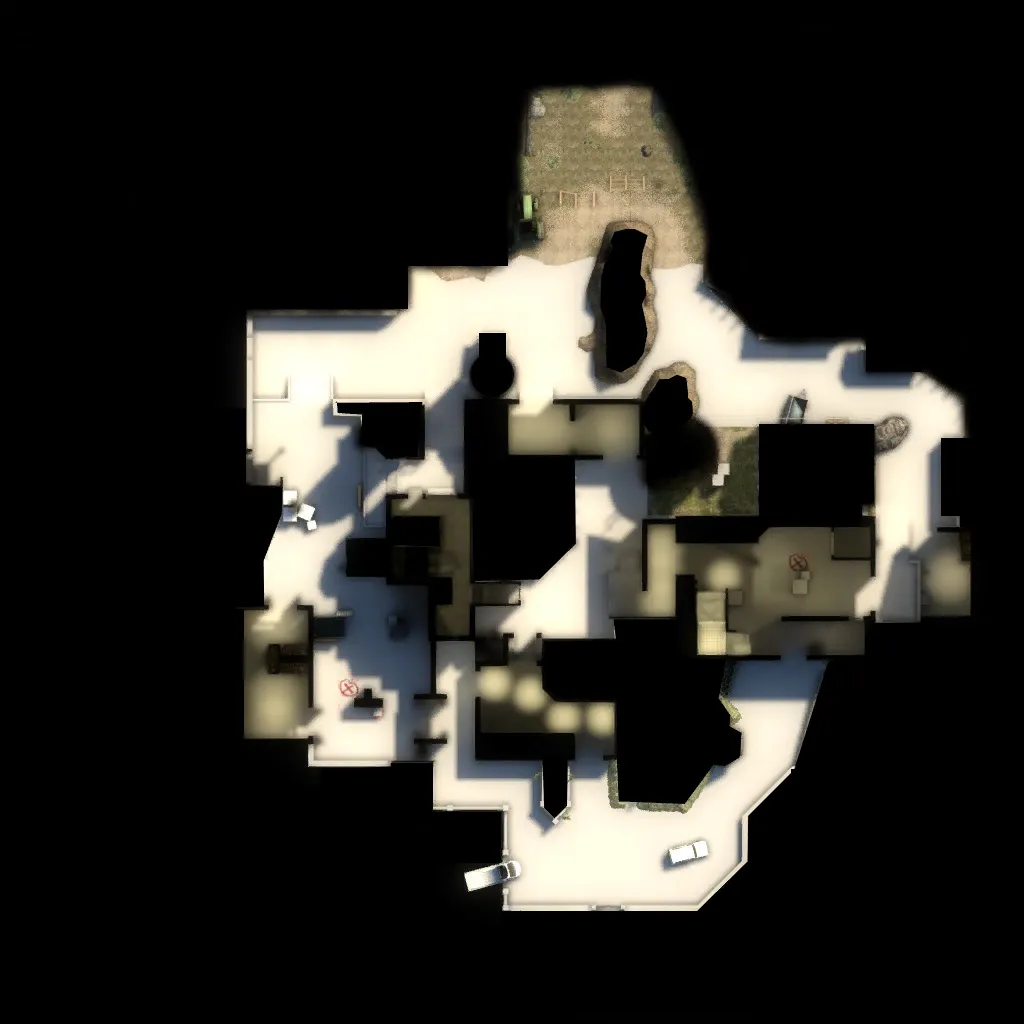
    Last playtest was two and half weeks ago. I got much feedback and I think I made better changes this time.

    Here's the new layout:


    Spoiler


    Vote results:

    Spoiler What are your initial impressions of the map?

    • Neutral, selected 10/15 times (66.66%)
    • Like, selected 4/15 times (26.66%)
    • Dislike, selected 1/15 times (6.66%)

    How do you like the map layout?

    • Neutral, selected 9/14 times (64.28%)
    • Like, selected 3/14 times (21.42%)
    • Dislike, selected 2/14 times (14.28%)

    What are your initial impressions of the map?

    • Neutral, selected 4/8 times (50.00%)
    • Like, selected 4/8 times (50.00%)
    • Dislike, selected 0/8 times (0.00%)

    I have no idea why the result seems to be very neutral. Maybe it's because it's still in layout fixing phase(?).

    Anyways. I was pretty happy already that initial impressions had only 1 dislike during the whole playtest. The layout dislikes are results from the poor rotation times I guess. This is something I fixed in new version.

    The feedback that was written during the playtest and changes that I made:

    • Spoiler
      • Fence wire brushes were solid ---> now they are func_brushes with no collision.
      • Connector outside of T side of B to middle didn't look like a passable route ---> tried to make it a bit bigger and more obvious route.
      • 64unit high wall in the ct base ----> was made lower (48units if remember right)
      • Lots of walls need to be raised ---> I considered this and tried to do something to it, but I didn't want to raise all fences to be 128units high so I changed for example ct to A route a bit to make it affect less.
      • Shelves in the A warehouse need brushes on the sides ---> Added sides so player can't see through them.
      • Rotating around the map is like infreno ct spawn to B. --->I did not get this metaphor, but I made rotating easier by changing A long routes a bit and adding a route through a shit (pardon my language) pile
      • Map needs more player clips --> this was something that I didn't care in earlier versions but now I placed player clips on their places.
      • Too much ways to go at A ---> I tried to make A long easier for CT to defend so routes wouldn't affect so much. I also united the route from mid to A and from CT to A.
      • There's a bug T side of B long. When playing with AUG or SG553 you can't see stone pillars under the building ---> I didn't fix this yet. Don't know what's causing it. I'll focus to it in next version
      • Add a route from middle to kiln ---> tested with ladders/balcony but changed it after testing to kind of closed porch with stairs.


    snickers commented many things during the playtest but the thing was that I wasn't sure if they were suppose to be feedback or just comments or what. I tried to contact the dude but I got no answer.

    Here are some additional photos from the map:

    http://imgur.com/a/437yx


    So there are at least 3 known bugs that I have to fix in next version after playtest:

    • Spoiler
      • Stone pillars under the building outside of B long.
      • You can see that skybox is square. Gotta change alignment of clouds.
      • Inside of kiln you can see partly through silo. Don't know what causes it.


  • MapCore CS:GO Playtesting 4.0

    • Dosentti
    • February 28, 2016 at 8:06 PM

    Server is running old version. Guys said on ts that playtest won't be happening because of that. How far will it be postponed? I wouldn't want to postpone it a lot... -.-'

  • de_nuke - A revised optimization system

    • Dosentti
    • February 27, 2016 at 10:25 PM
    Quote from will2k

    Note: For all the folks that are confused and have so many misconceptions about vvis, optimization, etc, please read my technical papers and articles about Source optimization in chronological order as they appear in my signature below.

    (For the guys confused about hints and fast vis in the posts above, vvis has nothing to do with implementing your optimization setup, that's vbsp's job - vvis simply calculates the visibility between your leaves and creates the PVS. vbsp is the one responsible for translating your hints, areaportals, nodraw, func_detail etc into visleaves cuts during the compile). Again, read my papers and all this is explained in great details :).

    I'm not sure how it's possible that I have missed your papers! I have been searching for something to read about source level designing. These are great! thanks!

  • de_farm [WIP]

    • Dosentti
    • February 27, 2016 at 9:10 PM
    Quote from Vorontsov

    The earlier version played better than I had expected, but it had issues that didn't have much to do with the amount of paths

    Aight. Are you talking about broken angles on bombsites or something else?

Discord

The Mapcore Discord is our lively IRC channel of the 2000s reborn. Chat about level design, gaming, and more.

Latest Posts

  1. Building a Huge Library of Free Images for Everyone

    Eric Matyas
    August 10, 2026 at 1:52 PM
  2. Any of the old guard still around? D:

    Chunks
    August 7, 2026 at 11:08 PM
  3. CS:S | cs_manoir | Map creation process by D'artagnan

    Thrik
    August 3, 2026 at 10:42 AM
  4. Custom Gamemodes Contest

    Angel
    July 20, 2026 at 11:46 AM
  5. FAQ

    Angel
    July 20, 2026 at 10:14 AM
  6. Tangerine

    Harry Poster
    July 18, 2026 at 11:10 AM
  7. About our archived forums

    Thrik
    June 30, 2026 at 2:12 PM
  8. Mapcore Discord

    mason_fan123
    June 24, 2026 at 8:52 PM
  9. [CS2] Valley

    Serialmapper
    June 22, 2026 at 11:56 AM
  10. Free Music / SFX Resource - Over 2500 Tracks

    Eric Matyas
    June 18, 2026 at 12:32 PM
  1. Privacy Policy
  2. Contact
Powered by WoltLab Suite™