

Maybe CS:GO Source 2 port burned down in that server room.
Posts by Mamorex
-
-
fy_pool_day and fy_iceworld looks cool; what is the chance that they will become available for CS:GO (CO) after all these years?
-
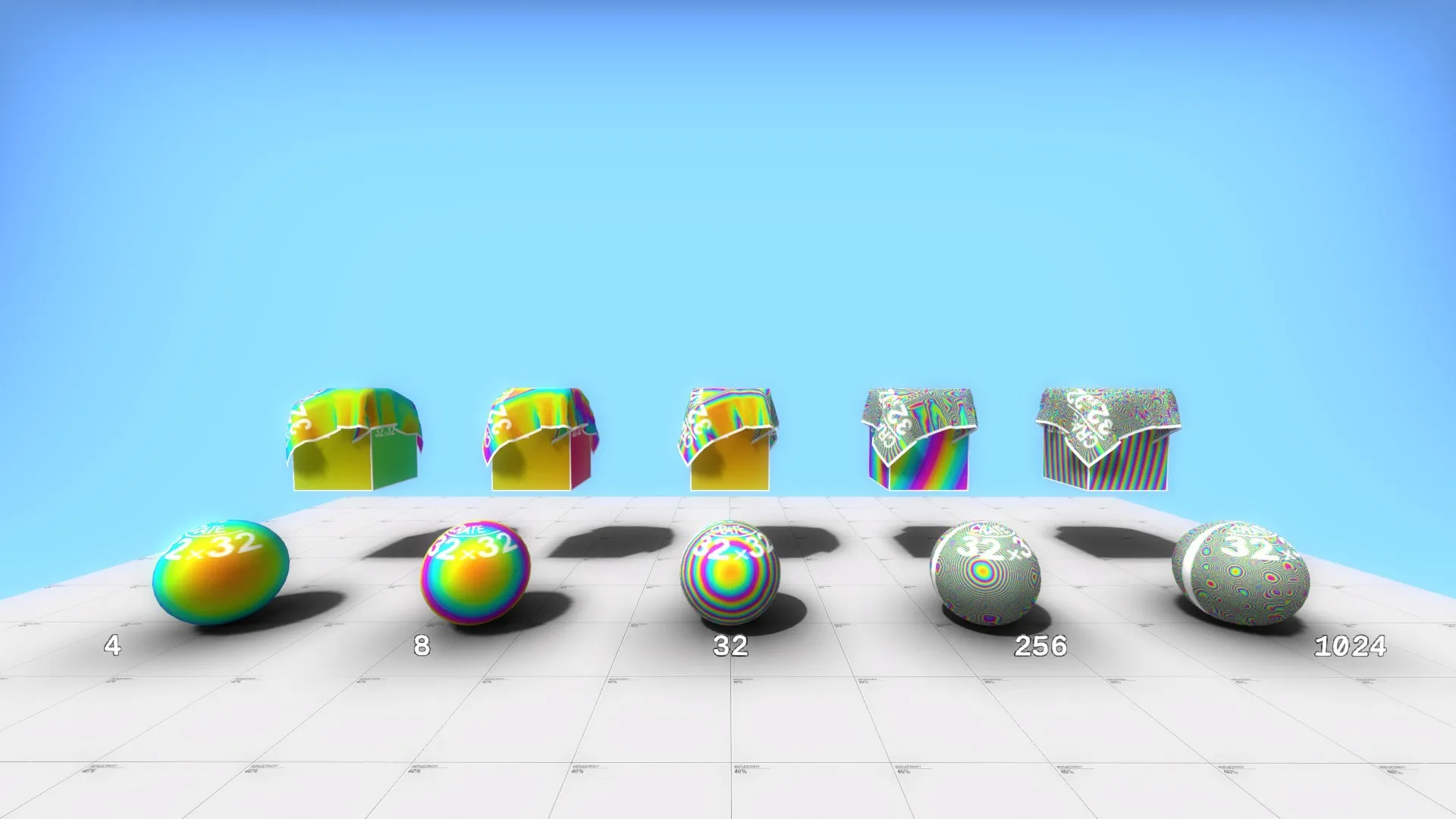
A new pearlescent skin feature on models:
 QuoteDisplay More
Quote "VertexLitGeneric"
{
"$basetexture" "dev/dev_measurecrate02" "$nocull" "1"
// "$phong" "1" "$phongboost" "0"
//
"$basemapalphaphongmask" "1" "$pearlescent" "4"
}
It's a phong shader feature; "$phong" "1" and "$basemapalphaphongmask" "1" are obligatory.
-
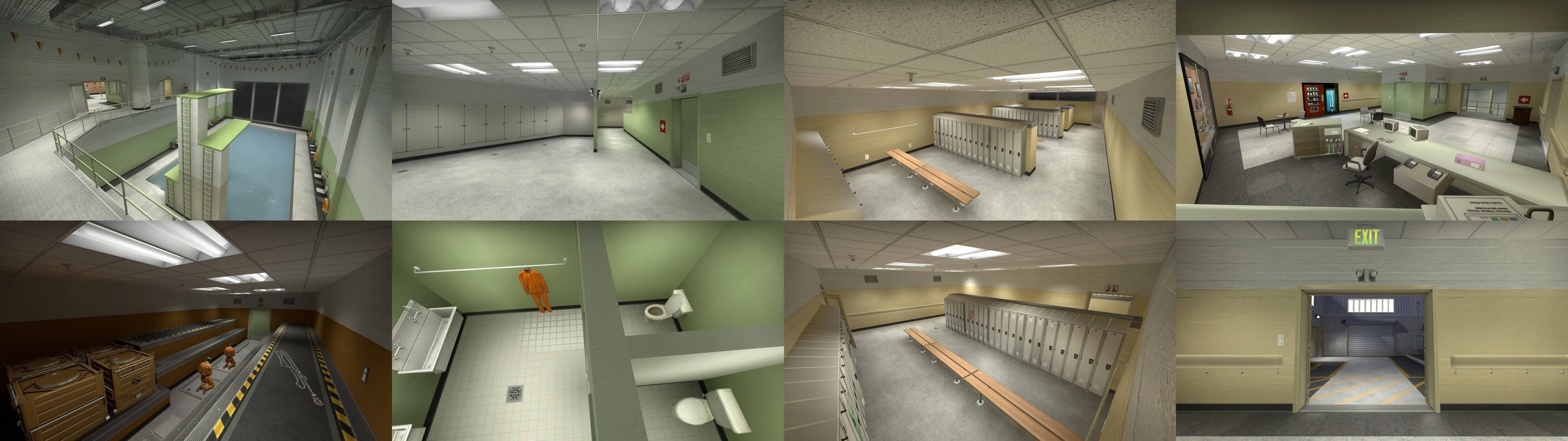
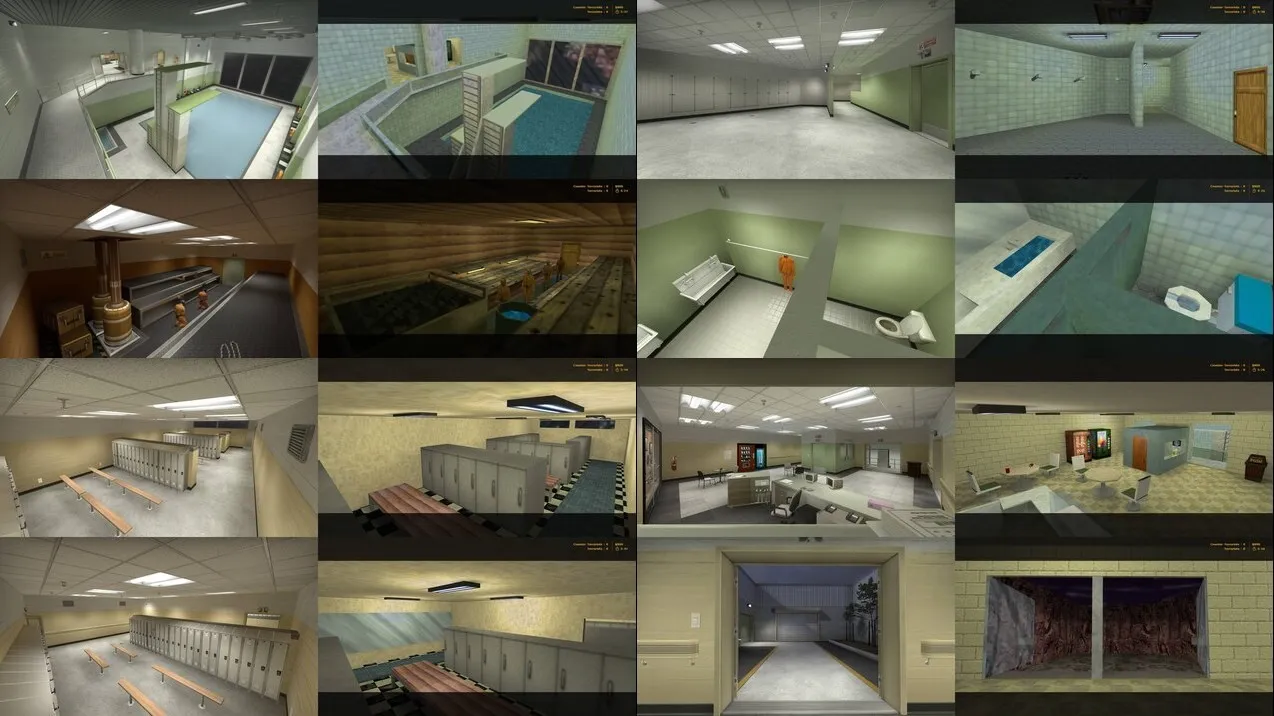
I want to keep the defects of the original 1.6 map, like rounder pillar, but I made some changes.
- correct use of player clip brushes
- reworked "sauna" room to eliminate lighting and gameplay problems
- the benches were placed in a simple arrangement
- added some props for better details, especially on CT spawn and ceiling of swimming pool
- added trees in 3D skybox
- some other visual and gameplay changes
- rebuilt Panorama style radar to adapt it for all changes
-
Edit 24.07.2020 - Now it's a cs_sauna_legacy.
https://steamcommunity.com/sharedfiles/fi…/?id=2042332498https://gamebanana.com/maps/205813
-
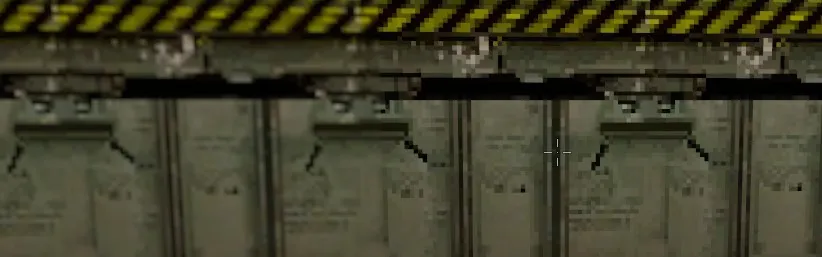
Today, with CS 1.6 dust2, Valve added a new material parameter, "$pointsamplemagfilter" "1". It works only with "LightmappedGeneric" and Bilinear or Trilinear filtering.
1 (right) - textures are pixelated (not filtered) 0 (left) - textures are blurred (filtered)
legacy_d2_crate01b.vmt
QuoteQuote LightmappedGeneric { $basetexture "dust2_legacy/legacy_d2_crate01b" $surfaceprop "metal" $POINTSAMPLEMAGFILTER 1 }
It gives good results with pixel art textures.
-
[Blocked Image: https://files.gamebanana.com/img/ss/textures/5c92b553564da.jpg]
GoldSrc: https://gamebanana.com/textures/5279
[Blocked Image: https://files.gamebanana.com/img/ss/textures/5c92b68063c49.jpg]
-
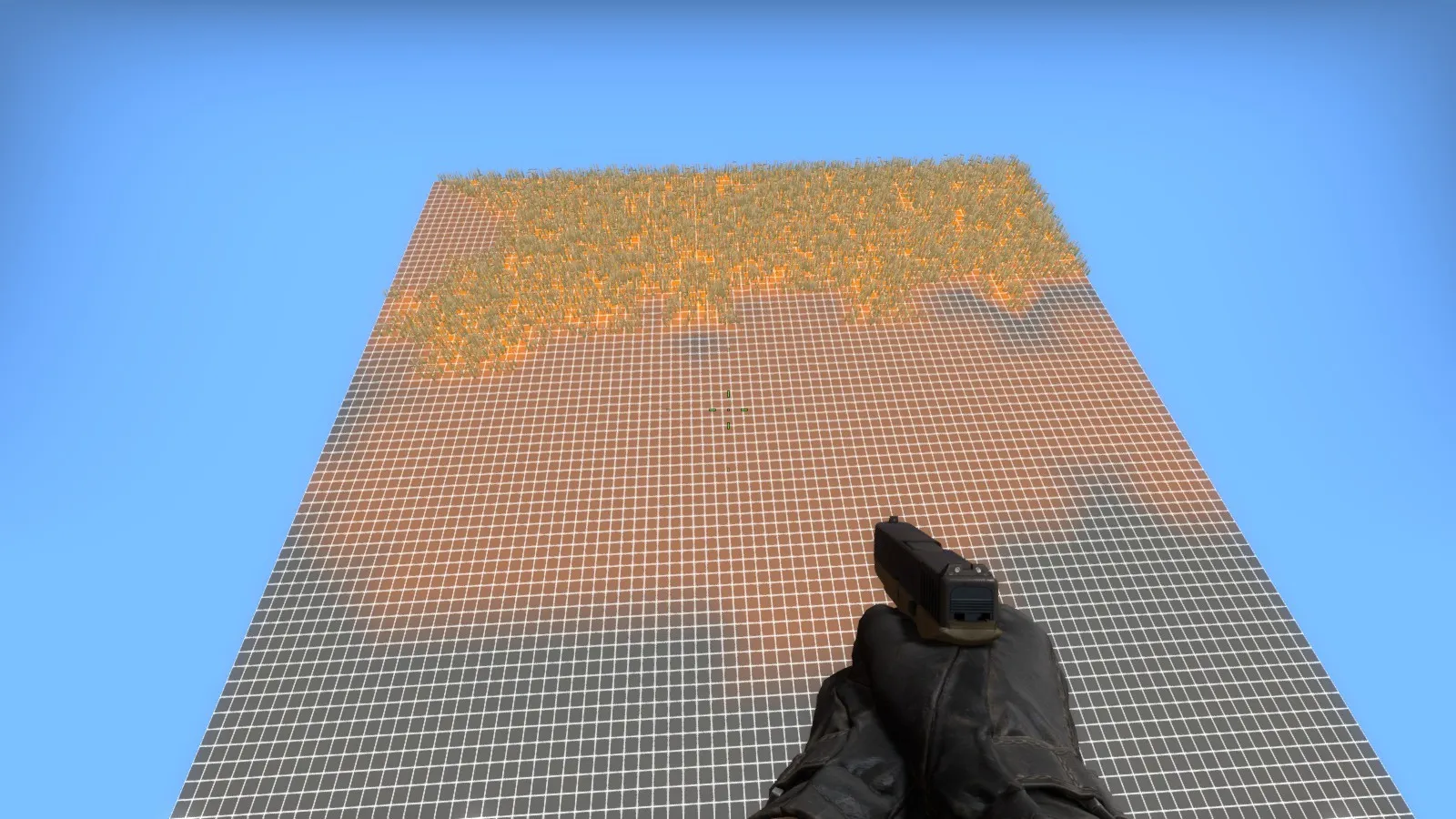
1. Decrease Tools - Options - 3D views - Detail render distance value to make Hammer happy. 2. How it's done? Again I'm tried to discover without help from Valve - with success.
I created a simple material using one of %detailtype made by Valve for a new map, "survival_grass_2" and I covered one big (~20k) displaced plane by this material.
Spoiler "WorldVertexTransition"
{
"$basetexture" "mamorex/dev64_orange" "$basetexture2" "mamorex/dev64_grey" "%detailtype" "survival_grass_2"
}
Here's the effect:
Spoiler
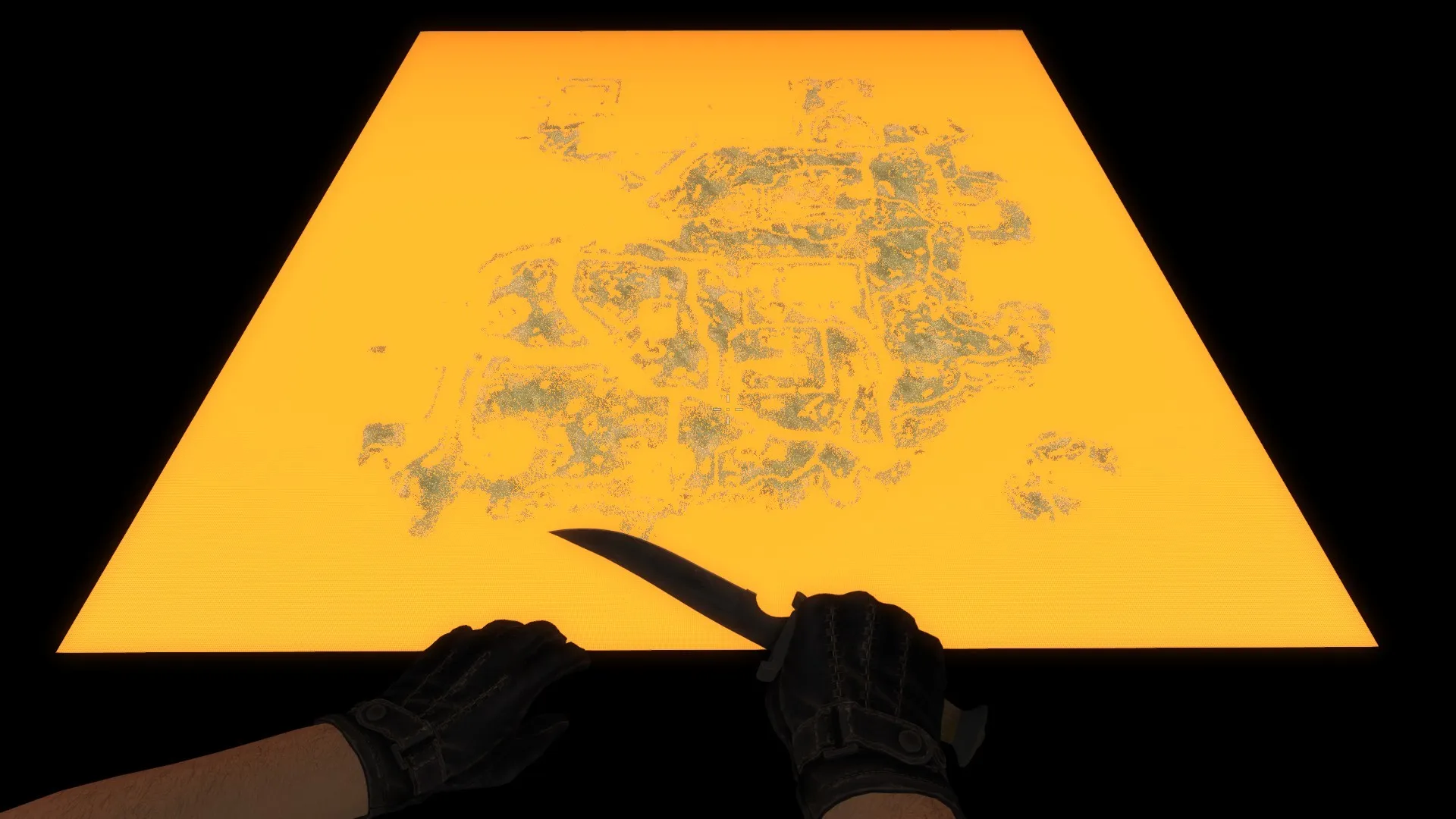
detail.vbsp is in csgo folder, the other files not, so I used GCFScapes.
survival_grass_2 using a "detail\detailsprites_survival" for detail sprites.
Spoiler grass { "$basetexture" "detail/detailsprites_survival" "$masks" "detail/detailsprites_survival_masks" "$alphatest" "1" "$vertexcolor" "1" "$worldspacetype" "detail/test_massive9_grass_type" "$worldspacetint" "detail/test_massive9_grass_tint" "$worldspaceburn" "_rt_grassburn" "$worldspacezone" "_rt_zoneprojection" %notooltexture "1" // "$worldspacescale" ".75" "$minimumspritesize" "22" }
So, Valve created three masks:
"$worldspacetint" "detail/test_massive9_grass_tint"
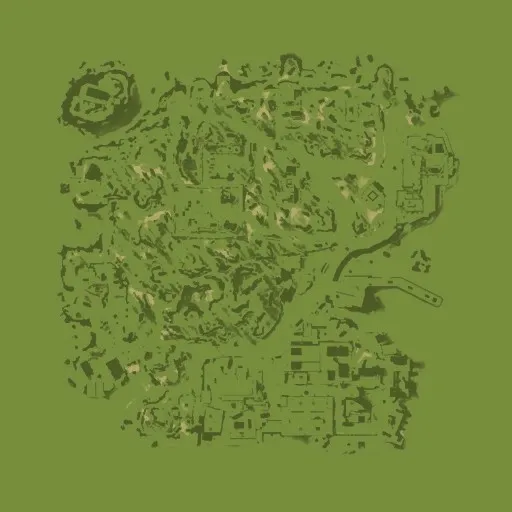
It looks like the darker = cover by grass, lighter = no grass.
"$worldspacetype" "detail/test_massive9_grass_type"
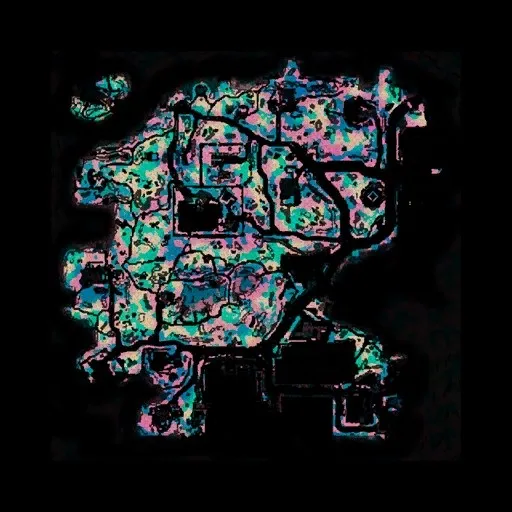
A few colors to decide, what type of grass will be placed.
"$masks" "detail/detailsprites_survival_masks"
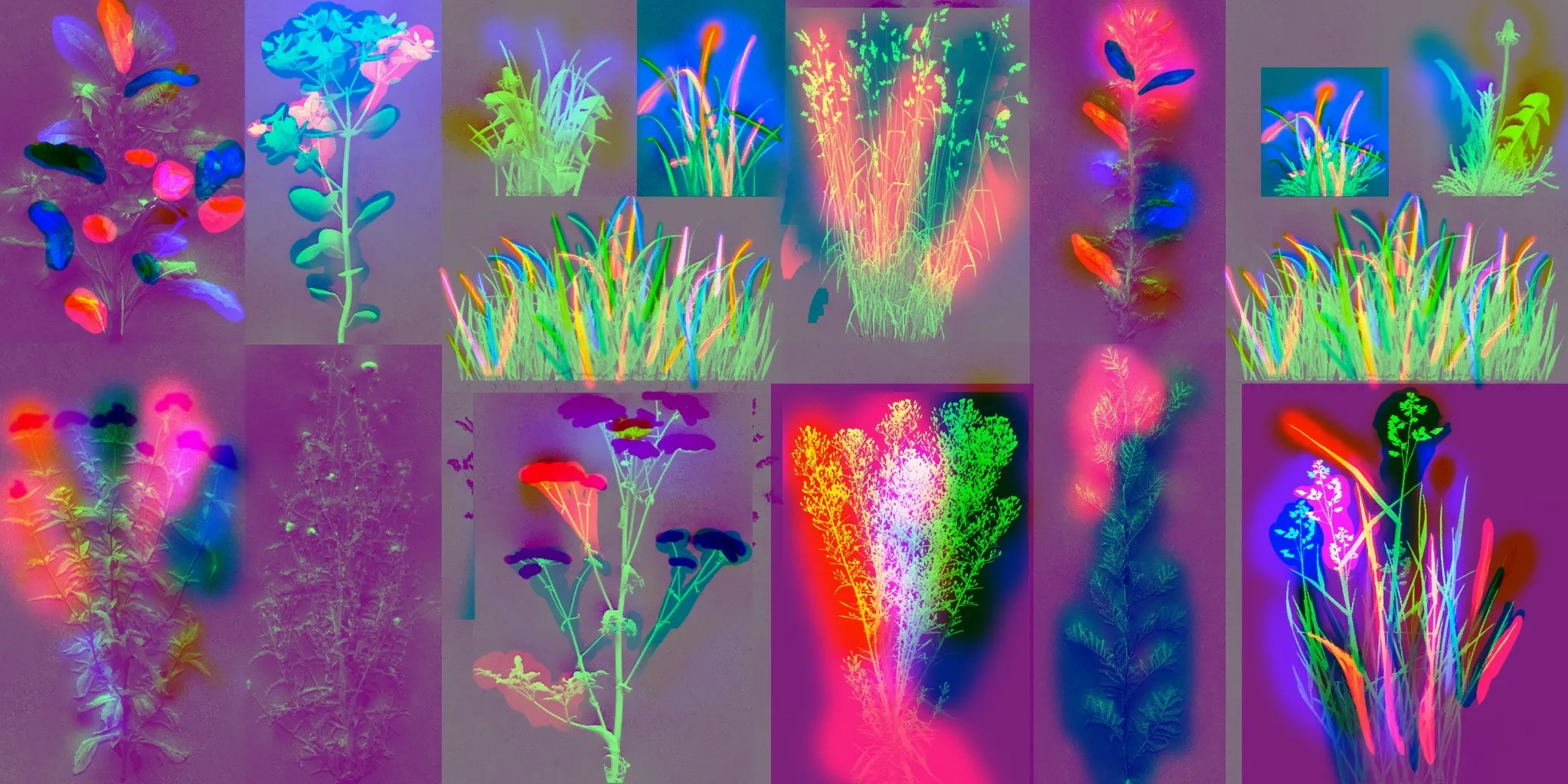
I don't know, how it works, but colors are the same as in the previous one.
So, if you want to use a detail sprites in your map like Valve, you must create a .vbsp file with a new detail sprites type and detail sprites material with a new masks, specially designed to your map.
If you delete masks entries from your custom detail sprites material, sprites are placed or not by blend alpha value and parameters from .vbsp file.
Spoiler
-
Valve used "$reflect3dskybox" 1 instead of "$reflect2dskybox" 1 in island_water_01 material. It is not described by Valve, I discovered it accidentally, ehhh... Now the 3d skybox and env_sun can be reflected by water.
island_water_01:
Spoiler "Water" { "%compilewater" 1 "%tooltexture" "dev/water_normal"
//forceexpensive Must be set to 1 for Portal 2 water reflections to work. $forceexpensive 1 "$abovewater" 1 "$surfaceprop" "water" "$bottommaterial" "dev/dev_waterbeneath2" // "$normalmap" "dev/water_normal" "$normalmap" "de_nuke/hr_nuke/pool_water_normals_001"
//Go with the flow! $flowmap "hr_massive/island_water_flowmap" $flow_normaluvscale 800 $flow_worlduvscale 1 $flow_timeintervalinseconds 1 // Amount of time before the change happens $flow_uvscrolldistance .5 // Stretch of UV Distance before change over to second set of flow $flow_bumpstrength 4 $flow_timescale 1 $flow_noise_texture "liquids/water_noise" $flow_noise_scale .001 $flow_debug 0
// Reflection "$reflecttexture" "_rt_WaterReflection" "$reflecttint" "{ 200 200 200 }" "$reflectskyboxonly" 0 // "$reflectentities" 1 "$reflectonlymarkedentities" 1 // "$reflect2dskybox" 1 "$reflect3dskybox" 1 "$reflectamount" "0.9"
// Refraction $refract 1 "$refracttexture" "_rt_WaterRefraction" "$refractamount" "0.8" "$refracttint" "{ 200 200 200 }"
// Fog stuff. "$fogenable" 1 "$fogcolor" "{ 54 76 91 }" "$fogstart" -16 "$fogend" 32 $lightmapwaterfog 1
"GPU<2" { "$fallbackmaterial" "hr_massive/island_water_01_cheap" } }
island_water_01_cheap:
Spoiler "Water" { "%compilewater" 1 "%tooltexture" "dev/water_normal"
//forceexpensive Must be set to 1 for Portal 2 water reflections to work. // $forceexpensive 1 "$abovewater" 1 "$surfaceprop" "water" "$bottommaterial" "dev/dev_waterbeneath2" "$normalmap" "de_nuke/hr_nuke/pool_water_normals_001"
// Reflection "$reflecttexture" "tools/toolsblack" "$reflecttint" "{ 200 200 200 }" // "$reflectskyboxonly" 0 // "$reflectentities" 1 "$reflectonlymarkedentities" 1 // "$reflect2dskybox" 1 // "$reflect3dskybox" 1 "$reflectamount" "0.9"
// Refraction $refract 1 "$refracttexture" "_rt_WaterRefraction" "$refractamount" "0.1" "$refracttint" "{ 200 200 200 }"
// Fog stuff. "$fogenable" 1 "$fogcolor" "{ 54 76 91 }" "$fogstart" -10 "$fogend" 15 $lightmapwaterfog 1
}
island_water_01_skybox:
Spoiler "Water" { "%compilewater" 1 "%tooltexture" "dev/water_normal"
//forceexpensive Must be set to 1 for Portal 2 water reflections to work. $forceexpensive 1 "$abovewater" 1 "$surfaceprop" "water" "$bottommaterial" "dev/dev_waterbeneath2" "$normalmap" "de_nuke/hr_nuke/pool_water_normals_001"
// Reflection "$reflecttexture" "_rt_WaterReflection" "$reflecttint" "{ 200 200 200 }" "$reflectskyboxonly" 0 // "$reflectentities" 1 "$reflectonlymarkedentities" 1 "$reflect2dskybox" 1 // "$reflect3dskybox" 1 "$reflectamount" "0.9"
// Refraction $refract 1 "$refracttexture" "_rt_WaterRefraction" "$refractamount" "0.8" "$refracttint" "{ 200 200 200 }"
// Fog stuff. "$fogenable" 1 "$fogcolor" "{ 54 76 91 }" "$fogstart" -10 "$fogend" 15 $lightmapwaterfog 1
"GPU<2" { "$fallbackmaterial" "hr_massive/island_water_01_cheap" } }
Reflections are broken when you don't make a 3d skybox (hollowed cube covered by toolskybox material with sky_camera entity inside). For maps without 3d skybox you must use "$reflect2dskybox" and env_sun will not be reflected.
-
 Quote from Mamorex
On 3/31/2018 at 9:23 AM, Mamorex said: I noticed a bug in CS:GO with a Phong shading from light_environment (it works well with other light sources) and prop_static entities. When prop_static collisions are on (VPhysics or Bounding Box), Phong shading from sun isn't working. When collisions are off, it works. It isn't working too, when I mix two entities with disabled and enabled collisions. Bug is noticeable on de_train.
Props scaling used. I wrote about it to Valve CS:GO team, no answer.
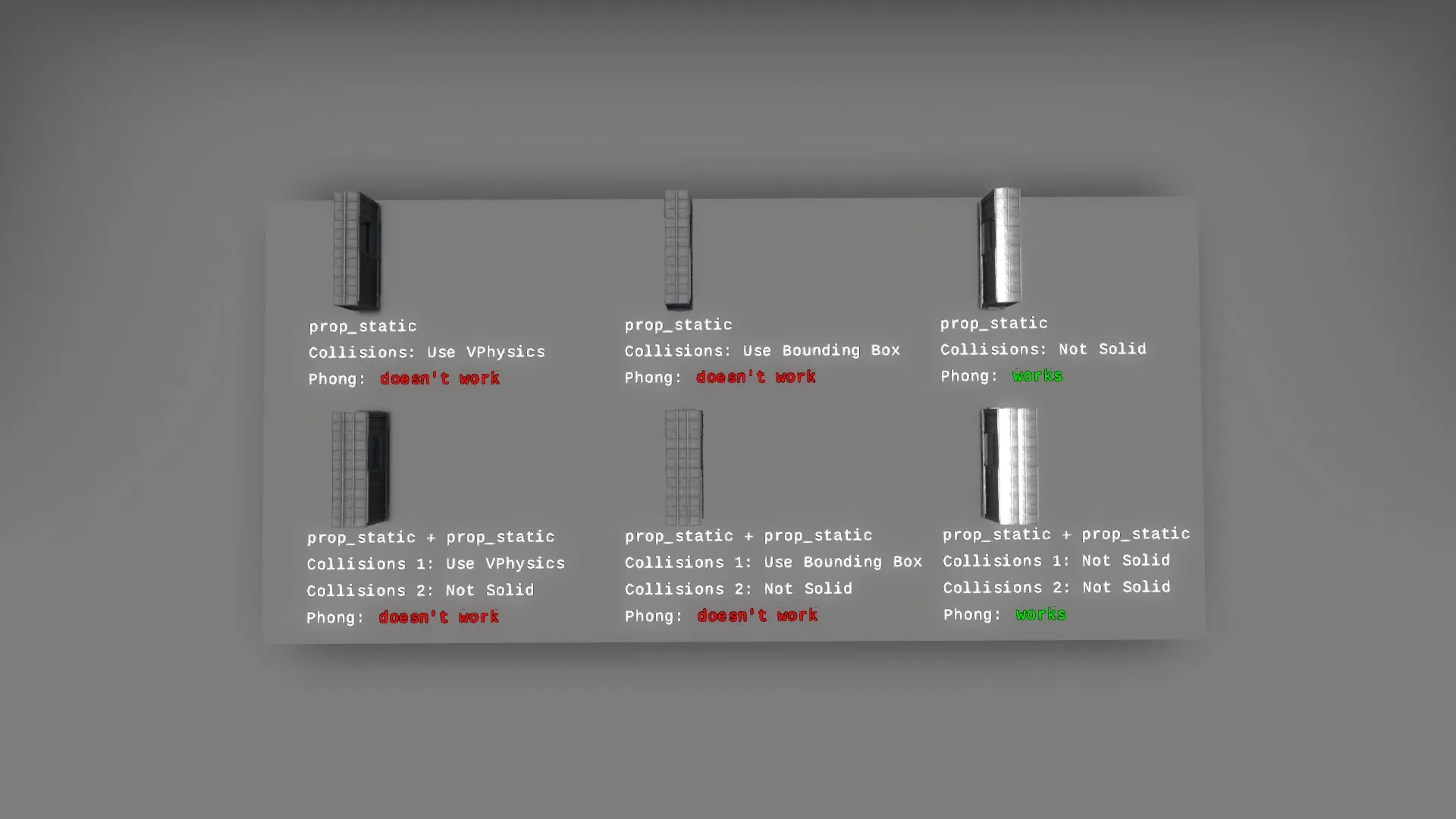
It has been repaired with today's update: http://blog.counter-strike.net/index.php/2018/07/20556/ (bug is not exist in patch notes, but we can find an updated Phong shader files in platform/shaders/fxc and it works on de_train). And, for me, all models using Phong shading (weapons, player models...) looks different after update.
-
https://gamebanana.com/maps/194729 Hammer editor files are included. It's important to scale everything brushes for 1.125 from 1.6. And I stretched every brush to 4x, 8x etc. to eliminate compile bugs.
[Blocked Image: https://files.gamebanana.com/img/ss/maps/58d31530a2a5f.jpg]
-
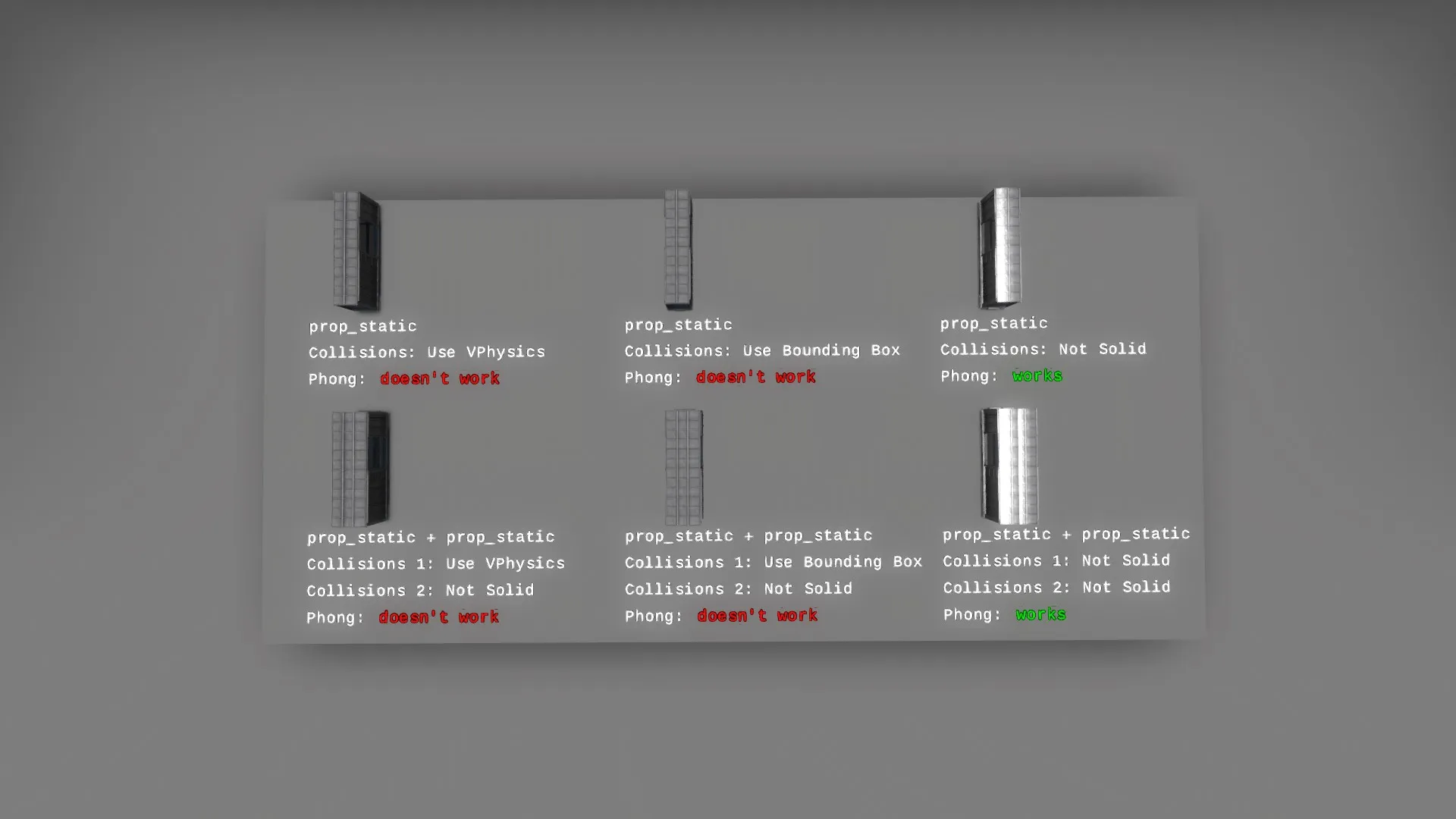
I noticed a bug in CS:GO with a Phong shading from light_environment (it works well with other light sources) and prop_static entities. When prop_static collisions are on (VPhysics or Bounding Box), Phong shading from sun isn't working. When collisions are off, it works. It isn't working too, when I mix two entities with disabled and enabled collisions. Bug is noticeable on de_train.
Props scaling used. I wrote about it to Valve CS:GO team, no answer.
-
https://gamebanana.com/textures/4175
Add "$reflectance" "1" into mirror.vmt file, if you want fully reclectance mirror (brighter reflections). Stock value is 0.25.
Files are still working, I compiled map for testing few minutes ago.
-
$treesway will be good option, but it doesn't work with normal maps.
-
 Quote from grapen
16 hours ago, grapen said: The shaders you want are disabled on low settings, that's just the way things are in CSGO, the middle ground here is to have a desaturated, slightly transparent texture. I know, it doesn't look realistic, but players must be able to identify the glass on all settings, so as to not create any unfair advantage.
https://developer.valvesoftware.com/wiki/Refract
[Blocked Image: https://developer.valvesoftware.com/w/images/c/cc/Note.png] Note:Will not work when applied to world brushes. [Blocked Image: https://developer.valvesoftware.com/w/images/c/cc/Note.png] Note:When being used on a model, you must specify $model "1". [Blocked Image: https://developer.valvesoftware.com/w/images/c/cc/Note.png] Note:Multiple layers of the Refract shader will not render when applied on the same entity. For refract you must use "Refract" shader, not "LightmappedGeneric". And use it on brush entity or model, func_brush is the best. For me 1st option is working with every graphics settings. glass_d - texture [Blocked Image: https://68.media.tumblr.com/avatar_dbec918561e7_128.png] glass_n - normal map [Blocked Image: http://developer.download.nvidia.com/whitepapers/2008/normalmapdxt_id_files/02_dot2_small.png] [Blocked Image: http://oi66.tinypic.com/2cenhgn.jpg] Create yours with VTFEdit.
-
1st option
Make a func_brush with this material:
QuoteQuote "Refract"
{
"$surfaceprop" "glass" "%tooltexture" "mamorex/glass/glass_d" //texture in Hammer
"$normalmap" "mamorex/glass/glass_n" "$refracttinttexture" "mamorex/glass/glass_d" "$refractamount" "0.02" //"$bluramount" "1" - use if you want a blur effect
}
2nd option
Just use this material:
QuoteDisplay MoreQuote "LightmappedGeneric"
{
"$surfaceprop" "glass"
"$basetexture" "mamorex/glass/glass_d" "$alpha" "0.25"
//for high shader setting
"$bumpmap" "mamorex/glass/glass_n" "$envmap" "env_cubemap" "$envmaptint" "[0 0 0]" //3x0 for Phong only, higher for Phong and cubemap reflections
"$phong" "1"
"$phongexponent" "150" "$phongamount" "[10 10 10 1.0]" }
All values must be changed for your map lighting and setup.
-
-
 Quote from Yanzl
On 3.04.2017 at 10:44 PM, Yanzl said: Valve haven't released any documentation for the new shader stuff, but I found some new parameters in Hammer and -tools material editor.
In Hammer you can add -staticpropbounce to vrad and there's a new setting in prop_static for bounced lighting, but don't really know if it works or not.
As far as the new vmt parameters go, you can now have 2 envmapmasks and 2 detail textures for blend materials. There's also a new system for adjusting the blend border. On VertexLit they added a seperate tint mask that can also specular mask in the red channel.
I already implemented this stuff in VMT Editor https://github.com/Gira-X/VMT-Editor/releases/tag/v1.3.4
Two envmapmasks works great.
[Blocked Image: http://oi65.tinypic.com/21mevzc.jpg]
QuoteDisplay MoreQuote "WorldVertexTransition"
{
//x - water //x2 - ground
"$surfaceprop" "puddle" "$surfaceprop2" "concrete"
"$blendmodulatetexture" "concrete/alley_blend"
"$basetexture" "brick/hr_brick/venice/brick_ground_b" "$basetexture2" "brick/hr_brick/venice/brick_ground_b"
"$bumpmap" "dev/water_normal" "$bumpmap2" "brick/hr_brick/venice/brick_ground_a_normals"
"$bumptransform" "center 0.5 0.5 scale 2 2 rotate 0.0 translate 0.0 0.0" "$bumpframe" "0"
"$envmapmask" "lights/white" "$envmapmask2" "brick/hr_brick/venice/brick_ground_b"
"$envmap" "env_cubemap" "$envmaptint" "[0.6 0.6 0.6]"
"$phong" "1"
"$phongexponent" "150" "$phongamount" "[10 10 10 0.1]"
"$phongexponent2" "15" "$phongamount2" "[10 10 10 1.0]"
"Proxies"
{ "AnimatedTexture" { "animatedtexturevar" "$bumpmap" "animatedtextureframenumvar" "$bumpframe" "animatedtextureframerate" 30.00 } }
}
Bounce lighting from models works too. How?
- turn on Enable Bounce Lighting in prop_static entity, from which we want to get a light - add -staticpropbounce 1-x parameter into $light_exe compile command line, for example, -staticpropbounce 16, higher number=more bounced light
[Blocked Image: http://oi67.tinypic.com/v5y73t.jpg]
On the left these are red models with "Enable Bounced Lighting" on. On the right with off. Twice, on models and on brushes. On brushes bounced light is darkness. My $light_exe settings is: -final -staticpropbounce 16 -textureshadows -hdr -StaticPropLighting -StaticPropPolys -game $gamedir $path\$file
-
I can't see any detail sprite at coop_cementplant made by Valve. These are invisible... Look at my screen:
[Blocked Image: http://oi64.tinypic.com/a09dv.jpg]
Now, look, how it must be:
[Blocked Image: http://i.imgur.com/lqPS6XL.jpg]
My graphics settings in menu are the highest. I tried delete cfg folder from csgo directory - still the same issue. Why? Because I have a Radeon graphics card? I want to try this: http://gamebanana.com/models/3800 , and I must can see grass sprites for a full satisfaction... Is there any command or something... for detail sprites?
-
Shawn Olson writed about this and other issues: https://migrationtest.mapcore.org/topic/19925-csgo-fgd-error/
I haven't any issue with compile and bad .fgd - just red letters, but it's very easy to fix it.