


Awesome job Joris! 
Posts by shawnolson
-
-
 Quote from will2k
6 hours ago, will2k said: I'm currently playing through Xen, and honestly, it looks astonishing...
Finally, a shoutout to @shawnolson since wallworm tools shine in all their glory in the intricate and organic shapes that make up the majority of Xen world. I can only imagine, in horror, if all this work was solely done in Hammer: the game would have probably released in 2040 at the earliest, that is if any member of the dev team managed to keep their sanity

Thank you Will. I am deeply flattered. But as flattering as that is, the shout-out belongs to the whole team. Many of the really cool tools in WW were only possible because I could devote so much time to the tools because of Black Mesa. I certainly would have worked on WW all along, but I would not have had the need (or opportunity) to push many of the tools as far as they went without being a part of Black Mesa.
-
Quote from That50
5 hours ago, That50'sGuy said: I've been using that tool since the very beginning. I can't imagine what modeling would be like without it hahah!
Makes me smile
Radix Obviously you are not an idiot for using Blender. Many wonderful and talented people do. That being said, I am very passionate about making life for Source fun, exciting, robust and powerful inside 3ds Max. Just go scroll through the WW Changelog to see how serious I've been at that for 10 years! (Note the bottom of the page that links to previous version archives... those demonstrate the kind of commitment WW users have been enjoying. Except for a period of several months in 2019 where I was fighting cancer, I have updated WW tools many times every week for many years.)
For those that are wanting help with your crunch using WW, feel free to ask for help on the WW Discord channel. I love seeing all the cool ideas people have come to life!
-
External Content www.youtube.comContent embedded from external sources will not be displayed without your consent.Through the activation of external content, you agree that personal data may be transferred to third party platforms. We have provided more information on this in our privacy policy.
-
For those interested, Wall Worm Pro Pack is currently on sale for 50% off. It includes Wall Worm Pro, CorVex, ShellVex, Arch, Brushify and many more plugins for modeling/mapping.
-
It would be remiss to leave out the level editor you are using...!!!
-
External Content www.youtube.comContent embedded from external sources will not be displayed without your consent.Through the activation of external content, you agree that personal data may be transferred to third party platforms. We have provided more information on this in our privacy policy.
-
I'm optimistic that the Indie version will expand to the rest of the world
As for a Blender version, it's not something that will happen. It would be too big of an investment in time with too little payoff for my time.
-
For all you 3ds Max users, you may have been happy to hear recently that Autodesk recently unveiled a Indie Version of 3ds Max at a rate affordable to the Indie crowd. In celebration of this, I've released a new product called Wall Worm Pro Pack that includes Wall Worm Pro as well as all the peripheral plugins I've been building for years (like CorVex, ShellVex, Brushify, Arch and more). I know that most WW users are modelers and the level design crowd hasn't really caught on to the fact that the majority of the tools available on WW are for level design. So if you are interested in taking your projects to the next level, give a good hard look at this collection.
Buying the pack is cheaper than buying all the plugins together, and there is an extra sale going on through August 31. Get Wall Worm Pro Pack here.
Enjoy! And help spread the word
-
 Quote from Karthoum
7 hours ago, Karthoum said: Just wondering if this is something stupid that I've done on my end but the uniform scale on importing the vmf seems to work, except it has moved all the props down and rotated them 180 degrees?
...
Still, if it's something I've done then it could be a cautionary tale for someone else if there's a fix or thing to avoid
I tested several scenarios and could not replicate this issue. You may need to send me your VMF for testing.
EDIT: Thanks for sending your scene and pointing this out. Latest WW fixes the problem.
-
@Mega WW/WW Pro were updated today to support importing props using modelscale or uniformscale. This includes CS:GO and Black Mesa prop_dynamic as well as prop_scalable. Other games/mods depend on their particular FGD. For any entity using modelscale or uniformscale, the prop will be scaled on import.
-
 Quote from Mega
2 hours ago, Mega said: Hello Shawn, first I'd like to thank you a lot for creating WallWorm. Being able to do pretty much all of my mapping workflow inside of Max is an absolute bliss.
I want to ask you if WallWorm supports or it's a planned addition for VMF importing to include the correct scale of CSGO props that have been adjusted in Hammer (this is a feature added in March 2018 that allowed re-sizing static props, more here under [SDK] https://blog.counter-strike.net/index.php/2018/03/20309/ ). I looked around the settings and on the internet and couldn't find any info on this, so this is why I came here to ask you.
Thank you for your time.
I am happy you are enjoying WW.The VMF exporter honors scale for props that support it. But it looks like I may need to address this in the importer. I'll put it on the TODO and try to get it into the next update.
-
 Quote from Interfearance
On 2/24/2019 at 6:56 PM, Interfearance said: @shawnolson Looks great, this is the first thing I dreamed of when I came to the antiquated hammer tools from modern modeling software. Little did I know it was a thing! However, as a Maya lover, I was wondering if there was any way to install wallworm on Maya with basic brush import/model export functionality. If not, I suppose I could just pick up 3ds.
Wall Worm started as a work of passion that proceeded so extensively and rapidly only because of my own particular goals (centered in a Max pipeline). At this point to start a new branch of WW (devoted to such an old engine) on a new platform would be a huge investment of my time with little returns. As such, it is very unlikely that there will ever be a version of WW outside of 3ds Max. That being said, if you are already competent in Maya, you will certainly pick up Max fairly quickly.
Also, in general news about WW, Autodesk recently featured an article they asked me to write about the development of Wall Worm. See From Black Sheep to Black Mesa and Beyond.
More excitingly, I will be the keynote speaker this year at GDC for Autodesk on 3ds Max. So if you're going to GDC, make sure to come see talk that includes a lot of information about using Max and developing tools for Max.
-
Recent updates to WW have included a bunch of new icons/toolbars/UI updates. I did not know that these updates broke the installer/updater for 2016 and older as I've been primarily working in 2019.3 and later. Today I loaded a new update for WW that will properly install/update into 2016 and older.
That being said, I strongly urge all WW users to use 3ds Max 2019.3 or later. Why? Too many reasons, honestly. But here is just one example of the kinds of things you can do in later versions of Max. (See the new site Hammered to the Max for even more videos that precede this video).
External Content www.youtube.comContent embedded from external sources will not be displayed without your consent.Through the activation of external content, you agree that personal data may be transferred to third party platforms. We have provided more information on this in our privacy policy. -
This video shows some techniques that you may find useful in your modeling/texturing adventures in 3ds Max. Enjoy.
External Content www.youtube.comContent embedded from external sources will not be displayed without your consent.Through the activation of external content, you agree that personal data may be transferred to third party platforms. We have provided more information on this in our privacy policy. -
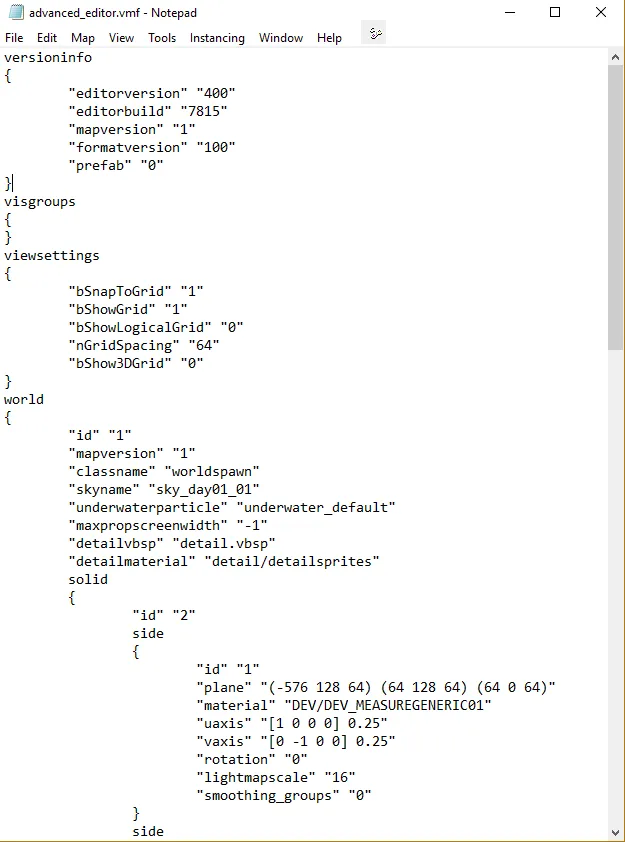
For all the Hammer users who have been praying for an update, Wall Worm is happy to announce a new Advanced VMF Editor. Just some of the key features:
- Classy black and white theme to increase readability in High Contrast Monitors.
- Familiar Hammer menus (some of which work as expected)
- Context-sensitive right-clicking to open assets directly in your Hex Editor of choice. Currently supports MDL and VTF.
- Tons more!
Finding the cause of a bad brush never got easier.
Here is a screenshot of this new, exciting product:
-
New free shape primitive for 3ds Max: Border Spline. This shape will create splines on each border of each valid geometry assigned to it. Enjoy.
External Content www.youtube.comContent embedded from external sources will not be displayed without your consent.Through the activation of external content, you agree that personal data may be transferred to third party platforms. We have provided more information on this in our privacy policy. -
There is also another feature we've added into BMS that didn't get into press release about new features: $moss. We've add a new set of VMT parameters that add a new layer to textures that works on VertexLitGeneric, LightmappedGeneric and Lightmapped_4wayBlend. When a prop with this param is used with a displacement using it on 4way, for example, there is a layer of texture blending between them that helps blend them more seamlessly.
I'm making a video soon to demonstrate how to create and visualize them via Wall Worm in 3ds Max. If no docs are up by time I make video, I'll also post information on how to set it up and all the accompanying parameters.
-
Latest update to WW/WW Pro includes new nudge tools and enhancements to grid objects.
External Content www.youtube.comContent embedded from external sources will not be displayed without your consent.Through the activation of external content, you agree that personal data may be transferred to third party platforms. We have provided more information on this in our privacy policy. -
Looking good @FMPONE. Really nice.