

Absolutely love that Ben Mauro has been delving more into blender, he's an awsome concept artist and also really good with zbrush, nice lil watch ty @Zarsky

Blender
-
-
Recently I was trying to make some physics destruction in blender, but most of the tools like cell fracture are sort of legacy. Does anyone know of methods or addons to create DESTRUCTION? All the other physics are pretty incredible, mantaflow is da beast!
-
 Quote from Interfearance
5 hours ago, Interfearance said: Recently I was trying to make some physics destruction in blender, but most of the tools like cell fracture are sort of legacy. Does anyone know of methods or addons to create DESTRUCTION? All the other physics are pretty incredible, mantaflow is da beast!
There's a branch named Fracture Modifier that gives access to much more powerful destruction.....but it's 2.79 only unfortunately. They are working on bringing it to 2.8, but it will probably take some time. There seems to be a method of using them together tho:
http://blenderphysics.com/fracturemodifier/
Next release brings better OpenVDB support, which should make it easier to import simulations from other software.
-
Ben is at it again. This time showing the power of some of the best hard surface plugins available for Blender:
External Content www.youtube.comContent embedded from external sources will not be displayed without your consent.Through the activation of external content, you agree that personal data may be transferred to third party platforms. We have provided more information on this in our privacy policy. -
Blender 2.83 is here!
External Content www.youtube.comContent embedded from external sources will not be displayed without your consent.Through the activation of external content, you agree that personal data may be transferred to third party platforms. We have provided more information on this in our privacy policy.https://www.blender.org/download/releases/2-83/External Content www.youtube.comContent embedded from external sources will not be displayed without your consent.Through the activation of external content, you agree that personal data may be transferred to third party platforms. We have provided more information on this in our privacy policy. -
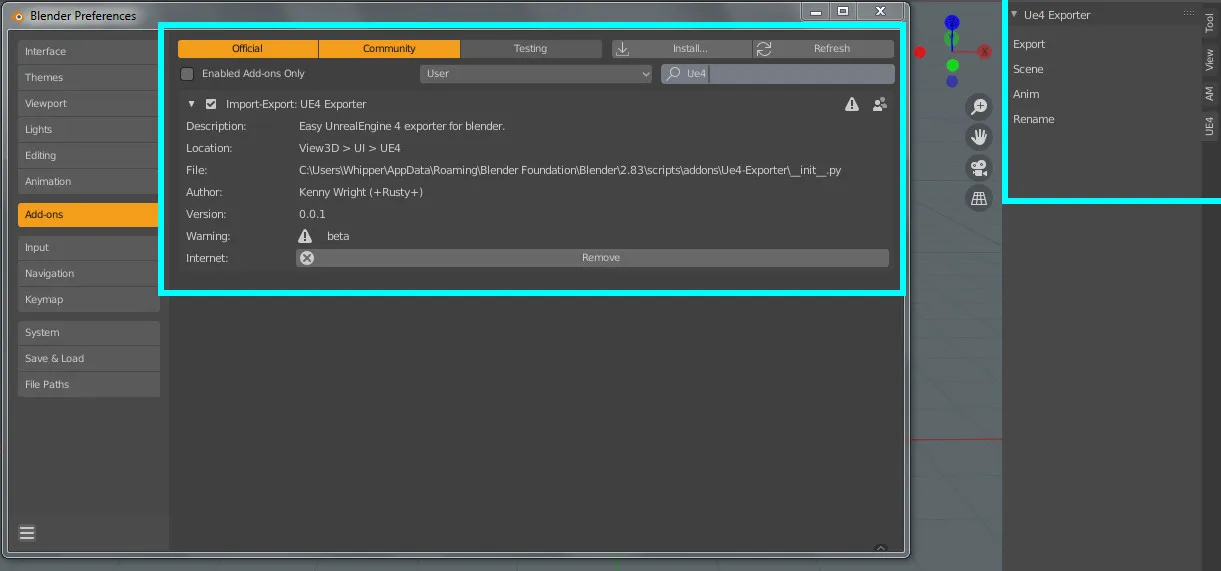
Nearly a year ago (within this thread) i posted about a UE4 addon for blender .. even though there are afew out there and you can still get the job done without any addon, Im still on the look out one that suits my needs and without a load of dropdown menus and options i would never use. So as they say "want something done right, do it yourself" and now racking my brains over blenders python coding to try and do exactly that, taking everything in from the api doc's ect and interweb sources. Very basic stuff so far but its a start, Iv only ever coded a simple popup menu for tools i mainly use but no need for that anymore with blenders recent quicktools menu built into 2.8 (which is brilliant). Got the addon options and toolbar up and going but still so much to take in^^
-
After a couple of days of looking at code i thought it may just be an easyer idea to try and just update the original UE4 addon but that turned out to be pretty frustraiting with API updates and understanding the style of the original creator, so was advised it would porbably be better to start from scratch.. So two weeks of constant looking at code and getting to grips with python im finally getting to where i want to be.
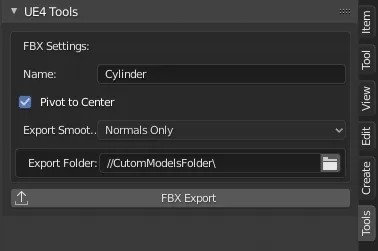
Iv managed to create this little custom panel for exporting simple models to UE4 (still very much wip ovc) -Selected objects name cane be changed within the panel -When pivot to centre is chekecked, on export the model's pivot is centred (which is 1 main reason i even wanted this addon because default fbx export causes you to manually move any objects to centre before exporting unless you want to keep blender's scene 1:1 which can also be done if unchecked) -Exporting normals type's that are used within ue4 -Adding the custom export folder destination with quick and easy acces when shift+click on the folder icon and ofcourse the export button that adds all the functions within.. Iv still to test more and add a mesh collision panel for also exporting collisions when checked.. Im no coder but learneing alot from this already.
-
 Quote from +Rusty+
22 hours ago, +Rusty+ said: After a couple of days of looking at code i thought it may just be an easyer idea to try and just update the original UE4 addon but that turned out to be pretty frustraiting with API updates and understanding the style of the original creator, so was advised it would porbably be better to start from scratch.. So two weeks of constant looking at code and getting to grips with python im finally getting to where i want to be.
Iv managed to create this little custom panel for exporting simple models to UE4 (still very much wip ovc) -Selected objects name cane be changed within the panel -When pivot to centre is chekecked, on export the model's pivot is centred (which is 1 main reason i even wanted this addon because default fbx export causes you to manually move any objects to centre before exporting unless you want to keep blender's scene 1:1 which can also be done if unchecked) -Exporting normals type's that are used within ue4 -Adding the custom export folder destination with quick and easy acces when shift+click on the folder icon and ofcourse the export button that adds all the functions within.. Iv still to test more and add a mesh collision panel for also exporting collisions when checked.. Im no coder but learneing alot from this already.
Those are always the first plugins I install when I get a new 3d package
 I will try this if I go back to Blender at some point. Question: Does Pivot to Center mean, it places the pivot at the center of the object, or does it move the object to the origin before exporting? If it's the latter, maybe you could rename it to something like "Export Pivot Location" or "Move to Origin Before Export" to avoid confusion
-
Quote
Quote Those are always the first plugins I install when I get a new 3d package
I will try this if I go back to Blender at some point. Question: Does Pivot to Center mean, it places the pivot at the center of the object, or does it move the object to the origin before exporting? If it's the latter, maybe you could rename it to something like "Export Pivot Location" or "Move to Origin Before Export" to avoid confusion Iv also added a descriptions to all the settings so when cursor hovers over them the description is show, but that is a great point!.
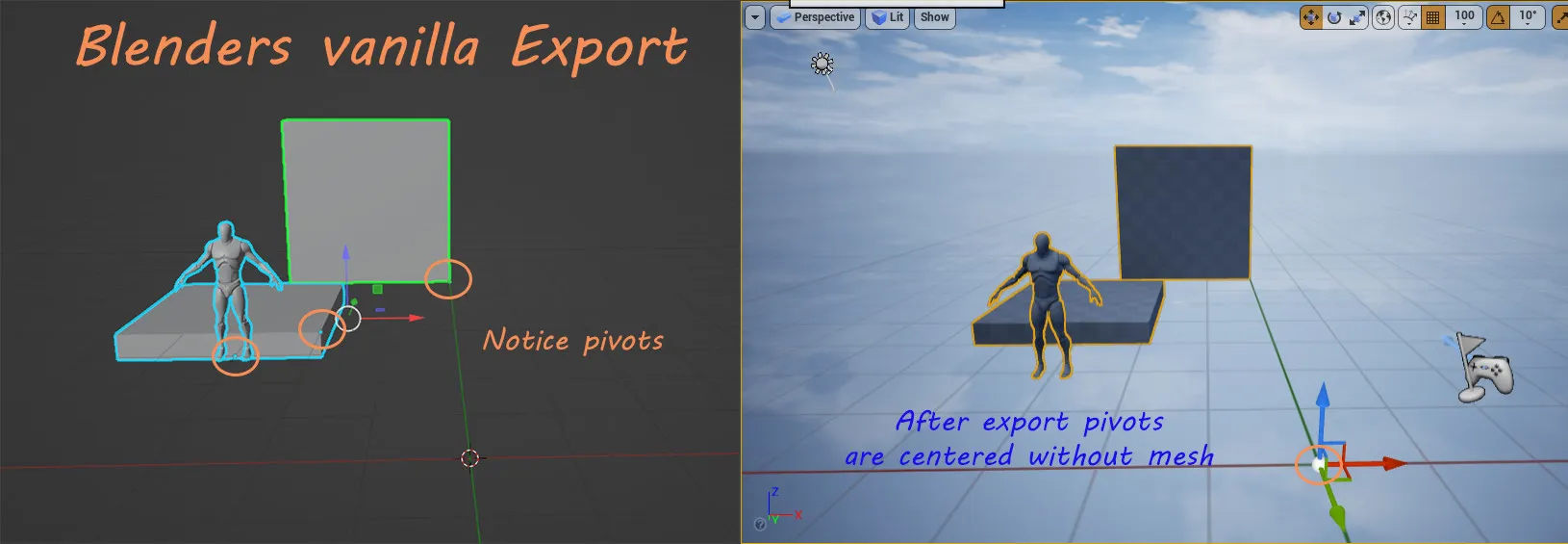
With the vanilla fbx export, if you were to have a model anywhere within blender when exporting the pivot is automatically centred as if transforms are automatically applyed but leave the mesh in the same position within blender and its pivot centred (which is ok if you want the positions of your models setup 1:1 with blender and keep the scene consistant.
Example: Exported each object as seen below and then within ue4 there pivots are centered without mesh
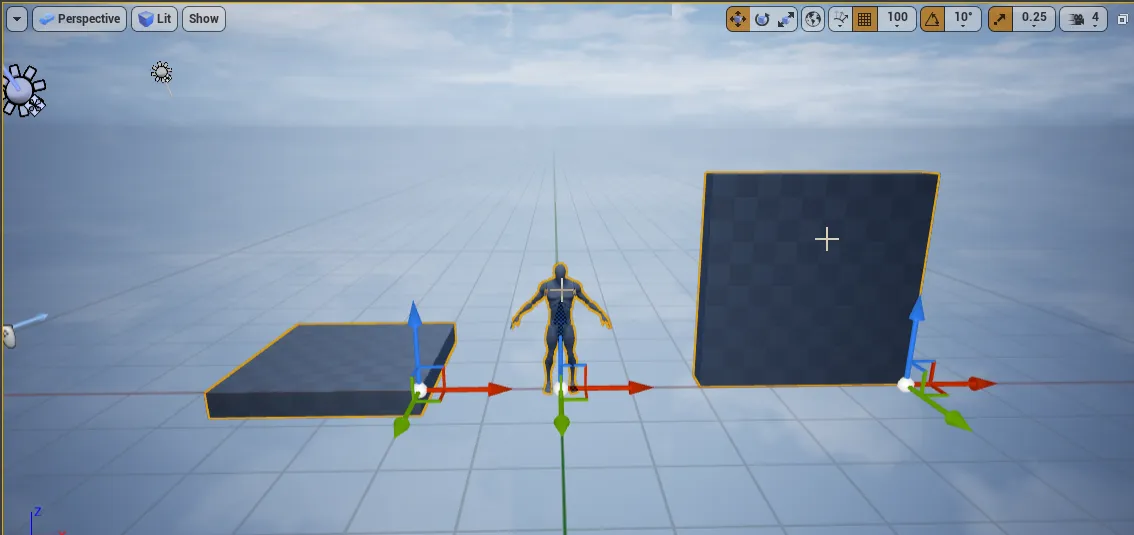
With my exporter (shown below in a gif) it will move exported mesh to center with pivot to keep the pivot and mesh correctly placed.
(sorry not the best compression with the gif) but here's after export in ue4 pivots are correct. Hope that makes sense @Minos
But i also do have an idea, when using the exporter script that when exporting it does the same (as above) but then returns it to original position within blender. Making things clear to anyone using the exporter is definetely a must, its still w.i.p and i do have plans to add some animation functions ohh and if anyone hasnt tryed the "asset manager addon" https://blendermarket.com/products/asset-management id also recommend it, really awsome tool for creating & building libraries.
-
Quote
Quote Question: Does Pivot to Center mean, it places the pivot at the center of the object, or does it move the object to the origin before exporting?
To answer your question: no it doesnt mean the pivot will be centered to the object (probably always best to manually set ones pivot especially for modular stuff) so yeh it moves the object and pivot to the the center of the scene keeping the object and pivot's origin intact .. if that makes sense? but will defo be refining names and also scrip's layout for easyer readability. Winging it as i go^^
-
External Content www.youtube.comContent embedded from external sources will not be displayed without your consent.Through the activation of external content, you agree that personal data may be transferred to third party platforms. We have provided more information on this in our privacy policy.
-
3d artists learning blender in 2020

-
Oh btw. Blender 2.90 is out!
Bunch of new features and fixes.
External Content www.youtube.comContent embedded from external sources will not be displayed without your consent.Through the activation of external content, you agree that personal data may be transferred to third party platforms. We have provided more information on this in our privacy policy.External Content www.youtube.comContent embedded from external sources will not be displayed without your consent.Through the activation of external content, you agree that personal data may be transferred to third party platforms. We have provided more information on this in our privacy policy.They've put much more effort in the release notes page:
https://www.blender.org/download/releases/2-90/
It now looks pretty slick!
Much more improvement incoming in roughly 3 months with the next (2.91) release. Last version was the LTS-release, so if you can't keep up, that one only gets bug fixes for the next 2 years.
-
Ubisoft makes Blender collaborative
External Content www.youtube.comContent embedded from external sources will not be displayed without your consent.Through the activation of external content, you agree that personal data may be transferred to third party platforms. We have provided more information on this in our privacy policy. -
Blender 2.93 is out!
https://www.blender.org/download/External Content www.youtube.comContent embedded from external sources will not be displayed without your consent.Through the activation of external content, you agree that personal data may be transferred to third party platforms. We have provided more information on this in our privacy policy.https://www.blender.org/download/releases/2-93/
This is a pretty big release but the next one will be even bigger (3.0)!
-
Saw a title on YT [from Gamedevfromscratch] that Adobe is joining the Blender fund… they must be the best funded open source project out there now/ever!
(imagine if OpenOffice had a bit more support than IBM)
Do you artists think Blender is going to be the most widespread tool in the game industry? Is it being used for some level design as well? (I have seen stuff done in Max+plugins for example)
-
I'm waiting on a bunch of compiles and animations, so I've started messing around with Simon Fuch's blender drone tutorial. Feels good to crack open a modelling tool after a long break
-
Blender 3.0 is out today
External Content www.youtube.comContent embedded from external sources will not be displayed without your consent.Through the activation of external content, you agree that personal data may be transferred to third party platforms. We have provided more information on this in our privacy policy.External Content www.youtube.comContent embedded from external sources will not be displayed without your consent.Through the activation of external content, you agree that personal data may be transferred to third party platforms. We have provided more information on this in our privacy policy. -
https://code.blender.org/2022/02/layered-textures-design/
Some very exciting features being designed here. I can't see it replacing the need for Substance products of course, but super useful for small tasks it seems like a great idea.
-
Boom, another release is here:
-
Participate now!
Don’t have an account yet? Register yourself now and be a part of our community!