Here's a script I've made that allows you to replace kv playermodels in your map with custom ones you've made without getting error boxes in Panorama!
Features:
- Easily configurable
- Runs on map spawn then refreshes every 2s by default
- The script precache the models for you
- As every script, "mp_restartgame 1" will refresh it
Issues:
- A non existing model may crash the game
- The Panorama team selection screen wont use the right models... this can't be fixed since Panorama loads before the map and isn't serversided.
>> DOWNLOAD <<
Place playermodelreplacer.nut inside scripts/vscripts/ it then needs to be packed in your map when you release it
What you need to do in order to get perfectly working playermodels:
Custom playermodels MUST use a valid prefix in order to receive the voicelines and gloves [+ sleeves] from their original model they're based on. You can't have custom arm models, they're now hardcoded inside client.dll along with skin colors
For instance: If you want to use the FBI voicelines and Arms you'll name your playermodel like so: ctm_fbimodelname.mdl
If you want a... Leet based model you'll name it like this: tm_leetmodelname.mdl
Examples: tm_leet_jap.mdl ctm_sas_kidotaiD.mdl ctm_swat_spetsnazA.mdl
Here's a complete list of the available prefixes including what they use:
Spoiler
PREFIX FEATURES DARK SKIN PREFIX
- ctm_fbi Blue sleeves, black hardknuckle gloves, American accent
ctm_fbi_variantc, doesn't work - ctm_gign Blue sleeves, blue hardknuckle gloves, French accent
- ctm_gsg9 Light blue sleeves, blue hardknuckle gloves, German accent
-
ctm_heavy BIG sleeves, black hardknuckle gloves, no voice - ctm_idf Green sleeves, green hardknuckle gloves, Arabic accent
- ctm_sas Blue sleeves, blue hardknuckle gloves, British accent
- ctm_st6 Green camo sleeves, green hardknuckle gloves, American accent
- ctm_swat Grey sleeves, black hardknuckle gloves, American accent ctm_swat_variantb, works
- tm_anarchist No sleeves, Full sleeves (considered as gloves), American accent
- tm_balkan Brown Leather, Fullfinger gloves, Turkish accent
-
tm_jumpsuit Black jumpsuit sleeves, Fingerless gloves, no voice tm_jumpsuit_varianta
- tm_leet_variant No sleeves, Fingerless gloves, Arabic accent tm_leet_varianta, works
- tm_phoenix No sleeves, Fullfinger gloves, Russian accent tm_phoenix_variantb
- tm_pirate Watch (considered as sleeve), Barehands, African accent
- tm_professional White sleeves, Fullfinger gloves, American accent tm_professional_var4
- tm_separatist Blue sleeves, Fullfinger gloves, Spanish accent
Models can only have a limited number of characters before the game can't load them, be sure to keep your suffixes short, specially for the long ones.
Setup:
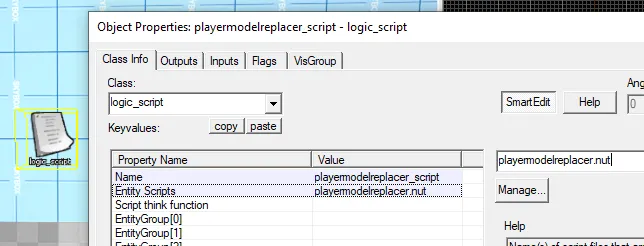
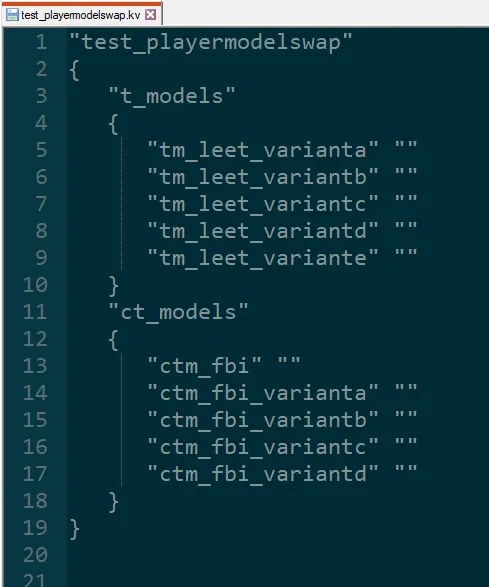
Set your KV corresponding to what playermodel your custom playermodel is based on,
it must match else the sleeves or gloves wont be loaded.
ct_arms and t_arms are obsolete since the glove update if you're wondering why they're not here.
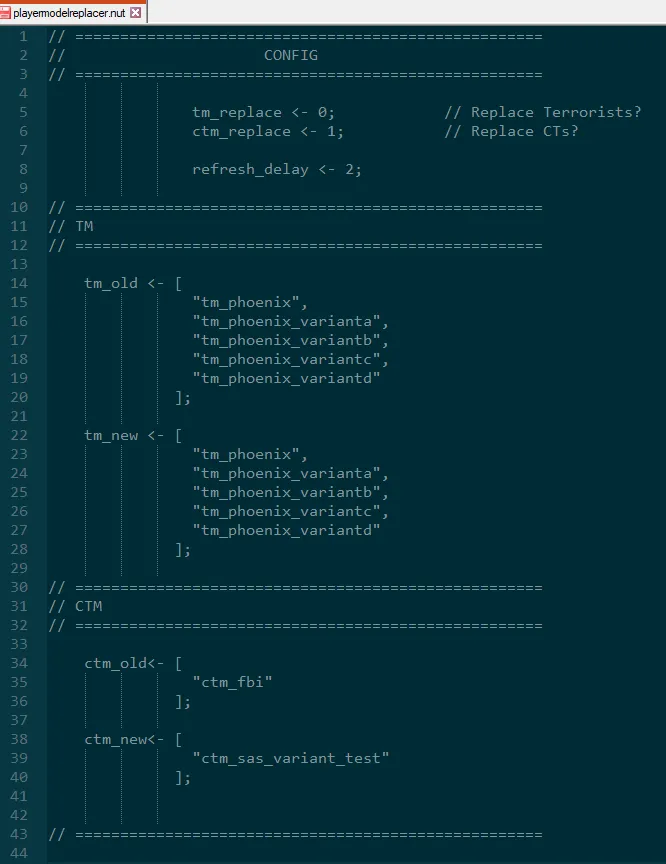
Open playermodelreplacer.nut and edit the following as you wish:
- set (c)tm_replace to 1 if you want to disable replacements for the team, 0 if not.
- refresh_delay is the time in seconds between each refresh to check if a player spawned with the model from the KV in order to replace it
- tm_old and ctm_old are the spots where you put your models used in the KV file
- tm_new and ctm_new are the ones where you put your custom models.
- (c)tm_new must have the same number of lines as (c)tm_old
In this example with the KV and this configuration, only the first ctm_fbi will be replaced with ctm_sas_variant_test
PRO TIP:
If you want to remove the sleeves from CTs, use a different CT prefix with the same gloves as your original model.
For instance: put "ctm_fbi" in the KV and in ctm_old<-
make your model use ctm_sas_variant as a prefix and put it in ctm_new<- as usual. Since the game wont precache the right sleeves, they'll be invisible but since they use the same gloves, they'll be precached correctly!
Go wild, Enhance the theme of your maps!
You can now reload the game to update the KV (kv files are loaded on game start with the gamemodes.txt) and enjoy your playermodels!
Enjoy!