This is the error that I got when loading my model in HLMV. My model doesnt show textures, and I dont know why...
Any ideas as to why this is happeing and how to fix it?

This is the error that I got when loading my model in HLMV. My model doesnt show textures, and I dont know why...
Any ideas as to why this is happeing and how to fix it?
Are you working with Blender? Every object which is part of the model you're exporting must have a material assigned which has the same name as your VMT file for the model.
And check the content of your VMT file. It should look like this (also look for typos):
VertexLitGeneric { $basetexture "models/subfolder/modelname" }
Yes I am using blender. I tried everything. Eaven changed the materials and texture names to mach everywhere. Changed the .vmt syntax to what you suggested. But still nothing. I rly need to fix this. Those pipes are a crucial element of my project!
Are there any errors while you're compiling the model? You can press the pause button on your keyboard after you dragged the qc file on your studiomdl.bat, but you have to be fast  You can check for errors there. Also how does your qc file look like? Maybe you can post it's content here.
I compiled using crowbar not the .bat file, because the bat file showed an error saying that the .qc couldnt be red, so I was advised to use crowbar instead and it worked.
This is the .qc syntax. Located in: C:\Program Files (x86)\Steam\steamapps\common\Counter-Strike Source\cstrike\custom\my custom stuff\models\Pipes
$modelname "models\pipe_test.mdl" $body mybody "Pipe.smd" $staticprop $surfaceprop concrete $cdmaterials "C:\Program Files (x86)\Steam\steamapps\common\Counter-Strike Source\cstrike\custom\my custom stuff\materials\models\Pipes"
$sequence idle "pipe_idle.smd"
$collisionmodel "Pipe-phys.smd" { $concave }
I used the full adress for materials, thinking it would work but it still didnt.
this is the .vmf syntax. Located in: C:\Program Files (x86)\Steam\steamapps\common\Counter-Strike Source\cstrike\custom\my custom stuff\materials\models\Pipes
"LightmappedGeneric" { "$basetexture" "models/Pipes/PipeUV_textured" "$surfaceprop" "Concrete" "$surfaceprop2" "Concrete" "$translucent" 1 }
Crowbar after compiling:
Compiling with Crowbar 0.34.0.0: "C:\Program Files (x86)\Steam\steamapps\common\Counter-Strike Source\cstrike\custom\my custom stuff\models\Pipes\pipe_test.qc" ...
Compiling ".\pipe_test.qc" ... qdir: "c:\program files (x86)\steam\steamapps\common\counter-strike source\cstrike\custom\my custom stuff\models\pipes\" gamedir: "C:\Program Files (x86)\Steam\steamapps\common\Counter-Strike Source\cstrike\" g_path: "pipe_test.qc" Building binary model files... Working on "pipe_test.qc" SMD MODEL Pipe.smd SMD MODEL pipe_idle.smd SMD MODEL Pipe-phys.smd WARNING: Model has 2-dimensional geometry (less than 0.500 inches thick on any axis)!!! WARNING: Model has 2-dimensional geometry (less than 0.500 inches thick on any axis)!!! WARNING: Model has 2-dimensional geometry (less than 0.500 inches thick on any axis)!!! WARNING: Model has 2-dimensional geometry (less than 0.500 inches thick on any axis)!!! WARNING: Model has 2-dimensional geometry (less than 0.500 inches thick on any axis)!!! WARNING: Model has 2-dimensional geometry (less than 0.500 inches thick on any axis)!!! WARNING: Model has 2-dimensional geometry (less than 0.500 inches thick on any axis)!!! WARNING: Model has 2-dimensional geometry (less than 0.500 inches thick on any axis)!!! WARNING: Model has 2-dimensional geometry (less than 0.500 inches thick on any axis)!!! WARNING: Model has 2-dimensional geometry (less than 0.500 inches thick on any axis)!!! WARNING: Model has 2-dimensional geometry (less than 0.500 inches thick on any axis)!!! WARNING: Model has 2-dimensional geometry (less than 0.500 inches thick on any axis)!!! WARNING: Model has 2-dimensional geometry (less than 0.500 inches thick on any axis)!!! WARNING: Model has 2-dimensional geometry (less than 0.500 inches thick on any axis)!!! WARNING: Model has 2-dimensional geometry (less than 0.500 inches thick on any axis)!!! WARNING: Model has 2-dimensional geometry (less than 0.500 inches thick on any axis)!!! WARNING: Model has 2-dimensional geometry (less than 0.500 inches thick on any axis)!!! WARNING: Model has 2-dimensional geometry (less than 0.500 inches thick on any axis)!!! WARNING: Model has 2-dimensional geometry (less than 0.500 inches thick on any axis)!!! WARNING: Model has 2-dimensional geometry (less than 0.500 inches thick on any axis)!!! WARNING: Model has 2-dimensional geometry (less than 0.500 inches thick on any axis)!!! WARNING: Model has 2-dimensional geometry (less than 0.500 inches thick on any axis)!!! WARNING: Error with convex elements of Pipe-phys.smd, building single convex!!!! Model has 1 convex sub-parts Collision model completed. --------------------- writing C:\Program Files (x86)\Steam\steamapps\common\Counter-Strike Source\cstrike\models/models\pipe_test.mdl: bones 964 bytes (1) animation x y ips angle @idle 0.00 0.00 : 1.#J ( 90.00) 0.0 animations 112 bytes (1 anims) (1 frames) [0:00] sequences 220 bytes (1 seq) ik/pose 164 bytes eyeballs 0 bytes (0 eyeballs) flexes 0 bytes (0 flexes) textures 72 bytes keyvalues 0 bytes bone transforms 0 bytes bone flex driver 0 bytes Collision model volume 4636748.50 in^3 collision 0 bytes total 1848 --------------------- writing C:\Program Files (x86)\Steam\steamapps\common\Counter-Strike Source\cstrike\models/models\pipe_test.vvd: vertices 6864 bytes (143 vertices) tangents 2288 bytes (143 vertices) total 9216 bytes --------------------- Generating optimized mesh "C:\Program Files (x86)\Steam\steamapps\common\Counter-Strike Source\cstrike\models/models\pipe_test.sw.vtx": body parts: 8 bytes models: 20 bytes model LODs: 12 bytes meshes: 9 bytes strip groups: 25 bytes strips: 27 bytes verts: 1287 bytes indices: 768 bytes bone changes: 16 bytes everything: 2196 bytes --------------------- Generating optimized mesh "C:\Program Files (x86)\Steam\steamapps\common\Counter-Strike Source\cstrike\models/models\pipe_test.dx80.vtx": body parts: 8 bytes models: 20 bytes model LODs: 12 bytes meshes: 9 bytes strip groups: 25 bytes strips: 27 bytes verts: 1287 bytes indices: 768 bytes bone changes: 16 bytes everything: 2196 bytes --------------------- Generating optimized mesh "C:\Program Files (x86)\Steam\steamapps\common\Counter-Strike Source\cstrike\models/models\pipe_test.dx90.vtx": body parts: 8 bytes models: 20 bytes model LODs: 12 bytes meshes: 9 bytes strip groups: 25 bytes strips: 27 bytes verts: 1287 bytes indices: 768 bytes bone changes: 16 bytes everything: 2196 bytes Completed "pipe_test.qc" ... Compiling ".\pipe_test.qc" finished. Check above for any errors.
... Compiling with Crowbar 0.34.0.0: "C:\Program Files (x86)\Steam\steamapps\common\Counter-Strike Source\cstrike\custom\my custom stuff\models\Pipes\pipe_test.qc" finished.
I think your qc file is the problem.
$surfaceprop has to be the name of your texture, which has to be identical with the material name used in Blender.
Also $cdmaterials starts at Steam\steamapps\common\Counter-Strike Global Offensive\csgo\materials and the same is the case for $modelname which starts at the Steam\steamapps\common\Counter-Strike Global Offensive\csgo\models - I'm not sure how it works with custom directories as you're doing it. You can try to place your files in the /models/ and /materials/models/ folders for now, just to be sure it works.
And I don't think you've got a separate idle animation, do you? So you can adjust $sequence to the orignal name of the model. The same applies to $collisionmodel, except you created a separate collision model.
Place the files in the normal folders of the game as described above and then try this version of your qc file:
$modelname "pipe_test.mdl" (you may have to adjust that if you're using a subfolder) $body "Pipe" "Pipe.smd" $staticprop $surfaceprop " PipeUV_textured" (or whatever the name of your VMT is) $cdmaterials "\models\Pipes" $sequence idle "pipe_test.smd" $collisionmodel "pipe_test.smd" { $concave }
 Quote from Anduriel
4 hours ago, Anduriel said: $surfaceprop has to be the name of your texture, which has to be identical with the material name used in Blender.
That's not right. $surfaceprop should be one of the properties in this list (not sure if this list can vary between different branches of Source).
 Quote from Squad
26 minutes ago, Squad said: That's not right. $surfaceprop should be one of the properties in this list (not sure if this list can vary between different branches of Source).
You can make your own surfaceprop (in a mod at least, it doesn't work when packed in a map). Not only it varies between different branches, but also between different games and mods. It tells which sound to make when shot and stepped on, and also control the penetration value of surfaces in CS:GO. Also some other cool stuff like friction and jump height.
At any rate you shouldn't need to use something other than the usual wood/concrete/metal/dirt/plastic etc, which can be found everywhere.
Quote from Squad9 hours ago, Squad said: That's not right. $surfaceprop should be one of the properties in this list (not sure if this list can vary between different branches of Source).
You're right and it totally makes sense. In fact I learned that false information from a tutorial and since it didn't cause any major issues with the few models I compiled so far I failed to realize that it was wrong.
Nonetheless the problem may be the path to the file locations in the qc file. So I'd recommend moving the VMT and VTF files to the normal "materials" folder used by CS:GO, adjust the paths in the qc file as described above and do another compile.
EUREKA!!! IT worked!!!!!! My model apeared textured!!! It has a few minor issues, but atleast it is there and textured!!!
Thanks alot guys!
And someone really need to make a decent blender to Source tutorial!
But now there's another problem. The model show up in hammer but not in the game! 
Regardless of what prop type I assign to it!
Fade distance is set to -1 so it should show up.
.VMT syntax:
"VertexLitGeneric" { "$basetexture" "models/Pipes/PipeUV" "$normalmapalphaenvmapmask" 1 "$envmapcontrast" 1 "$model" 1 "$selfillum" 1 "$surfaceprop" "Concrete" "$surfaceprop2" "Concrete" }
.qc syntax:
$modelname "compiled 0.34\pipe_test.mdl" $body "Pipe" "Pipe.smd" $staticprop $surfaceprop "PipeUV" $cdmaterials "\models\Pipes" $sequence idle "pipe-ref.smd" $collisionmodel "pipe_Phys.smd" { $concave }
Quote from Dr.ParadoXOn 11/2/2018 at 1:27 PM, Dr.ParadoX said: .qc syntax:
$modelname "compiled 0.34\pipe_test.mdl" $body "Pipe" "Pipe.smd" $staticprop $surfaceprop "PipeUV" $cdmaterials "\models\Pipes" $sequence idle "pipe-ref.smd" $collisionmodel "pipe_Phys.smd" { $concave }
Try a path without "."
Also change your $surfaceprop back to something like "metal" or wahtever fits your model. It was wrong what I told you in one of the posts before. And again the question: Do you have separate idle and collision models? Since I don't think so, I'd recommend you use your normal "pipe.smd" for these settings. You may need a separate collision model to avoid weird collisions, but it depends on the shape of your pipe. If that's the case, we can come back to that later.
Did you place the model as a prop_static in your map? You can't use prop_physics since you defined it as a static prop in the qc file. Anyhow there should be an error when you compile your map which states why the prop isn't shown in-game. There should be a ".log" file in the folder where the ".vmf" of your map is located (usually it's Steam\steamapps\common\Counter-Strike Global Offensive\sdk_content\maps) with the same name as your map. That's the compile log. You can open it with any text editor. Check it for errors referring to your model.
I found one error in the compile log.
Unable to load vertex data "models/compiled 0.34\pipe_test.vvd"
How do I fix this error?
Assuming that it is responsible for the model not showing up...
Try what @esspho said and remove that "compiled 0.34 " part from your qc file, so your model will be placed in another folder after you compiled it again. The folder name might be the problem.
Don't forget to remove the old model files in the "models/compiled 0.34" folder or you'll have two version of your model in hammer.
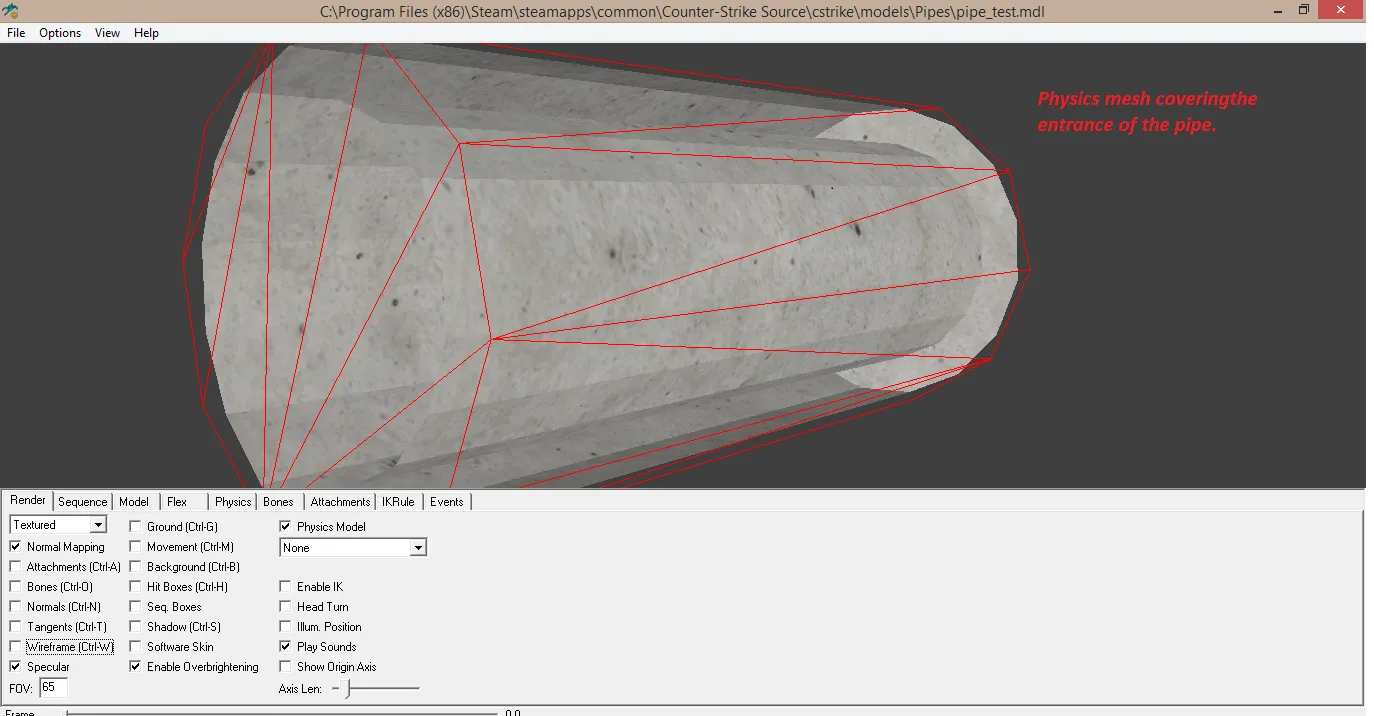
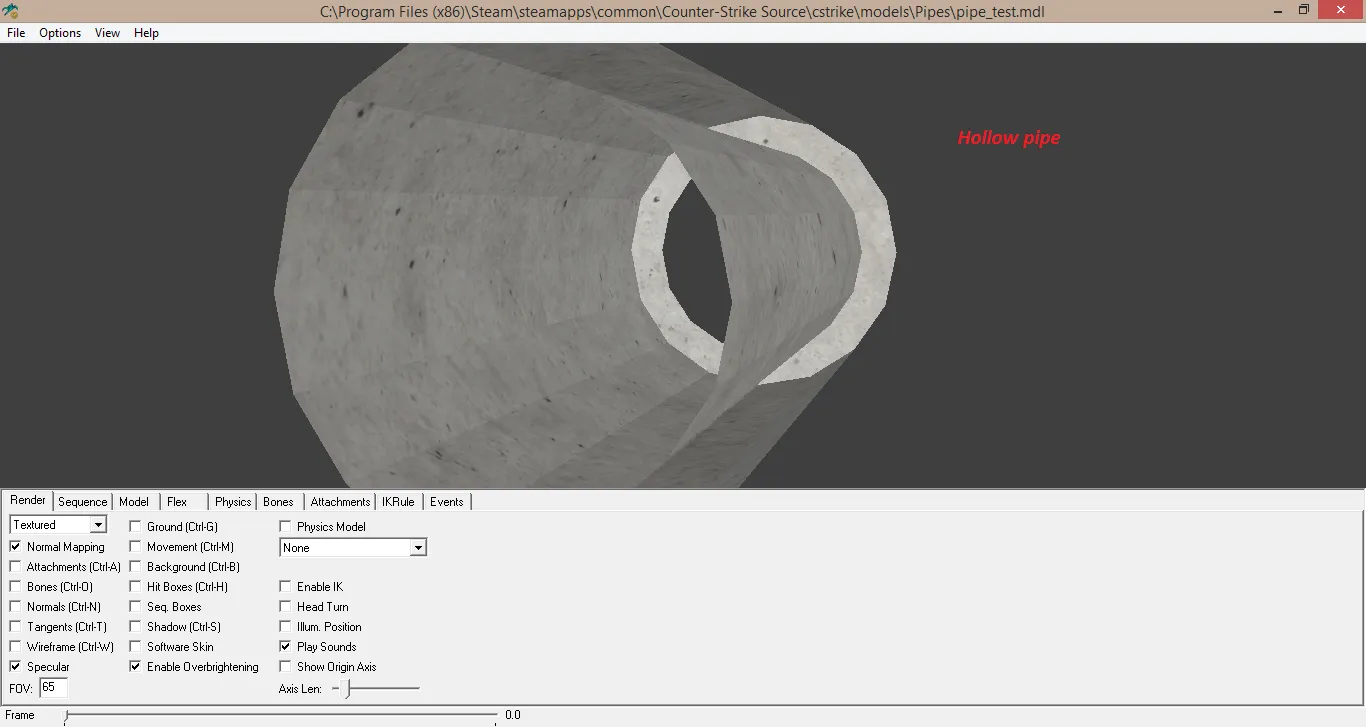
IT WORKED! IT's vissible in game now!! But now.........there is another issue. The pipes were supposed to be hollow like. Like you were supposed to be able to go in them, however instead they seem to be like blocks, thou appearing like pipes. Also it seems to be possible to see in the pipe from sides, which is not that important. Right now I would like to make it possible to go in the pipe. I loaded the pipe into HLMV and it showed that the physics mesh ''closed'' up the holes. Why? How do I fix this?
To see what I mean by being able to see thru the pipe please look at images.
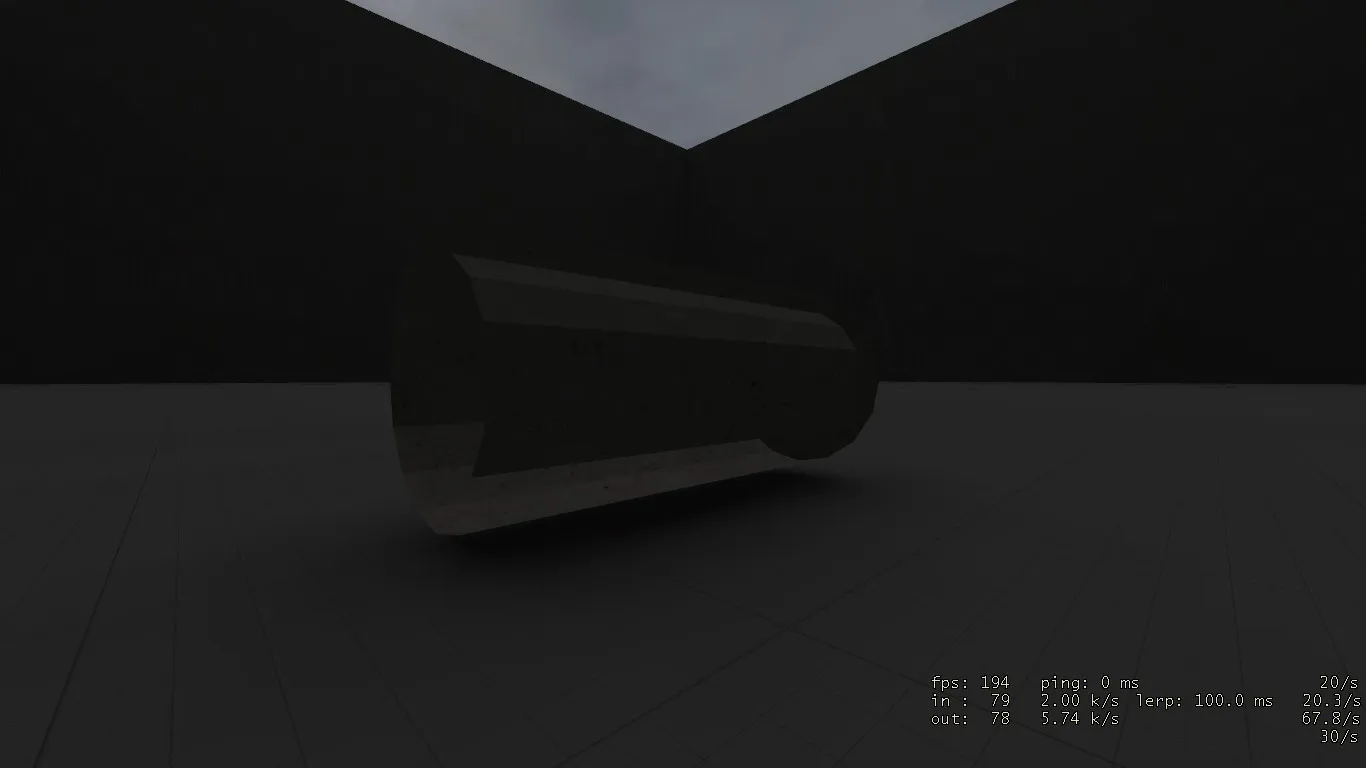
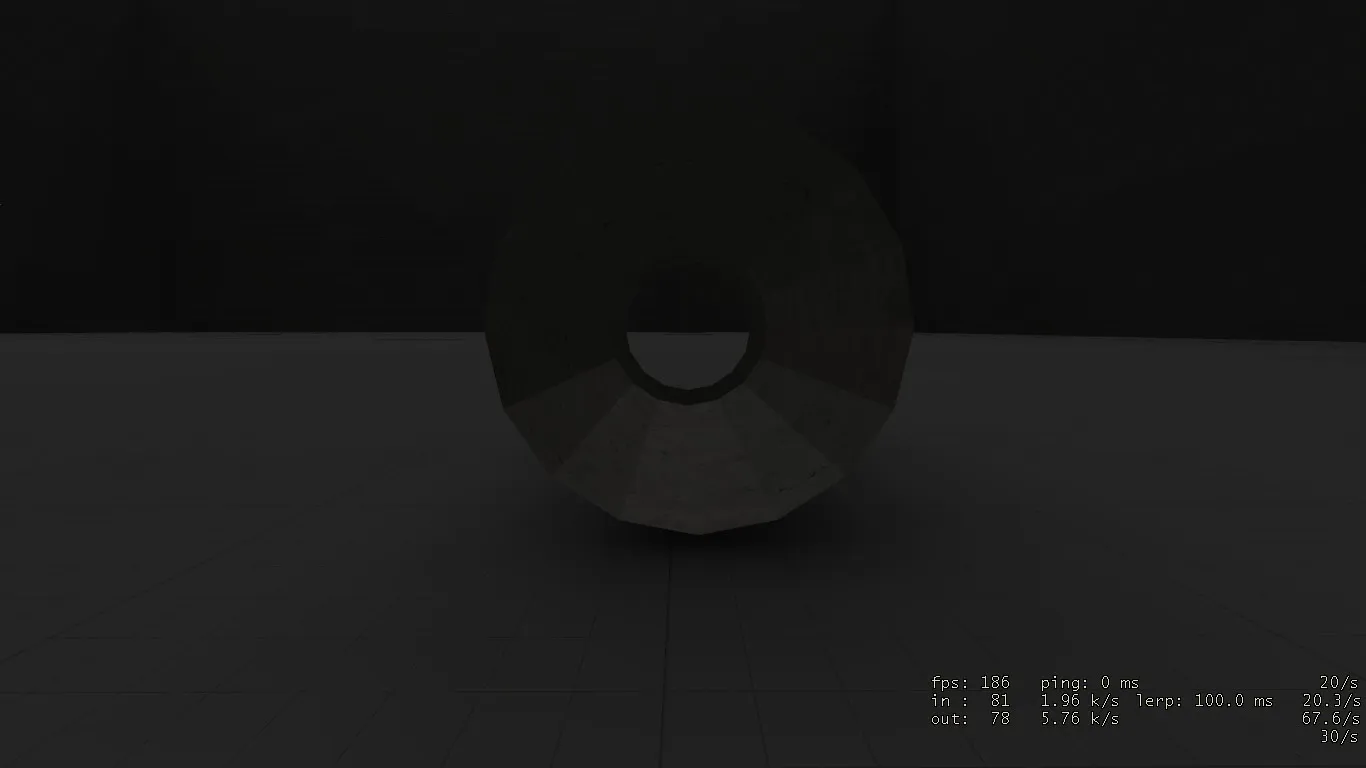
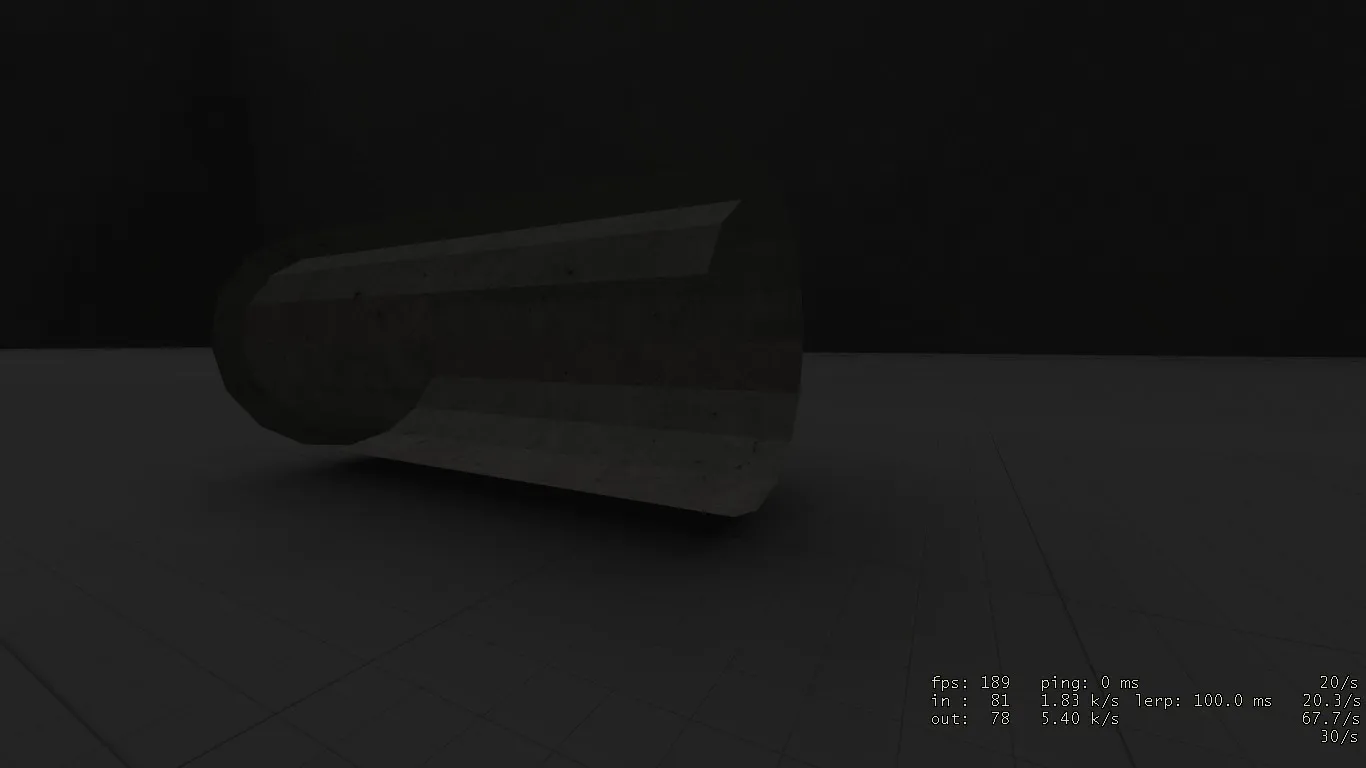
My guess is you have flipped normals. In Blender go into edit mode, select all faces and press Ctrl+N. This will automatically orientate the selected faces and should fix the problem.
The reason why you can't go into your pipe is the collision model. As you can see in your compile logs on the first page, the model compiler just creates one convex part. Holes are a bit tricky because they usually get covered and you have to make it clear for the compiler not to do that. Maybe I know a solution, but I have to do some testing first.
Quote from Dr.ParadoXOn 11/4/2018 at 8:32 PM, Dr.ParadoX said: Right now I would like to make it possible to go in the pipe. I loaded the pipe into HLMV and it showed that the physics mesh ''closed'' up the holes. Why? How do I fix this?
for the collision mesh to work properly you have to make each piece of the collision into a separate convex piece, and ideally with smooth shading as well, but I'm not 100% sure about that.
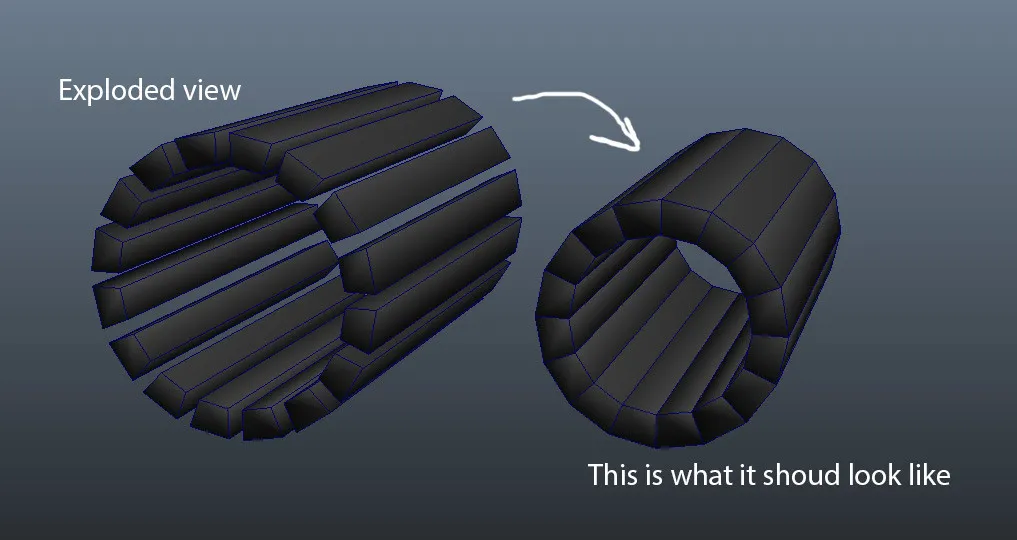
make sure you don't merge the verts since all the pieces need to be separate.
and you should probably simplify it as well and use less pieces if possible, collisions can easily get complex.
 Quote from tomm
8 hours ago, tomm said: ideally with smooth shading as well, but I'm not 100% sure about that.
I can confirm.
Yeah, you have to smooth shade them individually before grouping them together. Otherwise it'll again end up as a convex collision after exporting/compiling.
Don’t have an account yet? Register yourself now and be a part of our community!