1. Forums
  2. Discord
  3. About Mapcore
  4. Patreon Supporters
  • Login
  • Register
  • Search
This Thread
  • Everywhere
  • This Thread
  • This Forum
  • Articles
  • Pages
  • Forum
  • More Options
  1. Mapcore
  2. Discussions
  3. Level Design

Yanzl's Source Emporium

  • Yanzl
  • May 10, 2018 at 12:16 AM
  • Yanzl
    • May 10, 2018 at 12:16 AM
    • #1

    Hey, I've decided to make a topic where I'll put together all the links to different stuff I've released for Source/CS:GO.

    Assets

    Assets from my CS:GO maps. Free for non-commercial use as long as you give appropriate credit.

    Basalt

    Most of the assets from the map Basalt.

    [Blocked Image: https://i.imgur.com/9gUJslh.png]

    https://www.dropbox.com/s/e86kdqwpvhhs5x6/Basalt.zip?dl=0

    Breach

    Assets from Breach. Over 600 models and over 100 materials. Includes a zoo map.

    [Blocked Image: https://i.imgur.com/67oKomW.jpg]

    https://www.dropbox.com/s/xsfp5kobdv22voa/Breach.zip?dl=0

    Thrill

    Assets from Thrill. Includes a zoo map.

    [Blocked Image: https://i.imgur.com/HJLATWa.jpg]

    https://www.dropbox.com/s/tkgw959whnubnla/Thrill.zip?dl=0

    Pitstop

    https://www.dropbox.com/s/x6tn3b6nfo2u77d/Pitstop.zip?dl=0

    Cruise

    https://www.dropbox.com/s/q3ybhzd1p2q522t/Cruise.zip?dl=0

    Resort

    https://www.dropbox.com/s/dwasa7bs5g3wo1a/Resort.zip?dl=0

    Zoo

    https://www.dropbox.com/s/xehbw0k67tximp4/Zoo.zip?dl=0

    Castle

    https://www.dropbox.com/s/e76x6st0nsbpafq/Castle.zip?dl=0

    Water Pack

    Collection of 4 different water textures that work both on high and low shader settings. Free to modify.

    [Blocked Image: https://i.imgur.com/KH1HtiC.jpg]

    https://gortnar.com/vmt/liquids.zip


    Source Engine Tools

    Streamline the Source engine workflow. Mostly substance stuff.

    Substance Shaders (and templates)

    Newly updated shaders for Substance Designer and Substance Painter. Supports Diffuse, Envmap reflection, Specular reflection, Glossiness, Metallic (Diffuse tint), Fresnel ranges and LightmappedGeneric mode. Also includes Painter templates and export presets and a glossiness wizard filter for Painter that can be used to create glossiness and envmap mask maps from specular mask or roughness.

    [Blocked Image: https://i.imgur.com/z32Yo7y.png]

    https://gortnar.com/vmt/sbs_shaders.zip

    https://gortnar.com/vmt/painter_templates.zip

    VMT Editor

    PBR to Source

    A substance file and a VMT template that aim to match the PBR look as close as possible in Source (still a long way off). I don't suggest relying on this to make your materials (learn how Source handles materials instead), but it does an alright job with any PBR materials you might want to use in Source. Note that this converter only works on VertexLitGeneric. There's a brush version included but it requires manual tweaking based on the material.

    [Blocked Image: https://i.imgur.com/RXQpKIF.png]

    https://gortnar.com/vmt/pbr_to_source.zip

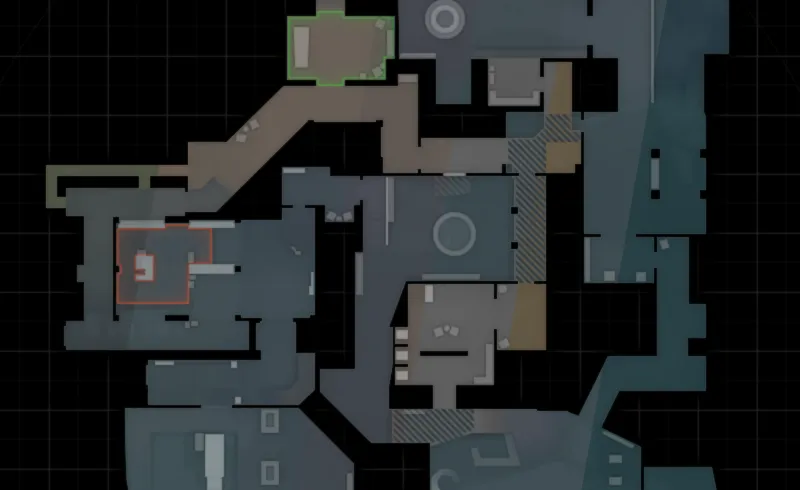
    Radar generator

    Generates CS:GO radar images, both regular and spectate versions. For multi level radars you have to use multiple generators and blend them together. Can be used with masks from Terri's auto radar.

    Requires you to make overview image, playable area and spawn/plant zone masks.
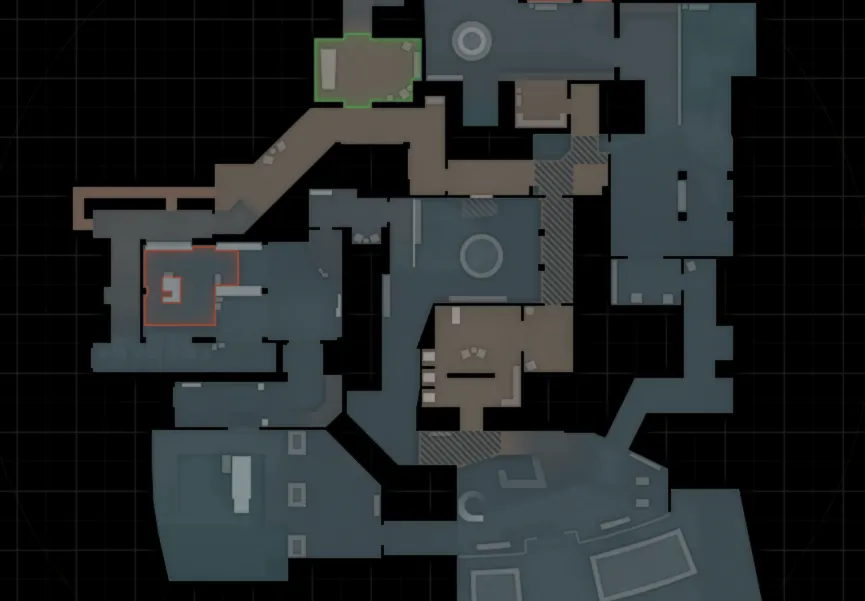
    https://www.dropbox.com/s/mij82s8x9q98…rgen.sbsar?dl=0

    Sun color calculator

    A quick test project, calculates the color of your light_environment direct brightness based on the fact that the final color depends on both ambient and direct.

    https://codepen.io/gortnar/full/xYJGLj/


    If you have any questions, ask away!
  • Squad
    • May 10, 2018 at 1:07 AM
    • #2

    This thread makes so much sense, it's weird it wasn't made before. Great job!

  • catfood
    • May 10, 2018 at 9:37 AM
    • #3

    great stuff man! btw those water shaders look awesome

  • blackdog
    • May 10, 2018 at 11:27 AM
    • #4

    This could change the workshop

  • General Vivi
    • May 10, 2018 at 5:18 PM
    • #5

    This is great! Thanks for posting.

  • That50'sGuy
    • May 10, 2018 at 6:47 PM
    • #6

    Wow! Thank you so much! I love all your content!

  • Vilham
    • May 13, 2018 at 8:54 AM
    • #7

    Awesome.

  • Can
    • May 13, 2018 at 12:42 PM
    • #8

    Wow! These are awesome thanks for sharing these. Pbr to Source link is dead btw.

  • Yanzl
    • May 16, 2018 at 3:25 PM
    • #9
    Quote from Overflow

    On 5/13/2018 at 1:42 PM, Overflow said: Wow! These are awesome thanks for sharing these. Pbr to Source link is dead btw.

    Fixed the link, thanks!

  • Yanzl
    • August 7, 2018 at 3:33 AM
    • #10

    I've updated the Substance Painter shader to support the new 2018.2 update and added panorama radar generator with multiple color presets based on different Valve maps.

    https://www.dropbox.com/s/zegqf63yt1tt…norama.zip?dl=0

  • trevor
    • September 15, 2018 at 8:42 PM
    • #11

    Allowing non-commercial access to all this is insane man. I know once I finish my first layout attempt that the radar generator will be immensely helpful. All these assets as well are astonishing as well.

  • maxgiddens
    • October 30, 2018 at 8:35 PM
    • #12

    Can you add in that color correction thingamabob you made for photoshop?

  • Yanzl
    • October 31, 2018 at 12:18 AM
    • #13

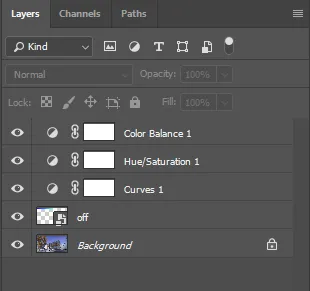
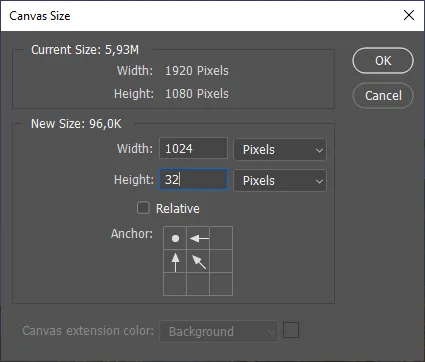
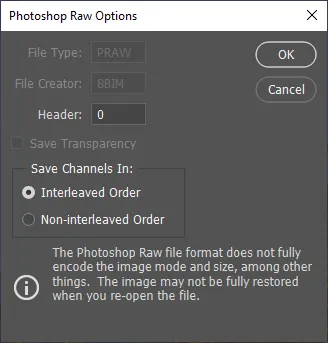
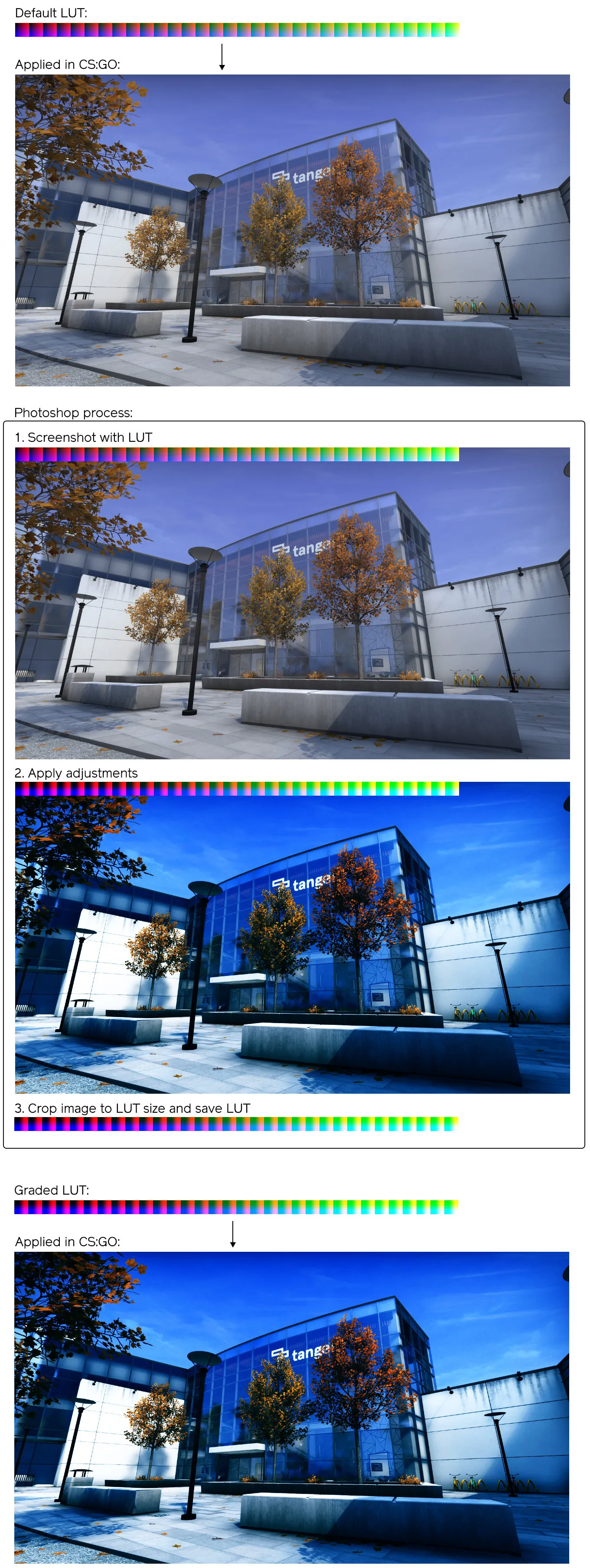
    I didn't make any Photoshop specific things, but here's the process for making a color correction file in Photoshop:

    1. Download this image (this is the off.raw color correction LUT you can find in materials/correction, converted to png)

    2. Open a screenshot of your map in Photoshop.

    3. Drag the above LUT onto the Photoshop file. Don't change the scale. Move it to a corner. It should look something like this:

    [Blocked Image: https://i.imgur.com/ERAEYLe.jpg]

    4. Either apply the color correction adjustments you want using adjustment layers or flatten the image and use the regular color correction tools.

    5. When you're happy with the result, crop the image to the LUT size - 1024 x 32 px.

    6. Save the file as .raw with the following settings and move it into materials/correction.

    7. You can now reference that file in Hammer and color correction should work. Don't forget to pack it when uploading to workshop.

  • Sklär
    • November 24, 2018 at 5:14 PM
    • #14

    Woah I didn't know Hammer could do that. That's sick.

  • blackdog
    • November 25, 2018 at 12:14 AM
    • #15

    I’m not sure I understand, is the LUT meant to disappear during editing to give proper colour balance, or is it gonna be modified by the adjustment layers and you save that result?

  • Yanzl
    • November 26, 2018 at 11:39 PM
    • #16
    Quote from blackdog

    On 11/25/2018 at 1:14 AM, blackdog said: I’m not sure I understand, is the LUT meant to disappear during editing to give proper colour balance, or is it gonna be modified by the adjustment layers and you save that result?

    Yeah you basically modify the clean LUT with your adjustments that are then applied in game. The screenshot is there so you can better see what adjustments you are making, but you could also just open the LUT file by itself, do some adjustments and save.

  • blackdog
    • November 27, 2018 at 3:58 PM
    • #17
    Quote from Yanzl

    16 hours ago, Yanzl said: Yeah you basically modify the clean LUT with your adjustments that are then applied in game. The screenshot is there so you can better see what adjustments you are making, but you could also just open the LUT file by itself, do some adjustments and save.

    Yeah but not using a screenshot you would be editing blindly, how could you achieve something that looks good?

    I think I’ve understood the process but I feel for best clarity one-two more screens of the process are needed.

    Also, I never got this far into a map development, so are the adjustments to be done multiple time, read: you have multiple colour correction entities in a map? (I thought that it would be possible to enhance for eg outside-inside contrast in colour temperature etc).

    Dont hesitate to tell me I’m not making sense :D

  • Yanzl
    • November 28, 2018 at 2:36 AM
    • #18
    Quote from blackdog

    10 hours ago, blackdog said: Yeah but not using a screenshot you would be editing blindly, how could you achieve something that looks good?

    I just said you could do that, not that it would produce good results :P

    Hopefully this helps understand it better:

    Also you can have multiple CCs in one map, you can limit them with a radius or with a fog_volume, so only one is active at a time.

  • blackdog
    • November 28, 2018 at 8:40 AM
    • #19

    Thank you @Yanzl, exactly like I thought then :)

  • millo
    • February 24, 2019 at 2:26 AM
    • #20

    @Yanzl how do you use the Radar Generator? I must be missing something as I don't know how to use it.

Participate now!

Don’t have an account yet? Register yourself now and be a part of our community!

Register Yourself Login
Discord

The Mapcore Discord is our lively IRC channel of the 2000s reborn. Chat about level design, gaming, and more.

Latest Posts

  1. Any of the old guard still around? D:

    Warby
    July 12, 2026 at 8:23 PM
  2. About our archived forums

    Thrik
    June 30, 2026 at 2:12 PM
  3. Mapcore Discord

    mason_fan123
    June 24, 2026 at 8:52 PM
  4. [CS2] Valley

    Serialmapper
    June 22, 2026 at 11:56 AM
  5. Free Music / SFX Resource - Over 2500 Tracks

    Eric Matyas
    June 18, 2026 at 12:32 PM
  6. Pango [WIP]

    Elowen
    June 11, 2026 at 10:13 AM
  7. [CS2] Dvina

    Jeremy Rivera
    June 11, 2026 at 10:03 AM
  8. Bridges 2.0 by NEXSIDE, MAP SHOWCASE. ( Steam Workshop )

    MrTrane18
    June 1, 2026 at 7:46 PM
  9. Classic Maps Reborn For CS2

    SillySpaceCat
    May 31, 2026 at 10:33 PM
  10. [CS2] Dvina

    Pulbusha
    May 29, 2026 at 5:54 PM

Users Viewing This Thread

  • 2 Guests
  1. Privacy Policy
  2. Contact
Powered by WoltLab Suite™