1. Forums
  2. Discord
  3. About Mapcore
  4. Patreon Supporters
  • Login
  • Register
  • Search
This Thread
  • Everywhere
  • This Thread
  • This Forum
  • Articles
  • Pages
  • Forum
  • More Options
  1. Mapcore
  2. Discussions
  3. Creative Chat

Reskinning Valve models

  • Freaky_Banana
  • November 28, 2016 at 10:37 PM
  • Freaky_Banana
    • November 28, 2016 at 10:37 PM
    • #1

    Hey guys,

    I couldn't find any other threads on this, so I guessed here was the right place to ask.

    Does anyone here know, how to reskin official Valve models? (Specifically I am talking the Urban_tree_giant models for CSGO)

    For example where are the texturefiles stored? And are there any legal problems which might arise?

    Thanks in advance and cheers!

  • Harry Godden
    • November 28, 2016 at 11:07 PM
    • #2

    First of I am going to assume you have knowledge of how models and textures in source work :P

    - How I would go about it:

    I would recommend downloading GCFScape from Nem's tools, you can find it here: http://nemesis.thewavelength.net/?p=26

    Then you can open pak01_dir.vpk in C:\Program Files (x86)\Steam\steamapps\common\Counter-Strike Global Offensive\csgo\pak01_dir.vpk

    This is where all the packed texture files and model files are stored.

    [Blocked Image: http://i.imgur.com/swJg5xA.png]

    You will be able to drag these out into a folder and edit them after you convert them to a png / tga with VTFEdit.

    From there you should use crowbar to decompile the model, make sure you get the .mdl, .phy, .vvd and .vtx files into one folder in order to decompile

    [Blocked Image: http://i.imgur.com/gjTiBL3.png]

    this will give you necessary SMD's (in the decompiled0.24 folder it makes) which you can import into you're modelling software if you wish to make changes that way, and a necessary .QC file to quickly recompile the model again using crowbar.

    [Blocked Image: http://i.imgur.com/OGSpk27.png]

    Make sure you edit the QC in a way where it will match your new texture file locations and change the model path to something new :)


    I don't know if this is the best way but certainly the way I would do it. Also as far as I'm concerned I don't think valve mind if you do this, just as long as it stays in cs:go (I think). I don't see why there would be a reason against it.

  • Squad
    • November 28, 2016 at 11:08 PM
    • #3

    Extract all needed files from the .vpk (model + material files). You need the mdl files too since you'll have to decompile and recompile the model with a different material name assigned to it. You can find the location of the material files by opening the model in HLMV, but usually its location is in a similar fashion as that of the model (for example, model is stored in /models/props_foliage/ then the material files are usually located in /materials/models/props_foliage/).

    I think there are no legal issues as long as you use it for a Valve game and not port it to something else. But don't take my word for it ;)

  • Freaky_Banana
    • November 28, 2016 at 11:36 PM
    • #4

    Thanks for the awesome quick replies!

    All this has the goal of facelifting oakwood, finally getting it the autumn trees I always imagined.

    So we will hopefully have implemented this by the time we roll out the next update :)!

    Oh and Squad

    I couldn't find any such folder in my directories. So either I am plain stupid (quite probable) or there actually is no such folder.

    Cheers!

  • Squad
    • November 29, 2016 at 7:26 AM
    • #5

    They were just example paths, although they're actually the ones you need. Here's how I found them. Make sure to look for them by using a program like GCFScape and opening the pak01_dir.vpk file in the root folder. You won't find the files by browsing the csgo/ directories.

    Open your model in HLMV. The vmt's used by the model are shown in the box I highlighted in red.

    [Blocked Image: http://i.imgur.com/niyOuwj.jpg]

    Browse to these paths in GCF (full path is not visible in the next picture, it's /materials/models/props_foliage/) Open the corresponding vmt's and check what vtf files they're using. Extract all vtf's you want to edit and the vmt's that are referencing to them.

    [Blocked Image: http://i.imgur.com/tCKAhvz.jpg]

  • Utzel
    • November 30, 2016 at 12:47 PM
    • #6

    Hey guys,

    I just got a question regarding this (as I'm the one, who has to do it :D)


    So I redid the textures and put them in "C:\Program Files (x86)\Steam\steamapps\[MySteamName]\Counter-Strike Global Offensive\csgo\materials\models\props_foliage"

    Then I took all of the model files from "urban_tree_giant01" (the .dx90.vtx, .mdl, .phy, .vtx, .vvd) and renamed them to "urban_tree_giant01_autumn".

    After that I decompiled them using crowbar. This is the log (don't know if necessary):


    Decompiling with Crowbar 0.36.0.0: "C:\Program Files (x86)\Steam\steamapps\utzler\Counter-Strike Global Offensive\csgo\models\urban_tree_giant01_autumn.mdl" ...

    Decompiling ".\urban_tree_giant01_autumn.mdl" ... Model version 49 detected. Reading MDL file header ... ... Reading MDL file header finished. Checking for required files ... ... All required files found. Reading data ... Reading MDL file ... ... Reading MDL file finished. Reading PHY file ... ... Reading PHY file finished. Reading VTX file ... ... Reading VTX file finished. Reading VVD file ... ... Reading VVD file finished. ... Reading data finished. Writing data ... QC file: urban_tree_giant01_autumn.qc Reference mesh files: urban_tree_giant01_autumn_reference.smd LOD mesh files: Physics mesh file: urban_tree_giant01_autumn_physics.smd Bone animation files: ref.smd ... Writing data finished. ... Decompiling ".\urban_tree_giant01_autumn.mdl" finished.

    ... Decompiling with Crowbar 0.36.0.0: "C:\Program Files (x86)\Steam\steamapps\utzler\Counter-Strike Global Offensive\csgo\models\urban_tree_giant01_autumn.mdl" finished.


    Now I got the following files:

    - "urban_tree_giant01_autumn_anims" folder...in it "ref.smd"

    - "urban_tree_giant01_autumn.qc"

    - "urban_tree_giant01_autumn_physics.smd"

    - "urban_tree_giant01_autumn_reference.smd"


    So I open the "urban_tree_giant01_autumn.qc" with notepad++.

    This is what I get


    // Created by Crowbar 0.36.0.0

    $ModelName "props_foliage/urban_tree_giant01.mdl"

    $StaticProp

    $BodyGroup "body" { studio "urban_tree_giant01_autumn_reference.smd" }

    $SurfaceProp "wood"

    $Contents "solid"

    $MaxEyeDeflection 90

    $NoForcedFade

    $MostlyOpaque

    $CDMaterials ""

    $CBox 0 0 0 0 0 0

    $BBox -466.198 -509.207 -0.25 494.407 541.933 721.685

    $Sequence "ref" { "urban_tree_giant01_autumn_anims\ref.smd" fadein 0.2 fadeout 0.2 fps 30 }

    $CollisionModel "urban_tree_giant01_autumn_physics.smd" { $mass 14004.04 $inertia 1 $damping 0 $rotdamping 0 $rootbone " " $concave

    }


    So where do I have to change something to the new textures and how do I go on from there?

  • Harry Godden
    • November 30, 2016 at 4:46 PM
    • #7
    Quote from Utzel

    3 hours ago, Utzel said: $CDMaterials ""[/i]

    Open up "urban_tree_giant01_autumn.qc"  Your going to want to change this line:

    $CDMaterials ""

    to:

    $CDMaterials "props_foliage"


    And then in the same file change this line to whatever you want your model to be called, you don't need to copy the already existing files around, when you compile it will make them for you. You shouldn't need to rename any model files, just change this line and it will change the model name :)

    $ModelName "props_foliage/urban_tree_giant01.mdl"


    You should then just be able to compile like so:

    [Blocked Image: http://i.imgur.com/UxnBioL.png]

  • Utzel
    • November 30, 2016 at 6:12 PM
    • #8

    First thanks for your reply,

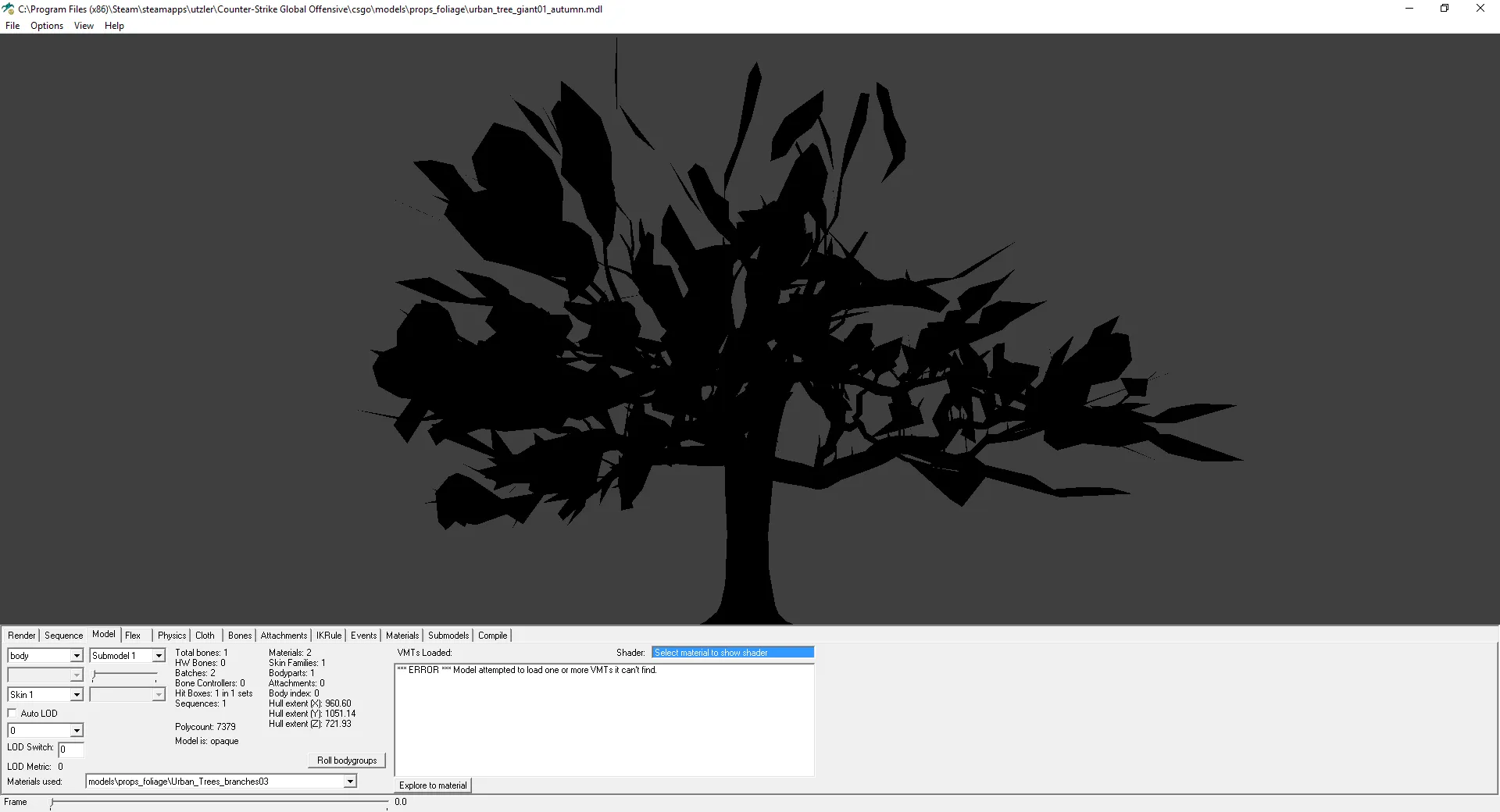
    I did the same steps like you but when I open it in HLMV i get this:


    I also copied the .vmt and .vtf files from my user account folder into the common "materials/models/props_foliage" folder, but i still get no textures.

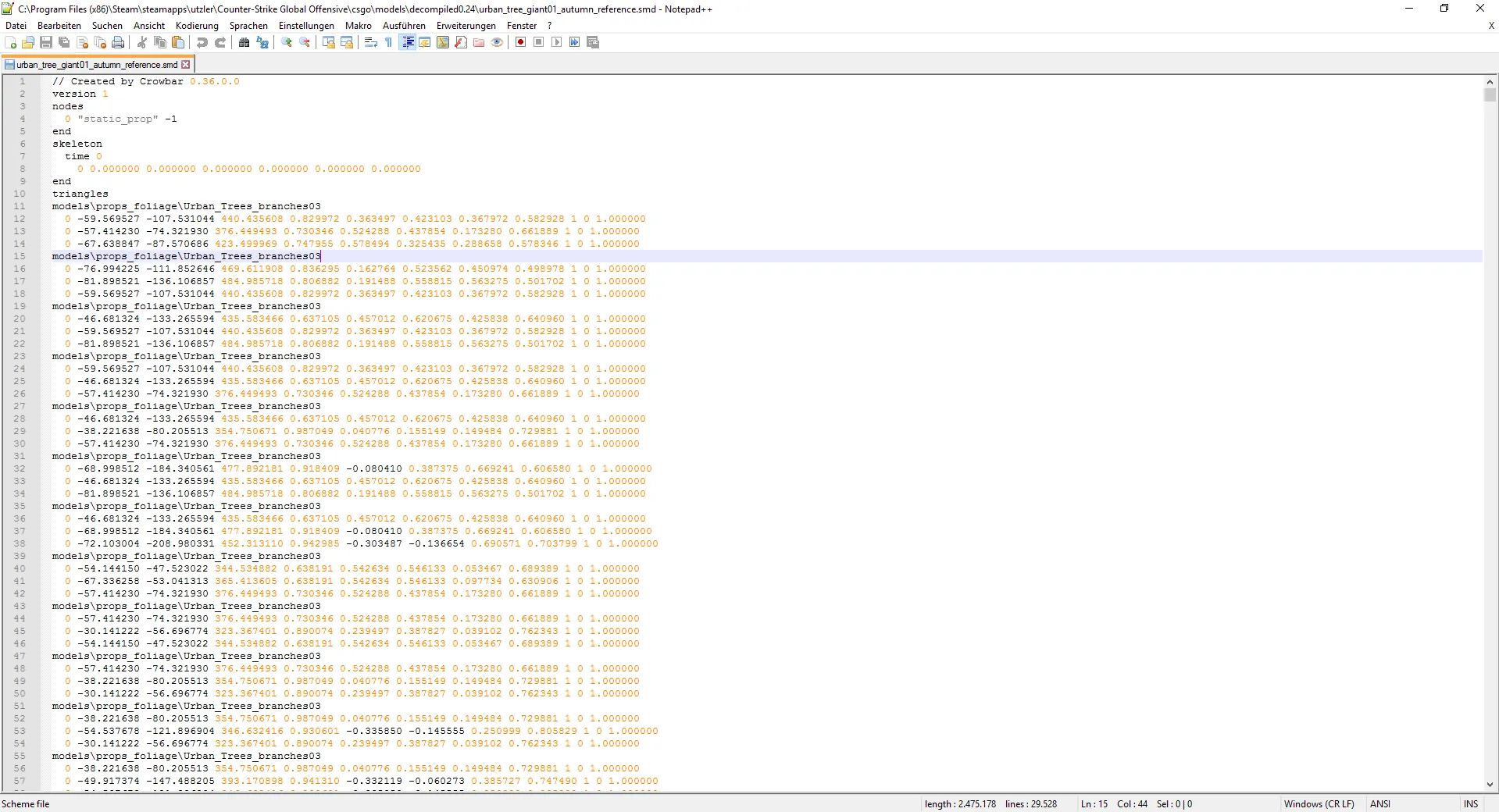
    Could it be that I have to edit something in my decompiled "urban_tree_giant01_autumn_reference.smd",

    because I found lines regarding the original files there.


    Heres the compiling log, don't know if it helps, put why not xD:


    Compiling with Crowbar 0.36.0.0: "C:\Program Files (x86)\Steam\steamapps\utzler\Counter-Strike Global Offensive\csgo\models\decompiled0.24\urban_tree_giant01_autumn.qc" ...

    Compiling ".\urban_tree_giant01_autumn.qc" ... qdir: "c:\program files (x86)\steam\steamapps\utzler\counter-strike global offensive\csgo\models\decompiled0.24\" gamedir: "C:\Program Files (x86)\Steam\steamapps\common\Counter-Strike Global Offensive\csgo\" g_path: "urban_tree_giant01_autumn.qc" Building binary model files... Working on "urban_tree_giant01_autumn.qc" SMD MODEL urban_tree_giant01_autumn_reference.smd SMD MODEL urban_tree_giant01_autumn_anims\ref.smd SMD MODEL urban_tree_giant01_autumn_physics.smd Processing LOD for material: models\props_foliage\Urban_Trees_branches03 Processing LOD for material: models\props_foliage\Urban_Trees_barks01 Model has 19 convex sub-parts Collision model completed. --------------------- writing C:\Program Files (x86)\Steam\steamapps\common\Counter-Strike Global Offensive\csgo\models/props_foliage/urban_tree_giant01_autumn.mdl: Loading preexisting model: C:\Program Files (x86)\Steam\steamapps\common\Counter-Strike Global Offensive\csgo\models/props_foliage/urban_tree_giant01_autumn.mdl Found 1 preexisting sequences. bones 964 bytes (1) animation x y ips angle animations 112 bytes (1 anims) (1 frames) [0:00] Building sequence index remapping table... No re-ordering required. sequences 220 bytes (1 seq) hdr@057FF684=79B10200 ik/pose 164 bytes eyeballs 0 bytes (0 eyeballs) flexes 0 bytes (0 flexes) hdr@057FF684=79B10200 textures 136 bytes keyvalues 176 bytes hdr@057FF680=79B10398 hdr@057FF684=79B10200 bone transforms 0 bytes bone flex driver 0 bytes bodygroup presets 0 bytes Collision model volume 1220824.50 in^3 collision 0 bytes total 2188 --------------------- writing C:\Program Files (x86)\Steam\steamapps\common\Counter-Strike Global Offensive\csgo\models/props_foliage/urban_tree_giant01_autumn.vvd: vertices 350016 bytes (7292 vertices) tangents 116672 bytes (7292 vertices) total 466752 bytes --------------------- Generating optimized mesh "C:\Program Files (x86)\Steam\steamapps\common\Counter-Strike Global Offensive\csgo\models/props_foliage/urban_tree_giant01_autumn.dx90.vtx": body parts: 8 bytes models: 20 bytes model LODs: 12 bytes meshes: 18 bytes strip groups: 66 bytes strips: 70 bytes verts: 65628 bytes indices: 44274 bytes bone changes: 24 bytes everything: 110144 bytes Completed "urban_tree_giant01_autumn.qc" CDynamicFunction: Loading library 'Kernel32.dll' (74F50000) CDynamicFunction: Lookup of 'TryEnterCriticalSection' in 'Kernel32.dll': 7769C010 CDynamicFunction: Closing library 'Kernel32.dll' (74F50000) ... Compiling ".\urban_tree_giant01_autumn.qc" finished. Check above for any errors.

    ... Compiling with Crowbar 0.36.0.0: "C:\Program Files (x86)\Steam\steamapps\utzler\Counter-Strike Global Offensive\csgo\models\decompiled0.24\urban_tree_giant01_autumn.qc" finished.

  • Harry Godden
    • November 30, 2016 at 6:46 PM
    • #9

    This is probably down to the reference .smd linking the wrong texture name.

    Try opening urban_tree_giant01_autumn_reference.smd and replace the original .vtf files with the new texture file you have.

    You can see it here in an smd I have:

    [Blocked Image: http://i.imgur.com/CbYtfW6.png]

    (Notepad++)

    Try replace the old texture name and see if that works. + Make sure the .vmt is VertexLitGeneric!

  • Utzel
    • November 30, 2016 at 7:57 PM
    • #10

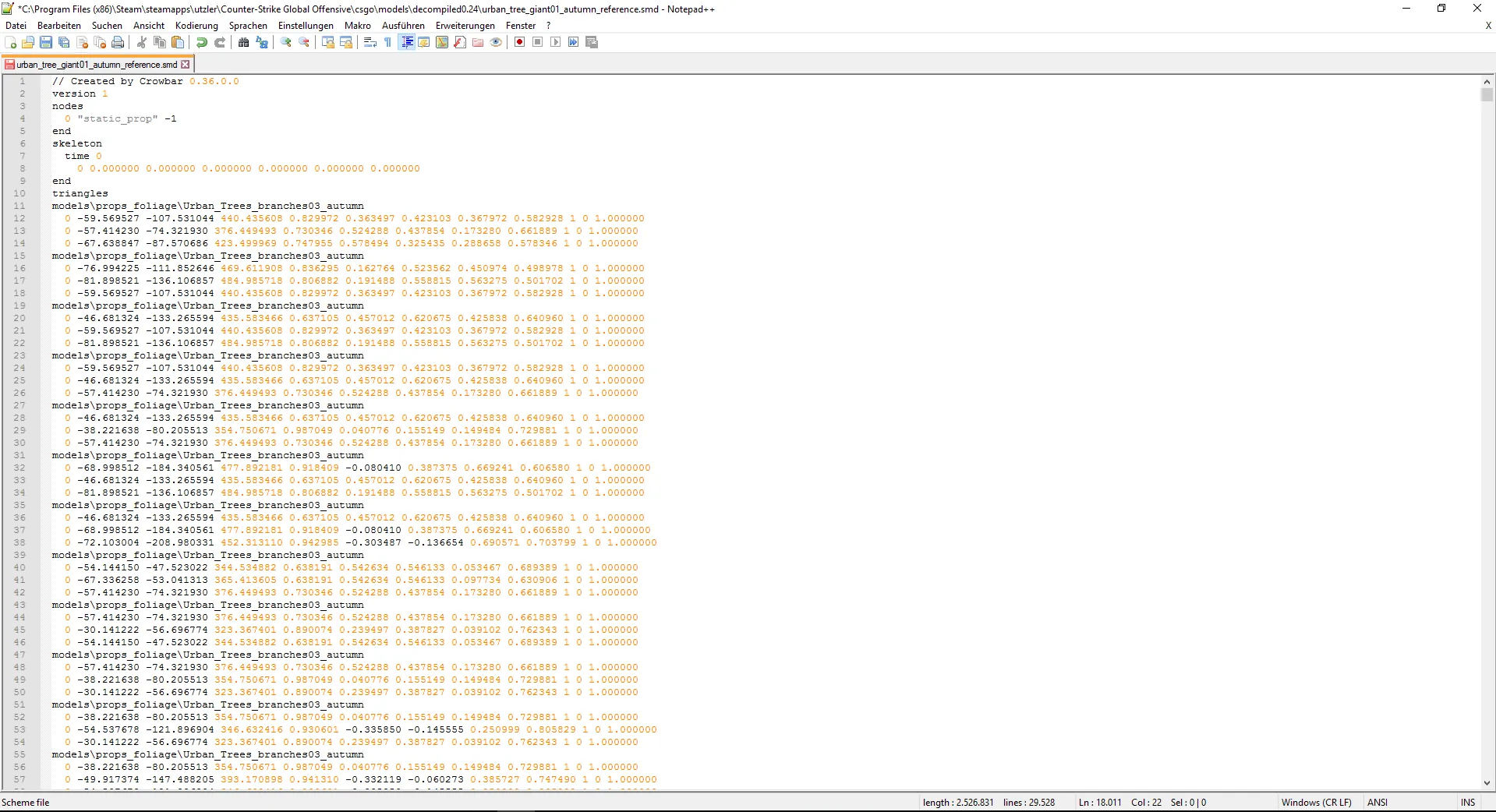
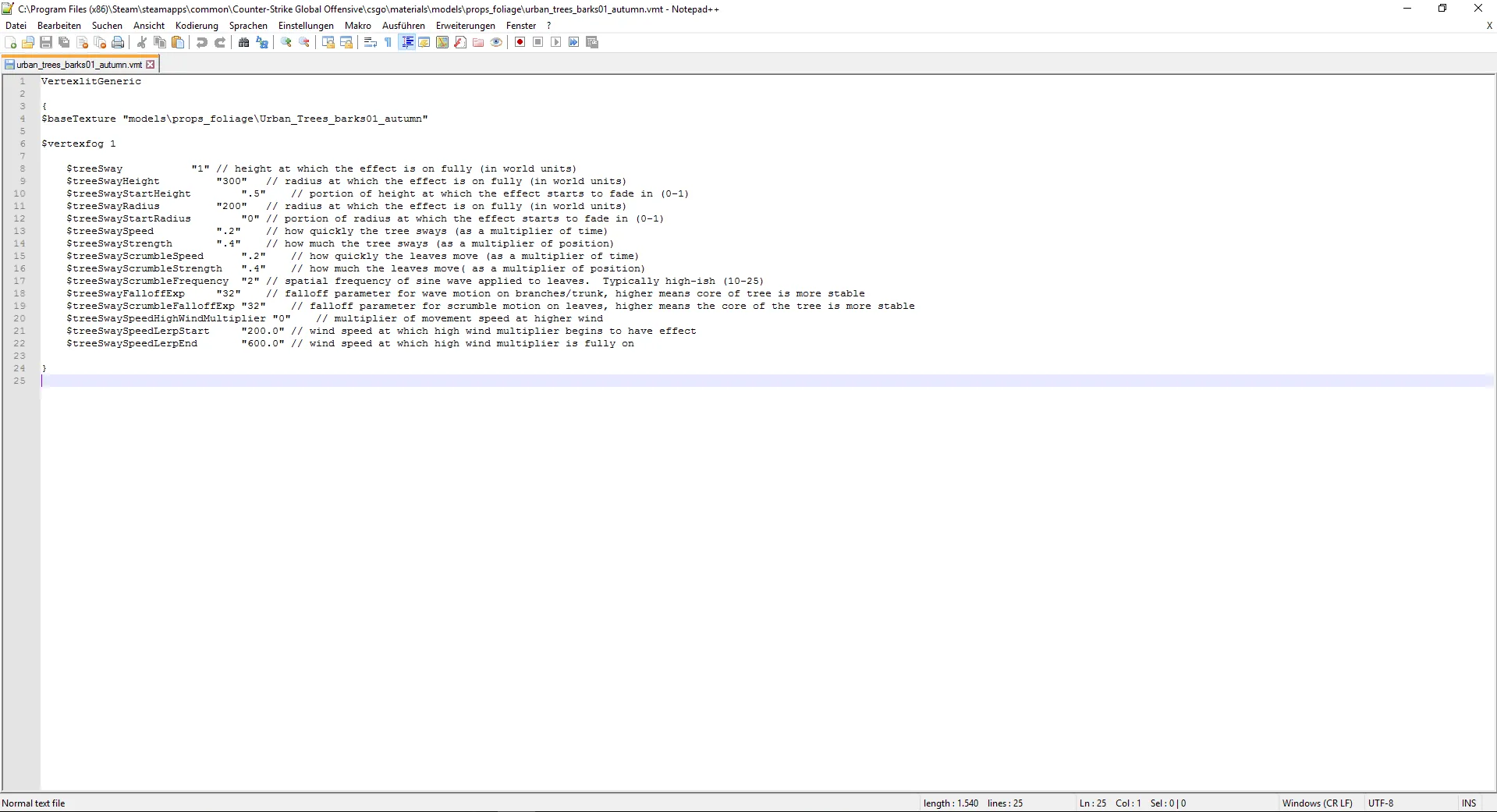
    So the problem is, that when I open my reference.smd file there were no .vtf endings

    But I just added my file name to the name without adding an extra .vtf

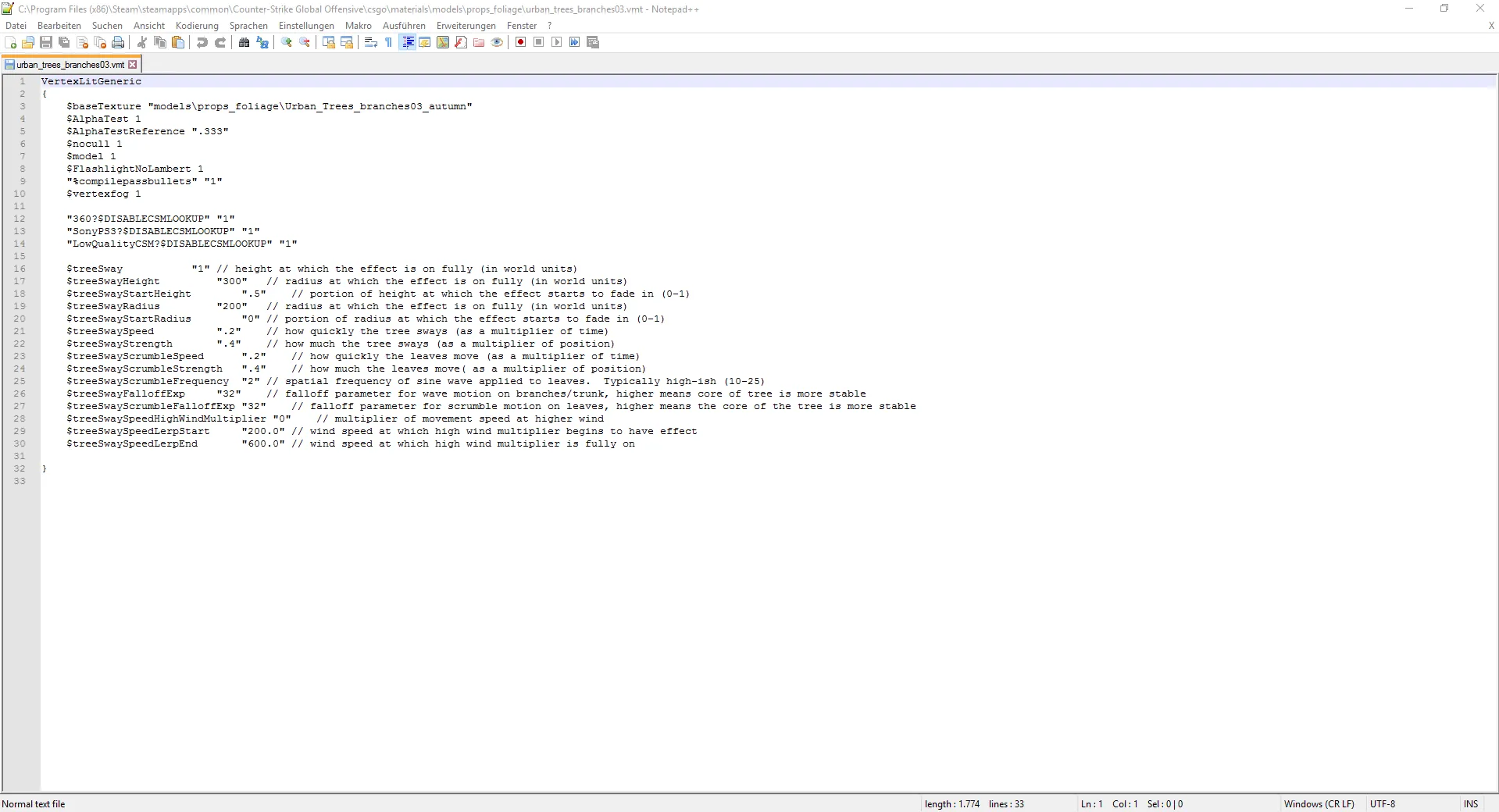
    Here are also the 2 .vmt files:

    So I think I did all of your steps and the compile worked but in HLMV I get an error message, when I try to open the model.

    So I tried to use the compiler in there for the .qc file.This is the output log:


    WARNING: AppFramework : Unable to load module p4lib.dll! qdir: "c:\program files (x86)\steam\steamapps\utzler\counter-strike global offensive\csgo\models\decompiled0.24\offensive\csgo\models\decompiled0.24\" gamedir: "c:\program files (x86)\steam\steamapps\utzler\counter-strike global offensive\csgo\" g_path: "offensive\csgo\models\decompiled0.24\urban_tree_giant01_autumn.qc" Building binary model files... Working on "urban_tree_giant01_autumn.qc" Error opening c:\program files (x86)\steam\steamapps\utzler\counter-strike global offensive\csgo\models\decompiled0.24\offensive\csgo\models\decompiled0.24\urban_tree_giant01_autumn.qc ERROR: 'EXCEPTION_ACCESS_VIOLATION' (assert: 1)

    RESULT: ERROR CDynamicFunction: Loading library 'Kernel32.dll' (74F50000) CDynamicFunction: Lookup of 'TryEnterCriticalSection' in 'Kernel32.dll': 7769C010 CDynamicFunction: Closing library 'Kernel32.dll' (74F50000)

    I hope it's kind of usefull


    Also... could it be that it's messed up because of the locations of the files or are these alright?

Participate now!

Don’t have an account yet? Register yourself now and be a part of our community!

Register Yourself Login
Discord

The Mapcore Discord is our lively IRC channel of the 2000s reborn. Chat about level design, gaming, and more.

Latest Posts

  1. How to Use a Free Kundali Maker for Accurate Future Predictions

    astr09
    July 23, 2026 at 6:35 AM
  2. Tangerine

    Harry Poster
    July 18, 2026 at 11:10 AM
  3. Any of the old guard still around? D:

    Warby
    July 12, 2026 at 8:23 PM
  4. About our archived forums

    Thrik
    June 30, 2026 at 2:12 PM
  5. Mapcore Discord

    mason_fan123
    June 24, 2026 at 8:52 PM
  6. [CS2] Valley

    Serialmapper
    June 22, 2026 at 11:56 AM
  7. Free Music / SFX Resource - Over 2500 Tracks

    Eric Matyas
    June 18, 2026 at 12:32 PM
  8. Pango [WIP]

    Elowen
    June 11, 2026 at 10:13 AM
  9. [CS2] Dvina

    Jeremy Rivera
    June 11, 2026 at 10:03 AM
  10. Bridges 2.0 by NEXSIDE, MAP SHOWCASE. ( Steam Workshop )

    MrTrane18
    June 1, 2026 at 7:46 PM
  1. Privacy Policy
  2. Contact
Powered by WoltLab Suite™