

Here is what the map script syntax will look like once we put the new update out:
Quote "ai" { "max_vision_range" "200" }

Here is what the map script syntax will look like once we put the new update out:
Quote "ai" { "max_vision_range" "200" }
Massive frustration as the text file provided to script the offensive gamemode actually scripts the functionality for liberation instead.
No idea why.
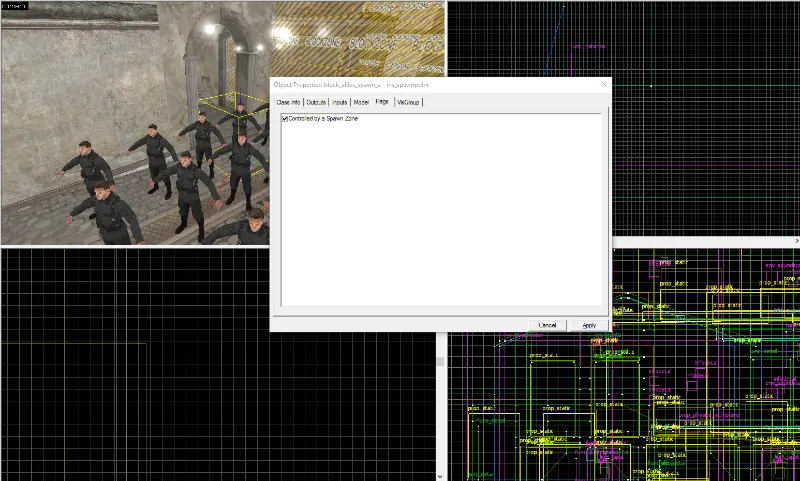
You might be getting this error because your ins_spawnpoints aren't controlled by the Spawn Zone. You can enable this for each spawn point in their properties, see image:
In Liberation mode, only A and C are in possession by each team. However, with 5 capture points I'm not sure if this mechanic functions as intended. I suggest to either make it 3 capture points or change your mode to Frontline, which supports 5 capture points: 2 destroyable points and 3 capture points. Also, it's better to stick to the game mechanics to make sure each mode functions properly.
Finally, "disablespawns" "1" means that the spawns are disabled and controlled by the game mode. Which means when you load the map with Liberation, only the Liberation spawns become active. For all other modes the spawns will be disabled.
After messing around with theaters I think I broke something, now the bots can't attack the opposing team, even without a theater override.. It's all default (americans vs axis) and they don't attack each other. am I doing somehting wrong ?
The map config file:
Quote "offensive" { "TeamOne" "axis" "TeamTwo" "americans" "AttackingTeam" "TEAM_ONE"
}
I just tested with the official maps, same problem, did I or it broke after the update?
I just investigated your issue and you're correct something broke after the update and bots don't fire anymore on any PVP mode. As a workaround, you can load any map with any coop mode and wait till the bots are spawned. As soon the bots are spawned, switch back to your own map and the bots should function correctly again. We will fix this issue as soon as we can. I will keep you guys posted.
You can find a lot of documentation on websites like Tumblr / Pinterest / Facebook. Some examples :
• https://www.facebook.com/WW2-Colourised…10813107/photos
• https://www.facebook.com/WorldWarColorisation/photos
• http://french-cut.tumblr.com/archive
• http://ultimate-world-war-ii.tumblr.com/archive
• https://fr.pinterest.com/prefieronosaber/ww2-colored-photos/?etslf=3278&eq=ww2 colore
• https://fr.pinterest.com/oldlag/ww2-normandy-1944/?etslf=7331&eq=ww2 normandy
• https://fr.pinterest.com/wimwuyts/ww2-normandy/?etslf=6693&eq=ww2 norman
• https://fr.pinterest.com/elitechateau/ww2-normandy/?etslf=25393&eq=ww2 norm
• etc...
Often the pictures are about soldiers / men but it's good for the context / colors / atmosphere.
[Blocked Image: https://scontent.xx.fbcdn.net/t31.0-8/14107793_963680377095088_2432118998235264944_o.jpg]
The bots not firing in PVP modes has been fixed in our latest hotfix
Currently -StaticPropSampleScale is not supported in DOI.
Make sure to set the logic_auto outputs to "OnMapSpawn" and it should function as intended when you spawn in-game.
Is anyone else experiencing some prop_statics and brushes with certain textures on it turning into wireframes since the update? It even occurs in official maps on regular servers. What can I do about that?
 Quote from poLemin
4 minutes ago, poLemin said: Is anyone else experiencing some prop_statics and brushes with certain textures on it turning into wireframes since the update? It even occurs in official maps on regular servers. What can I do about that?
Was getting that a lot, it's just one file that breaks on updates, validating the game cache fixes it.
 Quote from Squad
On 9/28/2016 at 6:08 AM, Squad said: I think I read somewhere ladders are not supported in DoI.
Not true. They work ok in my map. Use the ladder texture.
 Quote from Bastion
3 hours ago, Bastion said: Was getting that a lot, it's just one file that breaks on updates, validating the game cache fixes it.
Thanks mate! Forgot about that option - fixed.
For anyone still looking to get the game, there is a New World Interactive sale going on in the Humble Store.
https://www.humblebundle.com/store/promo/newworldinteractive/
Managed to find the money to buy the game. Hopefully I can get an entry together in time 
I've post this on the newworld forums a while ago and never had a answer. I hope someone can pleaaaasseee help me out!
Hey guys,I made the map in dev textures and I had no problems at all.Then I did a litle bit of texturing, compiled the map and tested it ingame and all textures appears to be black.Only props catch a litle bit of light. Here is a screenshot: http://images.akamai.steamusercontent.com/ugc/4361110761…2AAB8571DB876E/Anyone knows what's the problem here? I use the following compile settings: FULL compile HDR OnlyScreenshot of the warnings: http://i.imgur.com/KyHRgRF.jpg
What I tried already:
- I got rid of the blend materials, compiled the map without any warning or error.And still I have black textures. - Tried to adjust the light settings, no difference.- I have alligned some brushes on the grid since they were massy.- Removed a lost spawn which wasn't placed in the air.- Got rid of a overlap in 2 brushes.- I have set all textures to 0.25 x 0.25 so there aint no strechted weird sized textures, didn't work.
@Roald did you check for leaks?
I have a few questions regarding settings things up.
The latest update made it possible to set a max viewing distance for bots, but I'm not sure how exactly to configure it.
Quote [*] Added AI mapscript entry “max_vision_range” for overriding bot vision distance to fine-tune their vision behavior in maps that use fog. [/list]
Do we add this line in the mapname.txt file in /maps?
I'm adding the Offensive gamemode to my map and so far everything is functional except for the last objective, the radio. It shows up ingame, but I'm not able to destroy it.
Here is how the offensive gamemode is configured in the .txt file. I copied the part about the radio objective from an official map that has Allies as the attacking team as well.
I'm guessing it's related to the "teamnumber" parameter, but I'm unsure about the possible values for it.
Quote "offensive" { "TeamOne" "americans" "TeamTwo" "axis" "AttackingTeam" "TEAM_ONE" "controlpoint" "cp_liberation_a" "controlpoint" "cp_liberation_b" "controlpoint" "cp_liberation_c" "controlpoint" "radiopoint_axis_final" "spawnzones" { "disablespawns" "1" "0" "spawnzone_offensive_a" "1" "spawnzone_offensive_b" "2" "spawnzone_offensive_c" }
"entities" { // Radio point "obj_destructible" { "origin" "256 4224 40" "angles" "0 90 0" "targetname" "radio_axis_final" "teamnumber" "3" "ControlPoint" "radiopoint_axis_final" } "point_controlpoint" { "origin" "256 4224 64" "angles" "0 90 0" "targetname" "radiopoint_final" "printname" "#CP_AxisRadio" } } }
}
Thanks in advance!
@Squad does the game end after capturing the last base?
I was setting up the gameplay logic yesterday and noticed that my game ended after capturing the last base since there weren't any enemies left. Make sure that you still have hostile bots against you after capturing the last base. Then you should be able to destroy the radio. Oh, and in case you are not aware of it: The radio can only be destroyed after all bases are captured!
Yes. If no enemies are alive then game will end in last objective (Charlie) if all waves are finished.
Don’t have an account yet? Register yourself now and be a part of our community!