1. Forums
  2. Discord
  3. About Mapcore
  4. Patreon Supporters
  • Login
  • Register
  • Search
This Thread
  • Everywhere
  • This Thread
  • This Forum
  • Articles
  • Pages
  • Forum
  • More Options
  1. Mapcore
  2. Discussions
  3. Level Design

[csgo] Lighting on props broken since Wildfire Update? (+ Possible fix)

  • February 18, 2016 at 4:02 PM
  • Shibou
    • February 21, 2016 at 6:08 PM
    • #21
    Quote from baem123

    You added it at "additional game parameters", cut it and click on "Expert..."

    Now choose the fast configuration in the top left drop down menu. Go to "$light_exe" and paste these parameters there. Then click "GO" to compile.

    lets face it: that was realy noobish from me.

    But it worked and now everything is fine with my map again. Thank you very much!

  • Luffaren
    • February 21, 2016 at 9:12 PM
    • #22
    Quote from MagnarJ

    Hi there! We released an update to VRAD in the latest update. To get proper lighting on static props, you will need to run with -StaticPropLighting in VRAD, which sadly isn't updated (yet) in Hammer for the default, quick compile settings.

    This flag will increase compile times, but to help with iteration we also included the ability to tweak the quality of the new lighting by adding -StaticPropSampleScale x parameter (16 = slow, high quality, 4 = default and 0.25 = fast, low quality) which is useful if you want to speed up compile times. Note that adding -final is the same as having -StaticPropLightingScale 16.


    We'll have the full documentation for the upgraded compile tools out early next week.

    Hello there!

    Does the -StaticPropSampleScale x parameter affect the .bsp filesize in any way? My current project just raised around 30-35mb with the latest update and i can't seem to get it down by setting the value to 0.25. I've also tried setting the value to 1 and 4, still ending up with the same filesize.

    I'm not sure if i got something wrong, here's my parameter line for $light_exe:
    -textureshadows -hdr -StaticPropLighting -StaticPropSampleScale 0.25 -StaticPropPolys -game $gamedir $path\$file

    If there is nothing that can be done about the increase in filesize, would it perhaps be possible to use a previous version of vrad.exe? In that case, would you happen to have it available?

    I really need to get my .bsp filesize lower due to the community fastDL servers being capped at 150mb.

  • Iceberg
    • February 21, 2016 at 9:49 PM
    • #23
    Quote from Wrakk

    With the new Wildfire Update came a whole new Nuke, which included a lot of new assets. So, I go into Hammer and place down a few of the new props, then compile. They're all completely black. I tried to just compile older props from other maps, and they are also all black. Anyone else having this problem?

    Pics:

    Hidden Content

    I have the same problem

    :???:

  • MaanMan
    • February 22, 2016 at 4:28 AM
    • #24

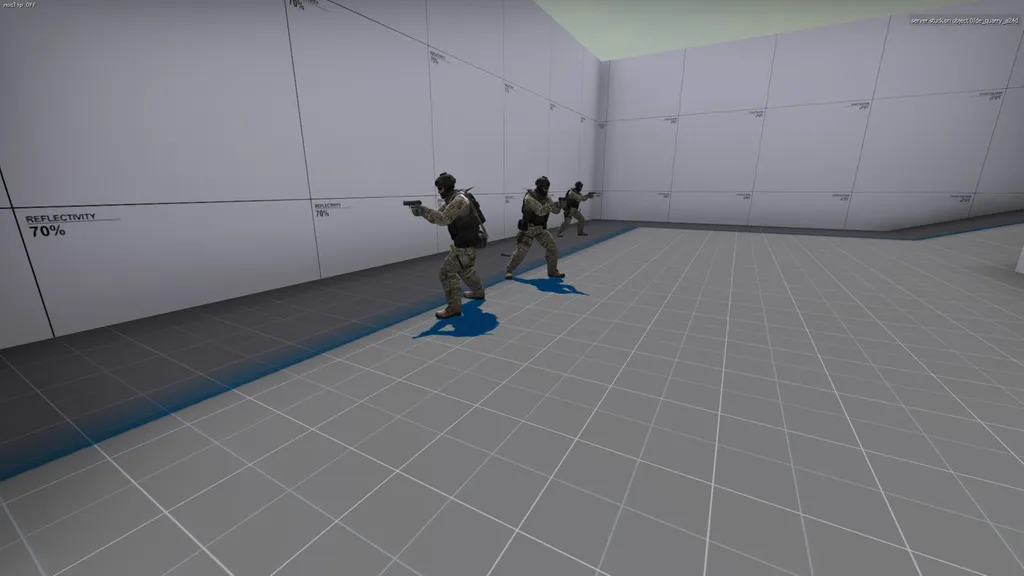
    Is anyone else having problems with HDR? All of my compiles are turning up with blue shadow highlights. The only solution I have found is compiling without HDR.

    Quote

  • jackophant
    • February 22, 2016 at 10:09 AM
    • #25

    I'm kind of having same problem as @MaanMan, but my shadows cast on the floor are solid black. If they carry on over to a wall, that shadow is fine. I also have odd light reflections on walls and anywhere a light source is, the weird, black, inky shadow disappears.

    This has been replicated on @Vaya's machine as well, using his originally non-problematic compile settings:

    http://imgur.com/a/dahc0

  • Vaya
    • February 22, 2016 at 10:15 AM
    • #26

    I've done a good compile for solution with the same settings too.

  • Michael Greenwood
    • February 22, 2016 at 2:33 PM
    • #27

    The -staticproplighting worked great for the issue I was having. Thanks for the fix!

  • w0llmart
    • February 22, 2016 at 7:19 PM
    • #28

    idk

    is anyone else seeing red


  • Shibou
    • February 22, 2016 at 9:57 PM
    • #29

    Strange shadows for everyone. Blue, black and red are allready taken.

    Green, and yellow are still available - choose one.

  • Plat
    • February 22, 2016 at 11:05 PM
    • #30
    Quote from baem123

    You added it at "additional game parameters", cut it and click on "Expert..."

    Now choose the fast configuration in the top left drop down menu. Go to "$light_exe" and paste these parameters there. Then click "GO" to compile.

    I did this and now it just crashes my vrad. No clue what's going on.

    EDIT: Can someone who got theirs to work give me their settings? I just want to be able to map again without dealing with this. I can't compile anymore without vrad crashing. Thanks valve.

  • Iceberg
    • February 23, 2016 at 10:54 AM
    • #31

    I imagine there will be some ongoing claim? someone valve is working to fix this problem :???::rolleyes::rolleyes:

  • 'RZL
    • February 23, 2016 at 11:31 AM
    • #32
    Quote from MaanMan

    Is anyone else having problems with HDR? All of my compiles are turning up with blue shadow highlights. The only solution I have found is compiling without HDR.

    Hidden Content

    This problem was solved by removing the light_environment and adding a new light_environment with the exact same settings. Looks like the entity was somehow corrupted. Funky stuff.

  • jackophant
    • February 23, 2016 at 3:25 PM
    • #33
    Quote

    This problem was solved by removing the light_environment and adding a new light_environment with the exact same settings. Looks like the entity was somehow corrupted. Funky stuff.

    Can confirm this does not work (for me). Still have solid dark shadows with occasional blue bits on props and when viewing shadows at a very shallow angle from large distance.

  • K
    • February 23, 2016 at 4:02 PM
    • #34
    Quote from jackophant

    Can confirm this does not work (for me). Still have solid dark shadows with occasional blue bits on props and when viewing shadows at a very shallow angle from large distance.

    I had the same problem here.
    I fixed it, by removing the light_directional,...try to do it, if you have one.

    This is sad. :sad:

  • jackophant
    • February 23, 2016 at 4:18 PM
    • #35
    Quote from K

    I had the same problem here.I fixed it, by removing the light_directional,...try to do it, if you have one.

    This is sad. :sad:

    Ah, yeah I'll give that a shot.

    I have to put my hands up and say I don't actually understand what the light_directional is meant to do. It seems to fulfil similar/same role as light_environment.

    I only have it due to taking lighting from another map and didn't take the time to understand what it does. Documentation on it is pretty barren as well.

  • Aztk
    • February 24, 2016 at 11:12 AM
    • #36

    Added -StaticPropLighting -StaticPropSampleScale 0.25 to $light_exe parameters in "fast" option in expert compile and this error appear when compiling:

    Code
    Command line: "E:\Steam\steamapps\common\Counter-Strike Global Offensive\bin\vrad.exe" "-bounce" "2" "-noextra" "-game" "E:\Steam\steamapps\common\Counter-Strike Global Offensive\csgo" "e:\steam\steamapps\common\counter-strike global offensive\sdk_content\maps\de_industry" "-StaticPropLighting" "-StaticPropSampleScale" "0.25"
    usage  : vrad [options...] bspfile
    example: vrad c:\hl2\hl2\maps\test

    And vrad crashes.

    How I can fix it? :c

  • Vaya
    • February 24, 2016 at 11:19 AM
    • #37

    put the options before the BSP file


    Code
    -bounce" "2" "-noextra"
    Code
    "-StaticPropLighting" "-StaticPropSampleScale" "0.25"
    Code
    "-game" "E:\Steam\steamapps\common\Counter-Strike Global Offensive\csgo" "e:\steam\steamapps\common\counter-strike global offensive\sdk_content\maps\de_industry"


    or something like that. not 100% on this syntax as i don't touch these often.

  • jackophant
    • February 24, 2016 at 11:34 AM
    • #38

    Removing light_directional fixed my shadow issue, thanks @K!

  • sevin
    • February 24, 2016 at 1:25 PM
    • #39
    Quote from jackophant

    Ah, yeah I'll give that a shot.

    I have to put my hands up and say I don't actually understand what the light_directional is meant to do. It seems to fulfil similar/same role as light_environment.

    I only have it due to taking lighting from another map and didn't take the time to understand what it does. Documentation on it is pretty barren as well.

    light_directional is like the twin of env_cascade_lighting, the entity that controls the cascade shadow mapping (super accurate real time shadows). The light_environment is what casts the light and sets angles and the other two are what control the shadow maps.

    Saying that, I don't actually think they're necessary to have because the shadow maps get generated without either of the entities.

  • jackophant
    • February 24, 2016 at 2:26 PM
    • #40
    Quote from sevin

    light_directional is like the twin of env_cascade_lighting, the entity that controls the cascade shadow mapping (super accurate real time shadows). The light_environment is what casts the light and sets angles and the other two are what control the shadow maps.

    Saying that, I don't actually think they're necessary to have because the shadow maps get generated without either of the entities.

    Good to know, thanks :)

Participate now!

Don’t have an account yet? Register yourself now and be a part of our community!

Register Yourself Login
Discord

The Mapcore Discord is our lively IRC channel of the 2000s reborn. Chat about level design, gaming, and more.

Latest Posts

  1. About our archived forums

    Thrik
    June 30, 2026 at 2:12 PM
  2. Mapcore Discord

    mason_fan123
    June 24, 2026 at 8:52 PM
  3. [CS2] Valley

    Serialmapper
    June 22, 2026 at 11:56 AM
  4. Any of the old guard still around? D:

    Thrik
    June 20, 2026 at 10:11 PM
  5. Free Music / SFX Resource - Over 2500 Tracks

    Eric Matyas
    June 18, 2026 at 12:32 PM
  6. Pango [WIP]

    Elowen
    June 11, 2026 at 10:13 AM
  7. [CS2] Dvina

    Jeremy Rivera
    June 11, 2026 at 10:03 AM
  8. Bridges 2.0 by NEXSIDE, MAP SHOWCASE. ( Steam Workshop )

    MrTrane18
    June 1, 2026 at 7:46 PM
  9. Classic Maps Reborn For CS2

    SillySpaceCat
    May 31, 2026 at 10:33 PM
  10. [CS2] Dvina

    Pulbusha
    May 29, 2026 at 5:54 PM
  1. Privacy Policy
  2. Contact
Powered by WoltLab Suite™