1. Forums
  2. Discord
  3. About Mapcore
  4. Patreon Supporters
  • Login
  • Register
  • Search
This Thread
  • Everywhere
  • This Thread
  • This Forum
  • Articles
  • Pages
  • Forum
  • More Options
  1. Mapcore
  2. Discussions
  3. Creative Chat

totally random texture thread

  • mikezilla
  • October 19, 2004 at 1:04 AM
  • Shibou
    • June 28, 2016 at 6:38 AM
    • #2,941
    Quote from Steppenwolf

    On 29.5.2016 at 1:13 AM, Steppenwolf said: I started learning Substance Designer few weeks ago after being super hesitant for a long time. I always thought it wouldn't feel like proper art making but now i'm loving it. This is one of my first attempts at a proper Substance, all procedural:

    [Blocked Image: http://i.imgur.com/bjsP7OR.jpg]

    did you create multiple masks for every roof tile to get an individual shape or is it some generator?

  • Steppenwolf
    • June 28, 2016 at 2:43 PM
    • #2,942

    I created the shape of a single tile and then i plugged it into a tile generator with some parameters to randomize things a little, like size, rotation, offset.

    [Blocked Image: http://i.imgur.com/7N8iML4.jpg]

  • Shibou
    • June 28, 2016 at 6:45 PM
    • #2,943
    Quote from Steppenwolf

    3 hours ago, Steppenwolf said: I created the shape of a single tile and then i plugged it into a tile generator with some parameters to randomize things a little, like size, rotation, offset.

    [Blocked Image: http://i.imgur.com/7N8iML4.jpg]

    I did the same but my result didn't even look half as good as yours. It seems like you used multiple generators and blended them together...


    you should make a Tutorial on that als roof tiles are more complicated then bricks ;)

  • Steppenwolf
    • June 28, 2016 at 7:07 PM
    • #2,944

    Well, once the shape is fed into the tile generator it runs through a whole other contraption of filters, noises and masks to create variation and get rid of the procedural look but it all follows the basic principle of adding layers of ever smaller details on top of each other.

    This Substance got pretty complex in the end and getting the roof tile shape took some experimenting but as with everything in Substance it can be broken down into very simple parts. When you take a look at the graph it's really just some basic geometric shapes, gradients and 2d transforms blended and masked together. For getting some of the round and skewed shapes i used simple directional warps with gradients to drive them. I didn't use any advanced tricks.

  • Steppenwolf
    • June 28, 2016 at 11:20 PM
    • #2,945

    On another note: when you make something like the tile shape always use tesselation and crank the scale up so you see exactly what's going on and how your tweaks affect the shape. For your large shapes in the early stage the heightmap is king, gives you a much better impression of what you're doing then looking at a flat surface with just a normal map.

  • Jenn0_Bing
    • September 15, 2016 at 3:04 AM
    • #2,946

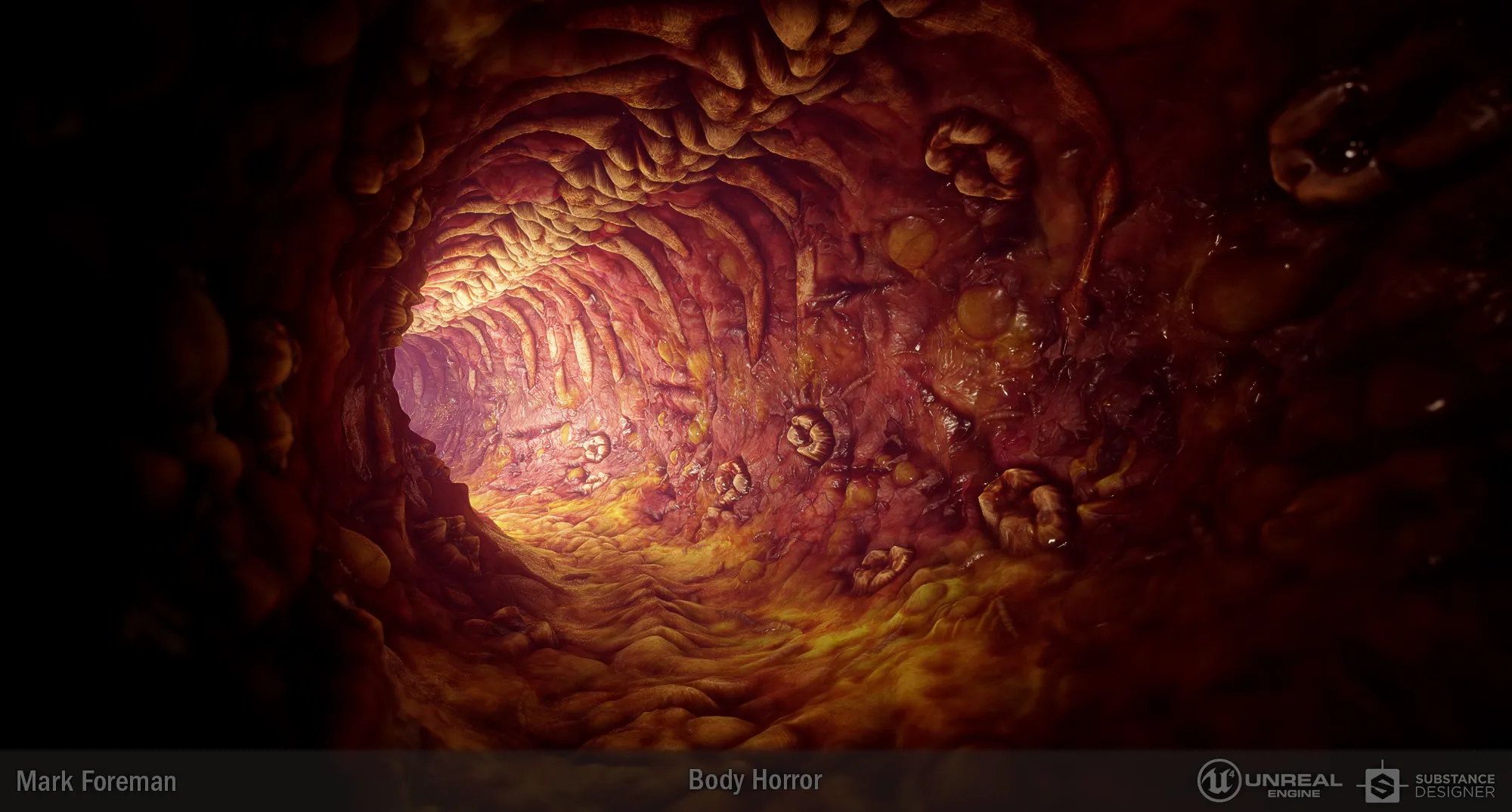
    This threads been a little quite lately. I've been plugging away at another substance. Got all inspired by various horror things recently, so I made a body horror type meat tunnel.

    The graph got a little out of hand along the way.

  • PogoP
    • September 15, 2016 at 1:24 PM
    • #2,947

    Fuckin hell man thats insane. Nice work! Is it all one texture? Wrapped around a cylinder and displaced?

    Reminds me of the Gorge tunnel in NS2![Blocked Image: http://sphotos-f.ak.fbcdn.net/hphotos-ak-ash3/792213_10151302093288105_1574697567_o.jpg]

  • Steppenwolf
    • September 15, 2016 at 2:17 PM
    • #2,948

    Crazy good Mark!

    I've added a couple Substances to my artstation recently that i haven't shown here: https://www.artstation.com/artist/steppenwolf/albums/45013

  • Pampers
    • September 15, 2016 at 3:54 PM
    • #2,949

    These all look good

    Spoiler but honestly never understoond the need to take screenshots of the substance nodes

  • Steppenwolf
    • September 15, 2016 at 6:17 PM
    • #2,950

    If you don't show the graph someone will always request it. It's educational for others. Think of it like 3d artist showing wireframes.

  • Pampers
    • September 15, 2016 at 11:16 PM
    • #2,951

    but showing it in that states is useless, can't see what nodes are being used or anything, anyway, stupid rant, carry on :)

  • Jenn0_Bing
    • September 18, 2016 at 11:49 AM
    • #2,952

    Thanks guys <3

    And yeah, I kinda agree Pampers but like Steppenwolf said, if I didn't post it someone would ask for it. It's as much insurance to the claim it was made in SD as it is breakdown of the graph. That said if anyone wanted any specific shots I'd be happy to share.

    I wish Allegorithmic would add some function to quickly output a high-resolution shot of your graph.

    Quote from PogoP

    On 9/15/2016 at 2:24 PM, PogoP said: Fuckin hell man thats insane. Nice work! Is it all one texture? Wrapped around a cylinder and displaced?

    Thanks :) It's 4 textures I exported from the one graph with vertex blending done in UE4 using tessellation. These are the individual ones I used:

  • grapen
    • September 19, 2016 at 3:20 PM
    • #2,953

    Eh, you guys sold Substance to me. I'll grab the indie license and dive right in. Any great starter tuts on the UI you'd recommend?

  • Steppenwolf
    • September 20, 2016 at 6:15 PM
    • #2,954

    Check out the tuts on the Allegorithmic youtube channel first. I can highly recommend Rogelio Olguins Gnomon tutorial but it's not free.

  • tomm
    • October 3, 2016 at 6:04 PM
    • #2,955

    started playing around with substance as well, this is my 2nd attempt at some generic ground tiles, first one was garbage.

    [Blocked Image: https://i.imgur.com/zHBYyV1.png]

  • Dosentti
    • October 3, 2016 at 8:20 PM
    • #2,956

    I see Substance Design is pretty HC tool. I gotta try it too. Is it any good with creating textures for csgo since there are so many limitations?

  • Pampers
    • October 4, 2016 at 1:58 PM
    • #2,957

    what limitations?

  • Vorontsov
    • October 4, 2016 at 3:06 PM
    • #2,958
    Quote from Dosentti

    18 hours ago, Dosentti said: I see Substance Design is pretty HC tool. I gotta try it too. Is it any good with creating textures for csgo since there are so many limitations?

    You can use Substance for CS:GO but I wouldn't do it. I used it a couple times for CS:GO and it's just not very worth it compared to "last gen" techniques. Now if you were in a proper engine that doesnt suck dick balls like UE4 or Unity 5, Substance is amazing.

  • Yanzl
    • October 4, 2016 at 4:06 PM
    • #2,959

    Speaking of Substance and CS:GO, I patched together a Source engine looking shader for substance.

    Get it here: http://gortnar.com/vmt/shaders.7z and put it in ...\Substance Designer 5\resources\view3d\shaders

    [Blocked Image: http://i.imgur.com/vHurn4P.png]

    It has cubemap looking reflections and a phong specular highlight. Values in the shader are similar to these .vmt commants: Envmap Tint = $envmaptint, Specular Tint = $phongting, Specular Glosiness = $phongexponent, Specular Boost = $phongboost, but I don't think the numbers translate 100%, so you'd probably need to adjust a bit in the vmt to make it look the same. The parameters after Specular boost are for controlling the lighting inside the Substance Designer.

    And for creating presentable stuff for source I usually overlay a light node, ambient occlusion and curvature on top of diffuse.

  • Motanum
    • October 4, 2016 at 5:13 PM
    • #2,960
    Quote from Yanzl

    54 minutes ago, Yanzl said: Speaking of Substance and CS:GO, I patched together a Source engine looking shader for substance.

    Get it here: http://gortnar.com/vmt/shaders.7z and put it in ...\Substance Designer 5\resources\view3d\shaders

    This deserves it's own thread!

    I expanded on this by making a template for Substance Designer to be used with the Source Shader. Download here: https://www.dropbox.com/s/dvkakn8mlij5…emplate.7z?dl=0 Instructions on how to set up are on the read me file

    [Blocked Image: http://i.imgur.com/ztzhVL8.png]

    I also made a Base Source Material node. You can use this node to get up and running the source shader for quick results, then later on plug in custom maps for env mask, and specularity (Phong). You can also work with height map and then the node will get the normal map.

    [Blocked Image: http://i.imgur.com/L09gxXJ.jpg]


    Example Node. To explain the very basics.

    [Blocked Image: http://i.imgur.com/3ojlXUZ.jpg]

Participate now!

Don’t have an account yet? Register yourself now and be a part of our community!

Register Yourself Login
Discord

The Mapcore Discord is our lively IRC channel of the 2000s reborn. Chat about level design, gaming, and more.

Latest Posts

  1. About our archived forums

    Thrik
    June 30, 2026 at 2:12 PM
  2. Mapcore Discord

    mason_fan123
    June 24, 2026 at 8:52 PM
  3. [CS2] Valley

    Serialmapper
    June 22, 2026 at 11:56 AM
  4. Any of the old guard still around? D:

    Thrik
    June 20, 2026 at 10:11 PM
  5. Free Music / SFX Resource - Over 2500 Tracks

    Eric Matyas
    June 18, 2026 at 12:32 PM
  6. Pango [WIP]

    Elowen
    June 11, 2026 at 10:13 AM
  7. [CS2] Dvina

    Jeremy Rivera
    June 11, 2026 at 10:03 AM
  8. Bridges 2.0 by NEXSIDE, MAP SHOWCASE. ( Steam Workshop )

    MrTrane18
    June 1, 2026 at 7:46 PM
  9. Classic Maps Reborn For CS2

    SillySpaceCat
    May 31, 2026 at 10:33 PM
  10. [CS2] Dvina

    Pulbusha
    May 29, 2026 at 5:54 PM

Users Viewing This Thread

  • 5 Guests
  1. Privacy Policy
  2. Contact
Powered by WoltLab Suite™