


 Quote from poLemin
2 hours ago, poLemin said:
Thanks!
Quote from poLemin2 hours ago, poLemin said:
Thanks!
Are we allowed to submit 2 maps if we can do them both?
3 minutes ago, That50'sGuy said: I believe there was a rule in the contest description that stated that people couldn't submit maps that are publicly available. So I think you may just have to make a new map from scratch.
It said in the rules it can be as long as it wasn't completed (layout & art) so I wanted to make sure that was usuable.
From the rules: "Maps that were under creation prior to the announcement of this Contest can be entered, as long as a complete map version (layout and art) has not been released for public download."
Wanted to know if this was still applicable.
Would I be allowed to submit a map that is publicly available, layout complete and art is WIP or am I not allowed to due to art usage?
Here is the map if you need to see whether art is too far to be considered: https://steamcommunity.com/sharedfiles/fi…/?id=1690431421
 Quote from PogoP
56 minutes ago, PogoP said: Show us some screenshots, maybe we can help if we can see what you're making.
One thing that took me a long time to get over, is that your level will look crap for a long time. It only really comes together in the end. All maps look really crappy at the start!
Personally when I start an environment (in your case, a new map), I do a very basic blockout of the rough layout to get a feel for it. Even if it ends up changing later, it's a good start and you can iterate on it. I then take one little section and make a little 'beautiful corner' of the map, that is quite highly detailed, to see what the final result could look like. Then, do what Minos said, and start applying what you learn there to the rest of the environment, bit by bit, working in large passes.
One other thing - lighting makes such a huge difference. It can make or break an environment. Look at what other maps do and try and replicate what they're doing.
https://steamcommunity.com/sharedfiles/fi…/?id=1690431421
screenshots there
 Quote from Roald
5 minutes ago, Roald said: Is your question about how you make things pretty or how to devine certain areas in your map?
Most (beginning) mappers are too much focused on creating one corridor to another corridor leading to a hall that leads to a new corridor. And thats kinda not inspiring at all. So maybe try to think in logic and give each area a identity, something believeable. It helps if you know what theme you want at the start and think of this while building the layout. It also helps to find as many cool references as you can find. You can even create aa overview of the level and drop in reference imagine with lines to certain areas so u get a good feeling of how each place should look and interact with eachother.
Sometimes corridors are a must to block seightlines, but it doesnt always have to be a tight boring corridor. Like cobblestone has this open field near T spawn/mid which is alright or abbey has a small pathway devined by a fence with behind it a open beautiful field and blabla.
I know what I want my areas to be but I am trying to make them pretty.
 Quote from Serialmapper
52 minutes ago, Serialmapper said: See, you just gave yourself the answer! If you don't know ho to make custom assets, stick to those already present in the game. Most of us had started like that. If you want to make your own assets try first with custom textures/materials. Those are the easyest to make, up to certain quality level.
I do use the game's assets but I can't make anything good looking with them. I'm alright at detailing the bombsites but the surrounding areas and walls are things that I struggle with.
 Quote from esspho
35 minutes ago, esspho said: Take some time to look for real world references that you like. Try to find some contrasting subthemes that fit your overall theme. For example an urban setting could have a storefront, a backalley and a parking lot. Then take your map overview and scribble in those areas. If you like how everything comes together start working off of your references.
What theme do you have in mind for your map?
I originally wanted to have a medieval German art style but found it was too difficult for me to make without custom assets. I have now decided to either use a Aztec/Dust2 Theme because they are already a lot of assets available to me in those styles.
I know what theme I want for my map but I'm struggling to make it a reality. Does anyone have any tips on detailing my map?
 Quote from Interfearance
23 hours ago, Interfearance said: @millo I thought I was the only one who thought this about Cache. Every single chokepoint is literally an L shape with no variation except squeaky
It does help players learn the map but if you have a map that has a lot of tight angles and indoor sections, your chokepoints are all doomed to be L-shaped. I'm not sure if my map is like that yet but if it does I will want to fix it.
Quote from InterfearanceOn 4/1/2019 at 8:23 PM, Interfearance said: Looks like there are allot of flat right angle turns. Try adding some more interesting geometry, including height variations.
Yes there are a lot of flat right angle turns or interesting geometry and not a lot of height variation, just like Cache.
Quote from Roald23 hours ago, Roald said: I am abit shy to say this but I have a brush on you for a very long time now ?.
Anyways it feels like you should stretch your map more vertically and remove some paths that doesn't have to be there to simplify things:[Blocked Image: https://i.imgur.com/tcETMo5.png]
I have removed the path in the top left as it was pretty much useless but I believe that the other 2 pathways you showed can be useful at the start of the round and end of the round. Maybe my mind will change in time, but I feel that for the most part they don't hinder gameplay too much.
https://steamcommunity.com/sharedfiles/fi…/?id=1690431421
Hello everyone!
This is my first map for CS:GO which I am calling de_princess! It is still quite early on in terms of theme but it is loosely based on the medieval German village Rottenburg am Neckar. You can see this inspiration at CT Spawn with the buildings. Overall, I am not too attached to the theme and will be prepared to change it if it will be easier for me to complete as although I believe I am alright at detailing environments, I know I'm not good at making buildings/houses. Please, play the map and tell me what you think! There are more images on the Steam Workshop page.
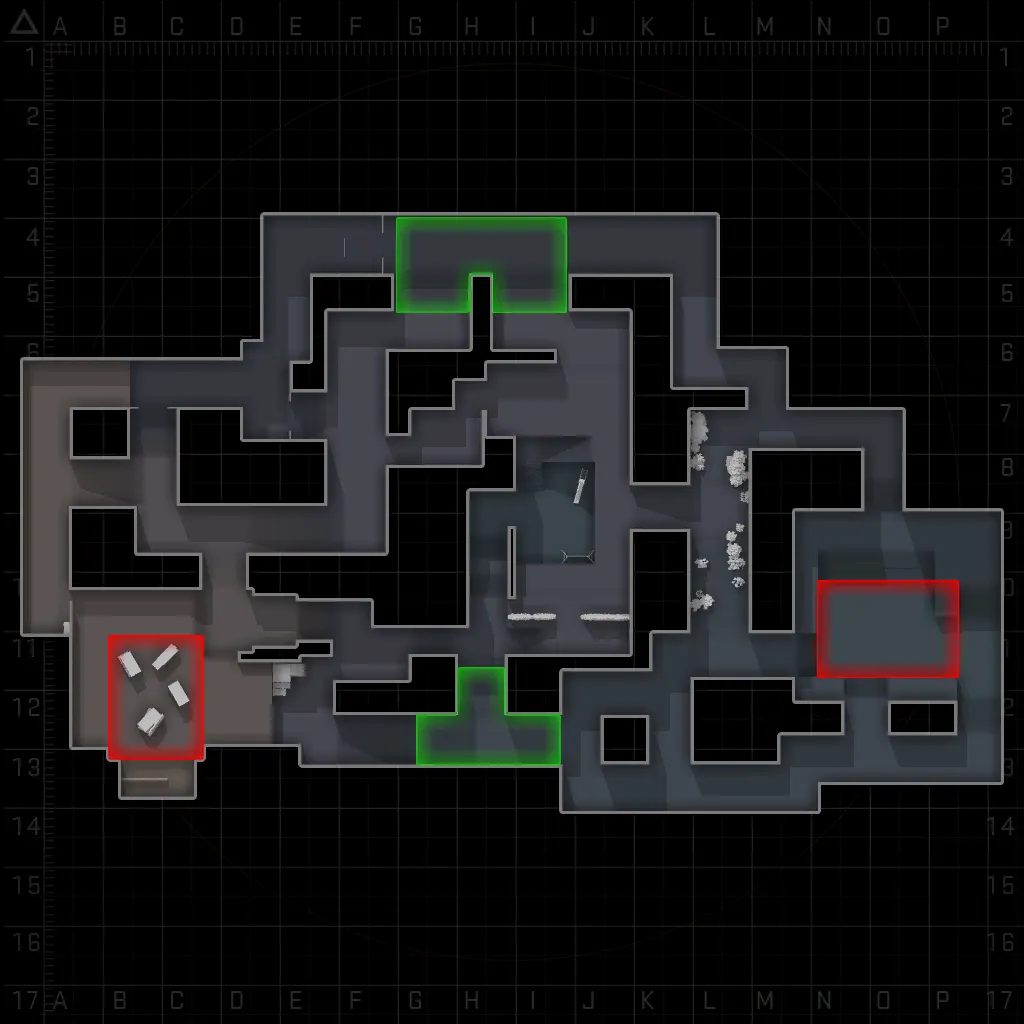
Thank you for clearing up how to use it. I've never used Substance Player before but I'll try my best to figure out how to use it and get it working well.
@Yanzl how do you use the Radar Generator? I must be missing something as I don't know how to use it.